In my last post I wrote about the complicated and timely process of determining all of a user’s group memberships when an LDAP namespace includes nested and dynamic group memberships. I wrote about how you can simplify and speed up getting a user’s group memberships through the use of a dynamic “member of” attribute and specifically the orclMemberOf attribute in OID.
Today I’d like to extend this discussion to WebLogic server authentications.
Showing posts with label sspi. Show all posts
Showing posts with label sspi. Show all posts
Wednesday, July 18, 2012


Monday, April 12, 2010
By Request - Multiple Realms in WebLogic Server
Every once and a while, I see a request for support for multiple security realms in WebLogic Server. Just to clarify, what people want is multiple active realms, specifically with regards to authentication providers. There are multiple realms today in WebLogic server, but there are really for administrative convenience. There are a couple of valid use cases for wanting more than one realm.
The first is that if you are running multiple applications inside a single WebLogic Server domain, and each application has their own set of users in a different directory. This results in the administrator having to make a choice of which provider to put first. You end up with a single provider for each application, each one with the JAAS control flag set to SUFFICIENT. The container goes provider by provider checking to see if the credentials are there. This can lead to performance issues for the applications further down in the list.
Anotehr use case is the handling or mishandling of the weblogic or system users. It is a best practice to leave the weblogic user in the Default Authenticator. This way you can still boot the server even if other directory is down. This is fine, but the consequence is that the other directory needs to consider the "weblogic" user. Assuming that the application's authentication provider is configured first, it will get called with the weblogic username/password at start-up and when administrators use admin tools like the console. It's fine that the user isn't there, but this can create additional, unwanted traffic. I think another issue is that malicious users could lock out the weblogic user temporarily by attempting to log in multiple times with username weblogic and bogus passwords - a possible DOS attack. I guess in theory this is possible if the same users have access to the console application, and probably a good reason to change to have a different administrative user than weblogic.
Finally, the last user cases is that customers are migrating from other application servers and those servers make heavy of JAAS and basically have the ability to associate a JAAS Login Configuration with an application. They got used to this functionality, and expect it to be there in WebLogic Server. WebLogic Server at its core uses JAAS Login modules for its authentication, but wraps the JAAS Login Module into an MBean - the AuthenticationProvider. One this that is really nice about the authentication provider, beyond a simple MBean is that many of authentication provider also implement the optional Authentication SSPI MBeans. This allows from a single library both authentication and management - something JAAS alone does not provide. I want people to understand this point before I go an explain the solution - you're giving up all of the management aspects that WLS provides, and going with the strictly JAAS based - authentication only - approach.
That having been said, once again its the little known ServletAuthenticationFilter to the rescue. The idea is to create a ServletAuthenticationFilter that intercepts the request, and then calls the regular JAAS Login Module. The result is a javax.security.Subject. You can then push this Subject on to the WLS stack using ServletAuthentication.runAs()
In this example, I did something a little "fancy". I made the javax.sql.Datasource defined in the application available to the login module. This supports the very common use case where applications want to authenticate these application users via the database. The way I did this was through creating my own javax.security.auth.login.Configuration. This configuration makes the DataSource available as an entry in the Option map of the JAAS Login Module. Why do it this way? In this example, I tried to eliminate dependencies between the JAAS Login Modules getting called and the ServletAuthenticationFilter which was calling them. By passing it through the map, this eliminated the need to create a proprietary CallbackHandler. It a little extra code on my side, but it simplifies the implementation for JAAS Login Modules.
This is all well and good, except that WLS needs to know about the principals. If the JAAS Login module is creating instances of WLSUserImpl or WLSGroupImpl then you're good, otherwise you'll nee to use a custom PrincipalValidator. The principal validator that I included in the project is VERY MINIMAL - all principals are trusted. If you have access to the JAAS Login Modules, the simplest thing to do is to modify the principals to extends the weblogic.security.principal.WLSAbstractPrincipal and then you can use the OOTB WebLogic Principal Validator. The details of Principal Validation can be found here.
What you're basically doing with this approach is re-inventing the wheel. This will not work with the out-of-the-box WLS authentication providers. It will pass the application datasource, but if you're working with LDAP then you're totally on your own. You'll also probably need to modify the MultiRealmFilter further to work with forms based authentication....HTTP redirect to an un-protected page, and then have that page POST back to the resource with the ServletAuthenticationFilter configured. You also lose all of the WebLogic management capabilities - lockouts, password policy composition - etc. I wonder if all of this complexity is worth it. What do you think?
The first is that if you are running multiple applications inside a single WebLogic Server domain, and each application has their own set of users in a different directory. This results in the administrator having to make a choice of which provider to put first. You end up with a single provider for each application, each one with the JAAS control flag set to SUFFICIENT. The container goes provider by provider checking to see if the credentials are there. This can lead to performance issues for the applications further down in the list.
Anotehr use case is the handling or mishandling of the weblogic or system users. It is a best practice to leave the weblogic user in the Default Authenticator. This way you can still boot the server even if other directory is down. This is fine, but the consequence is that the other directory needs to consider the "weblogic" user. Assuming that the application's authentication provider is configured first, it will get called with the weblogic username/password at start-up and when administrators use admin tools like the console. It's fine that the user isn't there, but this can create additional, unwanted traffic. I think another issue is that malicious users could lock out the weblogic user temporarily by attempting to log in multiple times with username weblogic and bogus passwords - a possible DOS attack. I guess in theory this is possible if the same users have access to the console application, and probably a good reason to change to have a different administrative user than weblogic.
Finally, the last user cases is that customers are migrating from other application servers and those servers make heavy of JAAS and basically have the ability to associate a JAAS Login Configuration with an application. They got used to this functionality, and expect it to be there in WebLogic Server. WebLogic Server at its core uses JAAS Login modules for its authentication, but wraps the JAAS Login Module into an MBean - the AuthenticationProvider. One this that is really nice about the authentication provider, beyond a simple MBean is that many of authentication provider also implement the optional Authentication SSPI MBeans. This allows from a single library both authentication and management - something JAAS alone does not provide. I want people to understand this point before I go an explain the solution - you're giving up all of the management aspects that WLS provides, and going with the strictly JAAS based - authentication only - approach.
That having been said, once again its the little known ServletAuthenticationFilter to the rescue. The idea is to create a ServletAuthenticationFilter that intercepts the request, and then calls the regular JAAS Login Module. The result is a javax.security.Subject. You can then push this Subject on to the WLS stack using ServletAuthentication.runAs()
public void doFilter(ServletRequest servletRequest,
                         ServletResponse servletResponse,
                         FilterChain filterChain) throws IOException, ServletException {

        System.out.println("In the filter....");
        HttpServletRequest httpServletRequest = (HttpServletRequest)servletRequest;

        String uri = httpServletRequest.getRequestURI();

        if (!uri.startsWith(this.URI)) {
         filterChain.doFilter(servletRequest, servletResponse);
         return;
        } else {
         System.out.println("Processing "+uri);
         this.initalizeMultiRealmConfig();
        }

        try {


         LoginContext lc = new LoginContext(this.jaasLoginEntry,null,new MutliRealmCallbackHandler((HttpServletRequest)servletRequest),this.multiRealmConfig);
            lc.login();
            Subject subject = lc.getSubject();
            System.out.println("The subject is "+subject);
            ServletAuthentication.runAs(subject, (HttpServletRequest)servletRequest);

        } catch (LoginException le) {
         le.printStackTrace();
         HttpServletResponse httpResponse = (HttpServletResponse)servletResponse;
         httpResponse.sendError(HttpServletResponse.SC_FORBIDDEN);
         return;
        }

        filterChain.doFilter(servletRequest, servletResponse);

    }
In this example, I did something a little "fancy". I made the javax.sql.Datasource defined in the application available to the login module. This supports the very common use case where applications want to authenticate these application users via the database. The way I did this was through creating my own javax.security.auth.login.Configuration. This configuration makes the DataSource available as an entry in the Option map of the JAAS Login Module. Why do it this way? In this example, I tried to eliminate dependencies between the JAAS Login Modules getting called and the ServletAuthenticationFilter which was calling them. By passing it through the map, this eliminated the need to create a proprietary CallbackHandler. It a little extra code on my side, but it simplifies the implementation for JAAS Login Modules.
public AppConfigurationEntry[] getAppConfigurationEntry(String name) {

  AppConfigurationEntry[] theEntries = this.theConfiguration.getAppConfigurationEntry(name);
  AppConfigurationEntry[] theNewEntries = new AppConfigurationEntry[theEntries.length];
  for (int i=0; i<theEntries.length; i++) {

   AppConfigurationEntry entry = theEntries[i];

   Map<String,Object> newMap = this.copyMap(entry.getOptions());
   newMap.put("DataSource", this.ds);

   theNewEntries[i] = new AppConfigurationEntry(entry.getLoginModuleName(),entry.getControlFlag(),newMap);
  }

  return theNewEntries;

 }
This is all well and good, except that WLS needs to know about the principals. If the JAAS Login module is creating instances of WLSUserImpl or WLSGroupImpl then you're good, otherwise you'll nee to use a custom PrincipalValidator. The principal validator that I included in the project is VERY MINIMAL - all principals are trusted. If you have access to the JAAS Login Modules, the simplest thing to do is to modify the principals to extends the weblogic.security.principal.WLSAbstractPrincipal and then you can use the OOTB WebLogic Principal Validator. The details of Principal Validation can be found here.
Building and deploying the sample
- Download the sample from Subversion
- Modify the MultiRealmFilter.java - specifically the MultiRealmCallbackHandler inner class
By default, the sample always passes a hardcoded username/password of foo/foo. You'll probably want it to do more. You need to modify it to fetch credentials from the HttpServletRequest and create the Callback that you need for the login modules.
/**
  * This callback handler gets information from the HttpRequest - cookies, username/password
  * @author jbregman
  *
  */
 class MutliRealmCallbackHandler implements CallbackHandler {

  private HttpServletRequest req;

  MutliRealmCallbackHandler(HttpServletRequest req) {
   super();
   this.req = req;
  }

  @Override
  public void handle(Callback[] callbacks) throws IOException,
    UnsupportedCallbackException {
   // TODO Auto-generated method stub

   for (int i=0; i<callbacks.length; i++) {

    Callback callback = callbacks[i];

    if (callback instanceof NameCallback) {

     NameCallback nc = (NameCallback)callback;

     //In here, you'd go and do something with the request
     System.out.println("The name is foo");

     nc.setName("foo");
    } else if (callback instanceof PasswordCallback) {

     PasswordCallback pc = (PasswordCallback)callback;

     System.out.println("The password is foo");
     pc.setPassword("foo".toCharArray());

    } else {

     System.out.println("Some other callback "+callback);

    }


   }

  }


} - Build the sample
You'll need to modify the build.xml for your environment - Restart your domain, and create an instance of the "MultiRealmIdentityAsserter"
Under the Provider specific properties, you need to set-up a few values
JAAS Config Entery - The entry in the jaas-login that you want called
Principal Class - If you're using the principal validator provided, then this is the base class of all the principals that the login module is creating. If you modified the principals so that they will work with the WebLogic principal validator, then you also updated the MultiRealmIdentityAsserterProviderImpl.java to return null
URI-The path this ServletAuthenticationFilter applies to. - Modify you domain to point to the jaas-login
Modify the setDomainEnv.cmd/.sh
set JAVA_OPTIONS=%JAVA_OPTIONS% -Djava.security.auth.login.config=multirealm_jaas.config
By default WLS will look for the config in the domain's home directory. Here's the very simple login config that I used:
Sample {
   multirealm.someotherloginmodule.MyLoginModule required debug=true;
}; - Make sure the resource in the application is protected by the container
If the resource isn't then the ServletAuthenticationFilter never gets called. - Make sure that the users authenticated by the JAAS Login Modules wind up in the JEE role that is protecting the application.
For example, if your weblogic.xml looks like this:
<wls:weblogic-web-app xmlns:wls="http://www.bea.com/ns/weblogic/weblogic-web-app" xmlns:xsi="http://www.w3.org/2001/XMLSchema-instance" xsi:schemaLocation="http://java.sun.com/xml/ns/javaee http://java.sun.com/xml/ns/javaee/web-app_2_5.xsd http://www.bea.com/ns/weblogic/weblogic-web-app http://www.bea.com/ns/weblogic/weblogic-web-app/1.0/weblogic-web-app.xsd">
    <wls:weblogic-version>10.3</wls:weblogic-version>
    <wls:security-role-assignment>
        <wls:role-name>multirealm</wls:role-name>
        <wls:principal-name>multirealm</wls:principal-name>
    </wls:security-role-assignment>
    <wls:context-root>App1</wls:context-root>
    <wls:library-ref>
        <wls:library-name>jstl</wls:library-name>
        <wls:specification-version>1.2</wls:specification-version>
        <wls:exact-match>true</wls:exact-match>
    </wls:library-ref>
    <wls:library-ref>
        <wls:library-name>wls-commonslogging-bridge-war</wls:library-name>
        <wls:specification-version>1.0</wls:specification-version>
        <wls:exact-match>true</wls:exact-match>
    </wls:library-ref>
    <wls:library-ref>
        <wls:library-name>jsf</wls:library-name>
        <wls:specification-version>1.2</wls:specification-version>
        <wls:exact-match>true</wls:exact-match>
    </wls:library-ref>
    <wls:resource-description>
     <wls:res-ref-name>dataSource</wls:res-ref-name>
     <wls:jndi-name>multiRealmDataSource</wls:jndi-name>
    </wls:resource-description>
</wls:weblogic-web-app>
Then you need to make sure that the user gets added in a Principal that is named multirealm - Restart the server and attempt to access the protected resources.
Summary
What you're basically doing with this approach is re-inventing the wheel. This will not work with the out-of-the-box WLS authentication providers. It will pass the application datasource, but if you're working with LDAP then you're totally on your own. You'll also probably need to modify the MultiRealmFilter further to work with forms based authentication....HTTP redirect to an un-protected page, and then have that page POST back to the resource with the ServletAuthenticationFilter configured. You also lose all of the WebLogic management capabilities - lockouts, password policy composition - etc. I wonder if all of this complexity is worth it. What do you think?
Wednesday, April 7, 2010
Security Clarification: OAM Identity Asserter for WebLogic
I want to clarify something rather important about the Oracle Access Manager (OAM) identity asserter for WebLogic. The OAM identity asserter is invoked based on the token "OBSSO Cookie" (though I think it now also lets you choose "OAM_REMOTE_USER"). It also contains provider specific configuration for connecting to an OAM access server. This might lead you to conclude that the identity asserter is validating the OBSSO cookie and then asserting the name extracted from the cookie.
The reality though is that even when the OBSSO cookie is the configured token for invoking the identity asserter, the asserter itself is simply asserting the value of the OAM_REMOTE_USER header. So, what about all the configuration for the connection to the access gate? The access gate connection only comes into play in an OAM/OWSM integration scenario where there is no webgate on a web server in front of WLS. If you are using the identity asserter to propagate an identity to an OAM protected web app then you don’t even need to fill in all that info.
If you had the wrong impression, don’t feel too bad. It is an easy and common mistake to make. The documentation touches on this here as step 2 is about establishing trust with WLS, but glosses over it in its description (10.2.2.2) of how the identity asserter works, which is why I thought this blog post was necessary.
So, given that the OAM identity asserter is asserting an identity contained in a clear text header that is inserted into the request at the web server, it is vitally important that measures are taken to ensure that all requests to OAM protected WLS resources come through the OAM webgate enabled web server.
As Chris mentioned in his post a few weeks ago this can be done by:
The reality though is that even when the OBSSO cookie is the configured token for invoking the identity asserter, the asserter itself is simply asserting the value of the OAM_REMOTE_USER header. So, what about all the configuration for the connection to the access gate? The access gate connection only comes into play in an OAM/OWSM integration scenario where there is no webgate on a web server in front of WLS. If you are using the identity asserter to propagate an identity to an OAM protected web app then you don’t even need to fill in all that info.
If you had the wrong impression, don’t feel too bad. It is an easy and common mistake to make. The documentation touches on this here as step 2 is about establishing trust with WLS, but glosses over it in its description (10.2.2.2) of how the identity asserter works, which is why I thought this blog post was necessary.
So, given that the OAM identity asserter is asserting an identity contained in a clear text header that is inserted into the request at the web server, it is vitally important that measures are taken to ensure that all requests to OAM protected WLS resources come through the OAM webgate enabled web server.
As Chris mentioned in his post a few weeks ago this can be done by:
- Taking network security measures.
- Two-way SSL.
- Utilizing the WLS connection filter to lock down what IP addresses WLS will service requests from.
Thursday, April 1, 2010
SAML, REST, smart phones and you
(or Smart devices, not so smart protocols)

I've been working on and off with a customer on a project that involves all sorts of cool buzzwords - iPhone/Android/Blackberry Apps as clients, using REST to invoke Web Services, authenticating via SAML. While I can't go into the details or reveal too much about the project there is one line of discussion that is really interesting.
First the background:
- A thick client, running on a smartphone, will do some sort of handshake with one web server to authenticate the user.
- Once the user is authenticated that server will issue the user a SAML Assertion.
- The client will then use the SAML assertion to authenticate to a different server and will send REST-style requests to invoke services on that server.
So something like this:

This begs the question why not just use a conventional web SSO product like Oracle Access Manager? An excellent question, the short version of which is that the Authentication Server and the REST Server are run by two different companies and don't share any infrastructure (a more common situation than you might think).
SAML actually solves a whole bunch of painful problems in this architecture - the AuthN server can sign the SAML Assertion to prove its validity and protect it from alteration and encrypt it to prevent the user from even seeing its contents. SAML also allows the AuthN server to send additional information about the user (i.e. attributes) in an extensible way - and additional attributes can be added later without needing to change any infrastructure, communication protocols or even the client.
Did you fill up your Buzzword bingo card yet?
So moving on to the problems...
Transmitting the SAML Assertion
If we were using SOAP to go from the device to the server WS-Security would have solved all of our problems. That standard spells out exactly how to attach a SAML assertion to a SOAP message so that both the client and server can understand. Unfortunately almost all "smart" devices lack a full SOAP stack. Further complicating matters is the fact that REST is a (air quote) "standard" intended to be a very lightweight way to send requests to a server and get back a structured response. Because it's intended to be so much simpler than SOAP there's very little (read no) standards around things like authentication, encryption, signing or any of the things that make SOAP a bit complicated at times.
All of which is just a long way to say that you're basically on your own figuring out how to use SAML with REST.
There are a few obvious options of how to use SAML with REST.
- Send the SAML assertion to the server and swap it for a cookie. Your deployment then becomes nothing more than a standard web SSO situation and your application doesn't need to worry about the SAML bits.
- Send the SAML assertion in every request as part of the POST data. This places the responsibility for parsing the SAML assertion into your application logic or something that can see and handle the HTTP POST data stream.
- Send the SAML assertion in every request as an HTTP header. This is a slight variant of #2 that is more similar to SOAP's WS-Security model where the authentication information is separated from the actual input/output parameters of the call.
I like option 1 because it pushes handling the SAML assertion out of scope, or in other words into an S.E.P. On the other hand having a thick client interacting and cooperating with a web SSO solution introduces a whole raft of other issues including properly handling things like idle and session timeouts, dealing with redirects, and a long list of others. Web SSO products were designed to interact with web browsers and their 'on the wire' behavior can be difficult to understand from an HTTP client's perspective. I'm not convinced that this is the best solution to our problem so on to options 2 and 3.
Option 2 and 3 are nearly identical - differing only in where the assertion goes in the HTTP request. That subtle difference is actually kinda a big deal and after thinking about it for a while I think I vastly prefer option 3 to option 2. Besides the logical separation of authentication and inputs I have a few other reasons, such as the fact that POST data can only generally be consumed once which is really important for my next trick.
You probably know about Servlet Filters, and if you've been reading this blog for a while you probably know about WebLogic's security framework (often called the SSPI framework). What you may not know about is how to put them together into a Servlet Authentication Filter. Basically you write a Servlet Filter that takes on responsibility for getting the authentication token and then ask WebLogic to go call the authentication provider for you. If everything works out WebLogic goes ahead and establishes a session for you. Then when your actual service wants to know who is invoking the service it can ask by calling weblogic.security.Security.getCurrentSubject().
No fuss no muss. And most importantly you don't have to commingle service logic with any code to deal with SAML, encryption keys, XML parsing or anything else unrelated to actually doing your actual work!
Session Management
One of the concerns with sending the SAML assertion along with every request is the performance impact of the XML and crypto operations. If you are invoking a simple service (hello world for example) the overhead of all of the SAML seems like it might be awfully expensive. If you had to pay that price with every request the overhead would quickly eat up your CPU cycles grinding even a reasonably fast machine to a halt under load.
Thankfully WebLogic's designers thought about this very problem.
The first and most obvious solution is to act just a little bit more like a browser. When you authenticate to Weblogic it automatically creates a session for you and sends a cookie (usually named JSESSIONID) back to your browser. If you include that cookie with subsequent requests there's no need to authenticate again. So if you smarten up the client so that it handles cookies gracefully you'll avoid WebLogic having to re-parse and validate your SAML assertion. In fact if I'm reading the relevant iPhone SDK docs (just to cite one example) correctly I think the iPhone SDK handles cookies properly for you automatically by default! Android includes Apache HttpClient which makes cookie handling almost trivial. And as for Blackberry, well it's J2ME which means you'll have to do cookie parsing by hand; which, while unfortunate, isn't the end of the world.
As long as you do the right thing with the cookies coming from WebLogic your session will be fine. If something happens to your session (e.g. the server gets rebooted, you get shunted off to another server that doesn't know about your session, your session times out, etc) the auth filter will automatically reestablish a session as long as your SAML assertion is still OK.
But that's only one part of the solution. If you disable WebLogic's issuance of cookies or you choose to not handle cookies in your thick client's code WebLogic has still got your back.
Weblogic's Identity Assertion Cache
Decrypting a chunk of XML, parsing it, and extracting some data takes some CPU cycles, but isn't all that slow. Searching an LDAP directory to find a user, then doing another search to chase down all of the group memberships on the other hand takes real, measurable clock time. Some of the time is because you're doing a search and some is because you're going over a physical wire to talk to the LDAP server and those wires (AFAIK) are still subject to the laws of physics.
The WebLogic docs describe the setting in some detail. The Javadoc for the Authentication Provider says:
The assertIdentity() method of an Identity Assertion provider is called every time identity assertion occurs, but the LoginModules may not be called if the Subject is cached. The -Dweblogic.security.identityAssertionTTL flag can be used to affect this behavior (for example, to modify the default TTL of 5 minutes or to disable the cache by setting the flag to -1).And the command line reference fills in some more details:
Wrapping it all upWhen using an Identity Assertion provider (either for an X.509 certificate or some other type of token), Subjects are cached within the server. This greatly enhances performance for servlets and EJB methods withtags as well as for other places where identity assertion is used but not cached (for example, signing and encrypting XML documents). There might be some cases where this caching violates the desired semantics.
So to summarize:
- SAML is cool
- smart devices are pretty cool, but they lack a SOAP stack
- WebLogic's SSPI framework is cool
- the WebLogic engineering team thought of darn near everything
Oh, and if you combine a Servlet Auth Filter, the SAML SSPI Identity Asserter, a teensy bit of code to handle cookies on the client side you can do some pretty clever things.
Got a comment or question? Let me know below!
----
Update: After having this up a few days I had a talk with someone out of band that in effect said "you said #1 is probably not the best way, but then you went through a whole discussion about 2/3 but wound up describing #1 and saying that it was best." So I obviously need to clarify.
What I was talking about in #1 is actually invoking a specific server. In other words login(String SamlAssertion) and have a token come back. The problem with that solution is that it's complicated and if the token isn't acceptable for some reason you need to know how to go back and get a fresh token.
In the rest of the post I describe sending the SAML Assertion on every request and doing "the right thing" when it comes to cookies. If the server sees the cookies and can find the associated session it won't bother checking the SAML assertion. If you don't have a cookie, the cookie or session is invalid or something else goes wrong then the server will go ahead and validate the SAML Assertion and establish a new one.
Hope that clears things up.
Wednesday, March 31, 2010
WebLogic, LDAP Authenticators, and Groups
As part of the authentication process, LDAP authenticators do a search to determine what groups the user is a member of which in turn get used in determining the group memberships and roles for the JAAS subject and principals. If there is a problem with this search, then WebLogic will fail the entire authentication even if the user authentication check (username + password) against the directory was successful. Notice that I said problem with the search and not search failure. If the user simply doesn’t exist in any groups then the authentication will succeed. The issue is with the authenticator not even being able to successfully execute the search.
The group search failure can be cause by a couple different things and can be a very nasty situation to recognize and sort out.
Search Configuration Failures
The more straight forward cause of a group search failure is that the search itself. This can be cause by having a bad “Group Base DN” or “All Groups Filter” in the authenticator configuration. If for example you mistyped part of the base DN or the object class in the filter, then the search will fail to execute. What you’ll see in the logs is a message saying authentication has succeeded then one or more error messages about the group search, and then another message saying authentication has failed.
Problems with Nested Groups
The more insidious cause of group search failures is with nested groups. By default the authenticator will search not only what groups a user belongs to, but will go on to search what groups those groups containing the user belong to and then what groups those groups belong to and on and on…
If there are a ton of groups with lots of nesting, the authenticators can time out just in processing nested groups. However, the bigger or more common issue is that authenticators can get in infinite loops processing two groups that contain each other or certain dynamic groups.
The best way to prevent this is to limit the levels of group membership nesting that the authenticator will follow to build up the JAAS subject and principals. You do this by changing “Group Membership Searching” from unlimited to limited and changing “Max Group Membership Search Level” to the desired level of nesting you want to pursue. Leaving it at 0 will mean that the authenticator will not process any nested groups.
My recommendation is that as a best practice you should almost always switch to a limited search even if you want the authenticator to heavily process nested groups. Setting the level of nesting to something high like 5 will almost always give you all the memberships/roles you need but will limit your exposure to infinite loop situations caused by problems in the directory.
Friday, January 22, 2010
The Worlds Most Dangerous WebLogic Identity Asserter
...or how Josh stole my idea for a post in one paragraph.
In a recent post Josh said
I'd started writing this post before Josh wrote that and figured I'd post this anyway in hopes that my longer and more detailed write up is helpful to someone unfamiliar with what all of the terms and acronyms mean.
WebLogic Server includes a great security framework that provides five services - authentication, role mapping, authorization, auditing, credential mapping. There's also a sixth service called adjudication that kicks in if you have more than one authorization provider, but that's a story for another day. Out of the box WebLogic ships with a bunch of providers for each of those services.
The authentication service/interface does exactly what you'd think - takes a set of credentials, verifies them, and allows WebLogic to create a JAAS subject and principals for the user. Out of the box credentials are things like username and password against an LDAP directory. The ability to assert a user's identity without having their actual password, for example via a certificate, is also supported; in that case the authenticator is called an Identity Asserter.
So what is the worlds most dangerous identity asserter?
To answer that you have to understand the typical WebLogic deployment architecture. The recommended way to deploy WebLogic is to deploy a load balancer, two or more web servers (Apache, OHS, IIS) with the WebLogic plug-in, and then two or more WebLogic servers. Here's a diagram:

This architecture allows you to do a bunch of very useful things - gracefully handling single component failure, load balance across the components, scale up more or less linearly by adding additional WLS servers, and more.
Enterprise deployments also typically involve integrating with web single sign-on solutions like Oracle Access Manager (OAM), SiteMinder, or even Microsoft's Kerberos implementation included in Windows.
When you do the authentication at the web tier you need to convey the user's identity over to WebLogic and install in an Identity Asserter to populate the JAAS subject and principals. When you're doing authentication on the web server the most obvious way to write an Identity Asserter is to just consume the username HTTP header - after all the web server already did the authentication why bother doing anything more?
Why? Because if anyone manages to sneak by your web server they can impersonate any user in your user directory. Combine that with the commonly quoted statistic that two-thirds of security breaches are internal rather than from a hacker on the outside.
Let the implications of that sink in for a second...
Assuming you did everything else right in your app and environment your biggest risk is a bad guy inside your network. If you write an Identity Asserter that just blindly trusts an HTTP header you'd better be sure to do something to protect the WebLogic server.
I recently encountered a customer that wanted to authenticate their users with Kerberos authentication at IIS rather than inside WebLogic. They could have done the authentication in WebLogic with the SPNEGO authenticator but, for a variety of reasons, doing the authentication in IIS was a better fit for their environment. We wrote a very simple Identity Asserter that consumed the Proxy-Remote-User HTTP header, stripped off the Windows domain name and asserted the remainder as the username.
How do you protect the WebLogic Server in this architecture?
There are really two options:
Two-way SSL between the web server and WebLogic Server both protects the data sent by encrypting it but also prevents access to the WebLogic Server from any client that doesn't have an appropriate client certificate. The actual steps are covered in the documentation for the ISAPI plug-in for IIS and for the Apache module. Using SSL requires certificates and imparts a performance impact, the magnitude of the impact depends on the environment so we always recommend testing.
An alternative to using two-way SSL is to use a firewall to protect the WebLogic Server. You can use a network based firewall, the traffic filtering functionality built into your host Operating System, or WebLogic Network Connection Filters. No matter which of these you opt to use the objective is to insure that any HTTP traffic coming into the WLS server orignated at one of the Web Servers and not from somewhere else in your environment.
Update November 2010: Due to popular demand the source code to this Identity Asserter is available at https://sample-identity-asserters.samplecode.oracle.com/
In a recent post Josh said
There is another approach that, unfortunately, is rather common - use a Web Gate in front of WebLogic Server and use a very weak identity asserter or no SSPI connector at all.
I'd started writing this post before Josh wrote that and figured I'd post this anyway in hopes that my longer and more detailed write up is helpful to someone unfamiliar with what all of the terms and acronyms mean.
WebLogic Server includes a great security framework that provides five services - authentication, role mapping, authorization, auditing, credential mapping. There's also a sixth service called adjudication that kicks in if you have more than one authorization provider, but that's a story for another day. Out of the box WebLogic ships with a bunch of providers for each of those services.
The authentication service/interface does exactly what you'd think - takes a set of credentials, verifies them, and allows WebLogic to create a JAAS subject and principals for the user. Out of the box credentials are things like username and password against an LDAP directory. The ability to assert a user's identity without having their actual password, for example via a certificate, is also supported; in that case the authenticator is called an Identity Asserter.
So what is the worlds most dangerous identity asserter?
To answer that you have to understand the typical WebLogic deployment architecture. The recommended way to deploy WebLogic is to deploy a load balancer, two or more web servers (Apache, OHS, IIS) with the WebLogic plug-in, and then two or more WebLogic servers. Here's a diagram:

This architecture allows you to do a bunch of very useful things - gracefully handling single component failure, load balance across the components, scale up more or less linearly by adding additional WLS servers, and more.
Enterprise deployments also typically involve integrating with web single sign-on solutions like Oracle Access Manager (OAM), SiteMinder, or even Microsoft's Kerberos implementation included in Windows.
When you do the authentication at the web tier you need to convey the user's identity over to WebLogic and install in an Identity Asserter to populate the JAAS subject and principals. When you're doing authentication on the web server the most obvious way to write an Identity Asserter is to just consume the username HTTP header - after all the web server already did the authentication why bother doing anything more?
Why? Because if anyone manages to sneak by your web server they can impersonate any user in your user directory. Combine that with the commonly quoted statistic that two-thirds of security breaches are internal rather than from a hacker on the outside.
Let the implications of that sink in for a second...
Assuming you did everything else right in your app and environment your biggest risk is a bad guy inside your network. If you write an Identity Asserter that just blindly trusts an HTTP header you'd better be sure to do something to protect the WebLogic server.
I recently encountered a customer that wanted to authenticate their users with Kerberos authentication at IIS rather than inside WebLogic. They could have done the authentication in WebLogic with the SPNEGO authenticator but, for a variety of reasons, doing the authentication in IIS was a better fit for their environment. We wrote a very simple Identity Asserter that consumed the Proxy-Remote-User HTTP header, stripped off the Windows domain name and asserted the remainder as the username.
How do you protect the WebLogic Server in this architecture?
There are really two options:
- two-way SSL between the web server and WebLogic Server
- firewalling
Two-way SSL between the web server and WebLogic Server both protects the data sent by encrypting it but also prevents access to the WebLogic Server from any client that doesn't have an appropriate client certificate. The actual steps are covered in the documentation for the ISAPI plug-in for IIS and for the Apache module. Using SSL requires certificates and imparts a performance impact, the magnitude of the impact depends on the environment so we always recommend testing.
An alternative to using two-way SSL is to use a firewall to protect the WebLogic Server. You can use a network based firewall, the traffic filtering functionality built into your host Operating System, or WebLogic Network Connection Filters. No matter which of these you opt to use the objective is to insure that any HTTP traffic coming into the WLS server orignated at one of the Web Servers and not from somewhere else in your environment.
Update November 2010: Due to popular demand the source code to this Identity Asserter is available at https://sample-identity-asserters.samplecode.oracle.com/
Wednesday, October 14, 2009
Update on samplecode.oracle.com
After some discussions with the OTN people, we decided that soa-security is not a project, but rather a category (ok, a sub-category under soa). I created a new project under the soa-security category
OES SSPI Providers
The thinking is to use this project for WLS SSPI plug-ins that we use that are OES specific. The two I have in mind are:
Seems likely that OWSM custom steps and assertions could also make a home in the soa-security sub category. As always, I'm open to suggestions, and I'm sure that this will evolve over time. Most of security is a configuration and administration problem, but there are occasions when some coding is required, and now by using samplecode.oracle.com, there is a vehicle to get this information out.
OES SSPI Providers
The thinking is to use this project for WLS SSPI plug-ins that we use that are OES specific. The two I have in mind are:
- OESBPELAuditor - the ability to audit changes to the OES policies are store them in XML, such that a BPEL process could consume the changes
- OESAdjuductor - the previously mentioned adjudicator that makes integrating the OES WLS-SM more straight forward, but only apply OES decisions to OES resources and XACML decisions to WLS resources.
Seems likely that OWSM custom steps and assertions could also make a home in the soa-security sub category. As always, I'm open to suggestions, and I'm sure that this will evolve over time. Most of security is a configuration and administration problem, but there are occasions when some coding is required, and now by using samplecode.oracle.com, there is a vehicle to get this information out.
Saturday, October 10, 2009
OES OWSM 11g Custom Assertion Finally Done
I'm leaving shortly for OOW, but I wanted to give a brief overview of the OES OWSM 11g custom assertion. This is my second OOW project, and once again this work - which I'll demonstrate at the session on Tuesday (shameless plug) - has provided an opportunity to put something together that should provide some value to the field and customers. Its hard sometimes to get the chance to build something a little bigger than a bread box, but that's the nature of this role. You move from engagement to engagement - one after another - not too much time for anything "broad".
So, this is an update of the OES-OWSM Custom step that was part of my OOW 2008 presentation. In doing the "migration" to 11g, I think I learned a number of things that I'll share over the coming weeks.
I was frustrated by the complexity of securing an 11g SOA domain with OES. It seemed like the biggest issue was writing OES policies for the WLS resources. In both scenarios, I just wanted to call the OES API, and securing the WLS resources was just a consequence of the fact that ASIAuthorizer plugged into the SSPI framework, and that the Adjudicator couldn't tell the difference between OES and WLS resources. Well, for the OOW demo, I created an OES Adjudicator that only enforces the decision from the ASI or XACML authorizer depending on the resource. This greatly simplifies the deployment, because there are no OES policies for WLS resources. It took me a while to build it, but I think ultimately this is a reasonable solution for POC environments. It might be better in a production environment to author some basic policies for WLS resources in the ASI authorizer. My concern is that the overhead of going through two authorizers might not be worth the simplicity.
I extended the existing custom step to be able to resolve XPath queries from either the body or the header of the SOAP:Envelope. This opens up the possibility of not just doing authorization based on the content of the SOAP message, but also the headers. SAML Attribute's are part of the SAML Assertion, and that's available in the WS-Security header. This gives a concrete implementation of the attribute based authorization and federated authorization use cases discussed in this post. The implementation uses the SAML capabilities of OWSM 11g. They key capability here is the ability of the OWSM client side policy to generate a SAML Assertion based on the attributes of the user in the WLS LDAP. OWSM made this whole use case really very simple.
I definitely picked-up some best practices from engineering, especially on how to get an OWSM custom Assertion into a policy that can be deployed to protect at WLS Web Service. In 11g environments, in makes sense to use OWSM to protect but composite web services as well at WLS web services. The reason is that you can get centralized policy management and avoid a lot of interoperability headaches. OWSM 11g and WLS 11g webservices stacks do work well together, but having the same stack for both producer and consumer greatly simplifies the process.
Like I said, there are more details to follow. Many of which I'll discuss/demonstrate at my OOW Session (2nd shameless plug), but all of which I will share on this blog in good time. For those who were awaiting the OES-OWSM 11g custom step and are not California Angels fans, feel free to contact me and I'll see what I can do about getting the step available ASAP. For Angel's fans and other who can wait, I get this information out as quickly as I can.
If anyone wants to meet up at OOW, I'm happy to accommodate, just ping me and let me know. Also, I'll try to post some updates from the conference.
Safe Travels
So, this is an update of the OES-OWSM Custom step that was part of my OOW 2008 presentation. In doing the "migration" to 11g, I think I learned a number of things that I'll share over the coming weeks.
OES Adjudication Provider
I was frustrated by the complexity of securing an 11g SOA domain with OES. It seemed like the biggest issue was writing OES policies for the WLS resources. In both scenarios, I just wanted to call the OES API, and securing the WLS resources was just a consequence of the fact that ASIAuthorizer plugged into the SSPI framework, and that the Adjudicator couldn't tell the difference between OES and WLS resources. Well, for the OOW demo, I created an OES Adjudicator that only enforces the decision from the ASI or XACML authorizer depending on the resource. This greatly simplifies the deployment, because there are no OES policies for WLS resources. It took me a while to build it, but I think ultimately this is a reasonable solution for POC environments. It might be better in a production environment to author some basic policies for WLS resources in the ASI authorizer. My concern is that the overhead of going through two authorizers might not be worth the simplicity.
Authorization based on SAML Attributes
I extended the existing custom step to be able to resolve XPath queries from either the body or the header of the SOAP:Envelope. This opens up the possibility of not just doing authorization based on the content of the SOAP message, but also the headers. SAML Attribute's are part of the SAML Assertion, and that's available in the WS-Security header. This gives a concrete implementation of the attribute based authorization and federated authorization use cases discussed in this post. The implementation uses the SAML capabilities of OWSM 11g. They key capability here is the ability of the OWSM client side policy to generate a SAML Assertion based on the attributes of the user in the WLS LDAP. OWSM made this whole use case really very simple.
Writing an 11g OWSM Custom Assertion
I definitely picked-up some best practices from engineering, especially on how to get an OWSM custom Assertion into a policy that can be deployed to protect at WLS Web Service. In 11g environments, in makes sense to use OWSM to protect but composite web services as well at WLS web services. The reason is that you can get centralized policy management and avoid a lot of interoperability headaches. OWSM 11g and WLS 11g webservices stacks do work well together, but having the same stack for both producer and consumer greatly simplifies the process.
Like I said, there are more details to follow. Many of which I'll discuss/demonstrate at my OOW Session (2nd shameless plug), but all of which I will share on this blog in good time. For those who were awaiting the OES-OWSM 11g custom step and are not California Angels fans, feel free to contact me and I'll see what I can do about getting the step available ASAP. For Angel's fans and other who can wait, I get this information out as quickly as I can.
If anyone wants to meet up at OOW, I'm happy to accommodate, just ping me and let me know. Also, I'll try to post some updates from the conference.
Safe Travels
Wednesday, August 26, 2009
So that's what WebLogic Certificate Registry is for...
<11/08/2009 12h10min32s ACT> <Error> <> <BEA-000000> <CertPathBuilder does not support building cert path from class weblogic.security.pk.SubjectKeyIdentifierSelector
java.security.InvalidAlgorithmParameterException: [Security:090596]The WebLogicCertPathProvider was passed an unsupported CertPathSelector.
at weblogic.security.providers.pk.WebLogicCertPathProviderRuntimeImpl$JDKCertPathBuilder.engineBuild(WebLogicCertPathProviderRuntimeImpl.java:682)
In a previous post I talked a little bit about how the WebLogic Sercurity Framework can be extended to support OCSP and CRL checking. Besides being used in SSL validation, the CertificationProviders are used in validating signatures in web services messages. When a response is received, it is typically signed. The way that the certificate that signed the response is identified is through a <wsee:SecurityTokenReference> This refernce can be of several types - SubjectKeyIdentifier, IssuerSerialNumber, Thumbprint#SHA1. You can use use what is called a direct-reference, which is to say the actual certificate itself is passed in the message.
Assuming that you don't want to pass the certificate itself (they're big), and you're passing one of the referenced tokens back to WebLogic Server, how should it find it? CLV = Certificate Lookup and Validation. In the OCSP/CRL check post, we focused more on the validation part of the CertificationProvider. Here, we're interested in lookup. The OOTB CertificationProvider which essentially wraps the JDK's provider only supports direct references (X509). In order to support more other references, like say SubjectKeyIdentifier, you need to configure the a CertificateRegistry provider. You add the list of certificates from the WLS admin console, and now the signature on the response can be validated.
Basically, if you're using WS-Security, then you need to configure a CertificateRegistry.
java.security.InvalidAlgorithmParameterException: [Security:090596]The WebLogicCertPathProvider was passed an unsupported CertPathSelector.
at weblogic.security.providers.pk.WebLogicCertPathProviderRuntimeImpl$JDKCertPathBuilder.engineBuild(WebLogicCertPathProviderRuntimeImpl.java:682)
In a previous post I talked a little bit about how the WebLogic Sercurity Framework can be extended to support OCSP and CRL checking. Besides being used in SSL validation, the CertificationProviders are used in validating signatures in web services messages. When a response is received, it is typically signed. The way that the certificate that signed the response is identified is through a <wsee:SecurityTokenReference> This refernce can be of several types - SubjectKeyIdentifier, IssuerSerialNumber, Thumbprint#SHA1. You can use use what is called a direct-reference, which is to say the actual certificate itself is passed in the message.
Assuming that you don't want to pass the certificate itself (they're big), and you're passing one of the referenced tokens back to WebLogic Server, how should it find it? CLV = Certificate Lookup and Validation. In the OCSP/CRL check post, we focused more on the validation part of the CertificationProvider. Here, we're interested in lookup. The OOTB CertificationProvider which essentially wraps the JDK's provider only supports direct references (X509). In order to support more other references, like say SubjectKeyIdentifier, you need to configure the a CertificateRegistry provider. You add the list of certificates from the WLS admin console, and now the signature on the response can be validated.
Basically, if you're using WS-Security, then you need to configure a CertificateRegistry.
Thursday, July 30, 2009
Building Custom Security Providers with JDeveloper 11g
As I mentioned previously, the WebLogic Server Sample Security Providers have emerged and have found a new home. This is great, but unfortunately the samples are a little out of date. I've received requests for a sample credential mapper, which I hope to be able to post shortly. In the meantime, I thought it would be useful to show how to work with the samples inside of JDeveloper.
Step 1 - Set-up the Application in JDeveloper

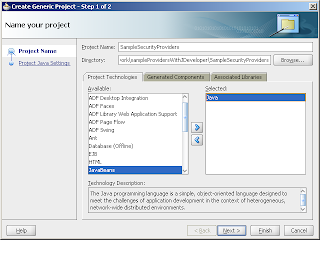 Create a new Generic Application in JDeveloper. Create a project for the application and make sure that Java is selected as a project technology. Next, import the samples into the project. Once you've downloaded the samples, unzip it. From JDeveloper, select "Import...Java Source" and then select the src folder from the directory where the samples were downloaded.

 Finally, modify the project settings to exclude the "tests" folder. Unfortunately, after some effort there are some parts of this sample that are just "too old" to get working - the test clients, test application, and test domains.
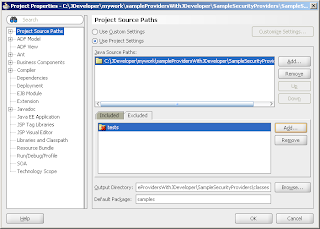
Step 2: Setting up Ant
Add an empty build file to the project, then replace the contents of the empty build file by cutting and pasting the contents of the build.xml from the samples into the build.xml in JDeveloper.
 If you've done this right, then you have a project that looks like this in JDeveloper.
 The next step, and this is probably the most "complicated" is to modify the build.xml to conform to your specific environment. Everything is keyed off of the lib property. Modify this to value to point to WEBLOGIC_HOME/server/lib - (c:\Oracle\Middleware\wlserver_10.3\server\lib).
The other complicated part is that since you're not running this inside of the WLS environment, the classpath is not their. Instead of dealing with JDeveloper and setting the environment that way, I just added elements to the
If you've done everything correctly, you should now be able to build the samples. You do this by running the ant task by right clicking on the build.xml and select the all target.
 And...you should have a file called wlSampleSecurityProviders.jar in your WEBLOGIC_HOME\server\lib\mbeantypes directory. This is the jar that contains the sample providers.
Admittedly, this is not a perfect solution. Even if you add weblogic.jar to the project classpath there are some funny things with this set-up. Most notably is the fact that the classes appear to be in the wrong packages. This is because of the way that the samples project is distributed. This can be a but annoying, but I've used this set-up for the WS-SecureConversation work that I did recently, and I found it workable. I'll probably go into more details in a future post, but if people have questions in the meantime, post them here, and I'll do my best to help
Step 1 - Set-up the Application in JDeveloper

 Create a new Generic Application in JDeveloper. Create a project for the application and make sure that Java is selected as a project technology. Next, import the samples into the project. Once you've downloaded the samples, unzip it. From JDeveloper, select "Import...Java Source" and then select the src folder from the directory where the samples were downloaded.
 Finally, modify the project settings to exclude the "tests" folder. Unfortunately, after some effort there are some parts of this sample that are just "too old" to get working - the test clients, test application, and test domains.
Step 2: Setting up Ant
Add an empty build file to the project, then replace the contents of the empty build file by cutting and pasting the contents of the build.xml from the samples into the build.xml in JDeveloper.
 If you've done this right, then you have a project that looks like this in JDeveloper.
 The next step, and this is probably the most "complicated" is to modify the build.xml to conform to your specific environment. Everything is keyed off of the lib property. Modify this to value to point to WEBLOGIC_HOME/server/lib - (c:\Oracle\Middleware\wlserver_10.3\server\lib).
The other complicated part is that since you're not running this inside of the WLS environment, the classpath is not their. Instead of dealing with JDeveloper and setting the environment that way, I just added
The last thing to do is to either make a similar change to the
<java classname="weblogic.management.commo.WebLogicMBeanMaker" fork="true" failonerror="true">
<jvmarg line="-Dfiles=${build_dir} -DMDFDIR=${build_dir} -DMJF=${build_dir}/${sampleprovidersjar} -DtargetNameSpace=${namespace} -DpreserveStubs=true -DcreateStubs=true -DmbeantypesDir=${mbeantypes}">
<classpath>
<path location="${lib}\..\..\..\modules\com.bea.core.mbean.maker_1.4.0.0.jar"/>
<path location="${lib}\..\..\..\modules\com.bea.core.utils.full_1.6.0.0.jar"/>
<path location="${lib}\weblogic.jar"/>
<path location="${java.home}\..\lib\tools.jar"/>
<javac srcdir="${test_src_dir}/java" destdir="${class_dir}">
<classpath>
<path location="${lib}\..\..\..\modules\com.bea.core.mbean.maker_1.4.0.0.jar"/>
<path location="${lib}\..\..\..\modules\com.bea.core.utils.full_1.6.0.0.jar"/>
<path location="${lib}\weblogic.jar"/>
<path location="${java.home}\..\lib\tools.jar"/>
</classpath>
</javac>
If you've done everything correctly, you should now be able to build the samples. You do this by running the ant task by right clicking on the build.xml and select the all target.
 And...you should have a file called wlSampleSecurityProviders.jar in your WEBLOGIC_HOME\server\lib\mbeantypes directory. This is the jar that contains the sample providers.
Admittedly, this is not a perfect solution. Even if you add weblogic.jar to the project classpath there are some funny things with this set-up. Most notably is the fact that the classes appear to be in the wrong packages. This is because of the way that the samples project is distributed. This can be a but annoying, but I've used this set-up for the WS-SecureConversation work that I did recently, and I found it workable. I'll probably go into more details in a future post, but if people have questions in the meantime, post them here, and I'll do my best to help
Friday, July 24, 2009
Binding WS-SecureConversation Bootstrap Identity to WebLogic Server Identity
In WebLogic Server, when you configure a web service to use WS-SecureConversation, you have a number of choices for how to "bootstrap" the conversation. Besides calling a Security Token Service (STS), you can also send a WS-Trust RequestSecurityToken (RST) message to the endpoint, and receive a SecureConversationToken in return. This token is then typically used to derive keys to sign and encrypt subsequent messages. But, how should the initial exchange where the context is created be secured?
WebLogic Server gives a number of options including 1 and 2 way SSL, Basic Authentication, and UsernameToken. With the exception of 1 way SSL, all of the other policies require the web service consumer to provide an identity. This identity is validated by WebLogic Server in the normal way. The web service can then also have a policy that requires another identity when invoking the service. For example, use 2 way SSL to bootstrap the secure conversation and then SAML to provide identity for the actual service. This makes a lot of sense if you want a separate bootstrap identity, but what if you don't? What if you want to use a single identity to both bootstrap the conversation and identify the consumer? Is there a way to do it without simply sending the same token in both the bootstrap request and the subsequent messages?
This was the question posed to me recently by a customer. There is nothing in the WS-SecureConversation standard that says the bootstrap identity should be preserved, but the requirement does seem pretty reasonable. Also, in discussing this issue with a colleague he made the observation that WS-SecureConversation is like "SSL for Messages". The SSL standard does not require that the original client certificate is passed for identity on every request, but many, if not all implementations do. So, following that analogy, I set off this week to try to get this type of functionality working inside of WLS.
So, after trying what felt like every conceivable approach, and a lot of late nights, this is how you can do it. There are a couple things that you have to know about the bootstrapping process and the WLS web services stack. The first is that during the bootstrapping process a session is created, but that its not associated with the bootstrap user. The second is that the WLS web services client will send the JSESSIONID cookie on subsequent requests. The third is that a HTTP based web service is really two different resources inside of WLS - one of type<url> and one of type <webservices> . The idea is to capture the session, get it associated with Subject created by the authentication of the bootstrap identity, and then push that Subject onto the Servlet stack, making it available for the web-service. As long as the client sends the same JSESSIONID cookie, the bootstrap identity will be preserved.
The solution leverages a SessionEventListener to capture the HttpSession that is created during the bootstrapping process. The session is stored in a ThreadLocal.
public class SessionListener implements HttpSessionListener {
private HttpSession session = null;
public void sessionCreated(HttpSessionEvent event) {
session = event.getSession();
WSCSubjectThreadLocal.getWSCSubjectThreadLocal().set(session);
}
public void sessionDestroyed(HttpSessionEvent httpSessionEvent) {
}
}
With the session stored in the ThreadLocal, the next thing to happen is to capture the bootstrap identity in the form of the Subject, and add it to the session. This can be done through a custom AuthenticationProvider, but this a very unusual provider. Its required, its configured to be the last provider in the realm, and its only purpose is in the commit method to capture the subject.
public boolean commit() {
HttpSession session =
WSCSubjectThreadLocal.getWSCSubjectThreadLocal().get();
if (session!=null) {
session.setAttribute("wsscSubject",this.subject);
WSCSubjectThreadLocal.getWSCSubjectThreadLocal().remove();
}
return true;
}
So, at this point the bootstrapping is complete. The Subject is stored as an attribute in the session and the client is passed the JSESSIONID cookie. Assuming that the client sends the cookie in the next request, all that is left to do is to push the Subject on to the stack. To accomplish this, I used a custom AuthorizationProvider. This provider is only looking for requests, and always returns a PEMIT. Its only purpose if to push the Subject onto the stack.
public Result isAccessAllowed(
Subject subject, Map map, Resource resource,
ContextHandler contextHandler,Direction direction) {
if (resource.getType().equals("")) {
HttpServletRequest request = (HttpServletRequest)contextHandler.getValue("HttpServletRequest");
if (subject.getPrincipals().size()==0) {
HttpSession session = request.getSession();
Subject theWSCSubject = (Subject)session.getAttribute("wsscSubject");
if (theWSCSubject!=null) { ServletAuthentication.runAs(theWSCSubject,request);
}
}
}
return Result.PERMIT;
}
The application needs to be deployed with the Custom Roles and Policies. If the URL is protected in the deployment descriptor, the bootstrapping process will fail - the user is not authorized. Its also worth noting the limitation that the identity is tied to the session and the client is responsible for sending the session in the cookie in the transport. This means that a single client won't be able to maintain two conversations concurrently with the same server. Also, since the identity is not included in the message, this solution is best suited for single party operations - client calls WebLogic Server, and WLS processes the message. Although, since there is a real identity inside of WLS, the identity can be pretty easily propagated using the CredentialMappers (PKI/SAML) of WLS.
WebLogic Server gives a number of options including 1 and 2 way SSL, Basic Authentication, and UsernameToken. With the exception of 1 way SSL, all of the other policies require the web service consumer to provide an identity. This identity is validated by WebLogic Server in the normal way. The web service can then also have a policy that requires another identity when invoking the service. For example, use 2 way SSL to bootstrap the secure conversation and then SAML to provide identity for the actual service. This makes a lot of sense if you want a separate bootstrap identity, but what if you don't? What if you want to use a single identity to both bootstrap the conversation and identify the consumer? Is there a way to do it without simply sending the same token in both the bootstrap request and the subsequent messages?
This was the question posed to me recently by a customer. There is nothing in the WS-SecureConversation standard that says the bootstrap identity should be preserved, but the requirement does seem pretty reasonable. Also, in discussing this issue with a colleague he made the observation that WS-SecureConversation is like "SSL for Messages". The SSL standard does not require that the original client certificate is passed for identity on every request, but many, if not all implementations do. So, following that analogy, I set off this week to try to get this type of functionality working inside of WLS.
So, after trying what felt like every conceivable approach, and a lot of late nights, this is how you can do it. There are a couple things that you have to know about the bootstrapping process and the WLS web services stack. The first is that during the bootstrapping process a session is created, but that its not associated with the bootstrap user. The second is that the WLS web services client will send the JSESSIONID cookie on subsequent requests. The third is that a HTTP based web service is really two different resources inside of WLS - one of type
The solution leverages a SessionEventListener to capture the HttpSession that is created during the bootstrapping process. The session is stored in a ThreadLocal.
public class SessionListener implements HttpSessionListener {
private HttpSession session = null;
public void sessionCreated(HttpSessionEvent event) {
session = event.getSession();
WSCSubjectThreadLocal.getWSCSubjectThreadLocal().set(session);
}
public void sessionDestroyed(HttpSessionEvent httpSessionEvent) {
}
}
With the session stored in the ThreadLocal, the next thing to happen is to capture the bootstrap identity in the form of the Subject, and add it to the session. This can be done through a custom AuthenticationProvider, but this a very unusual provider. Its required, its configured to be the last provider in the realm, and its only purpose is in the commit method to capture the subject.
public boolean commit() {
HttpSession session =
WSCSubjectThreadLocal.getWSCSubjectThreadLocal().get();
if (session!=null) {
session.setAttribute("wsscSubject",this.subject);
WSCSubjectThreadLocal.getWSCSubjectThreadLocal().remove();
}
return true;
}
So, at this point the bootstrapping is complete. The Subject is stored as an attribute in the session and the client is passed the JSESSIONID cookie. Assuming that the client sends the cookie in the next request, all that is left to do is to push the Subject on to the stack. To accomplish this, I used a custom AuthorizationProvider. This provider is only looking for
public Result isAccessAllowed(
Subject subject, Map map, Resource resource,
ContextHandler contextHandler,Direction direction) {
if (resource.getType().equals("
HttpServletRequest request = (HttpServletRequest)contextHandler.getValue("HttpServletRequest");
if (subject.getPrincipals().size()==0) {
HttpSession session = request.getSession();
Subject theWSCSubject = (Subject)session.getAttribute("wsscSubject");
if (theWSCSubject!=null) { ServletAuthentication.runAs(theWSCSubject,request);
}
}
}
return Result.PERMIT;
}
The application needs to be deployed with the Custom Roles and Policies. If the URL is protected in the deployment descriptor, the bootstrapping process will fail - the user is not authorized. Its also worth noting the limitation that the identity is tied to the session and the client is responsible for sending the session in the cookie in the transport. This means that a single client won't be able to maintain two conversations concurrently with the same server. Also, since the identity is not included in the message, this solution is best suited for single party operations - client calls WebLogic Server, and WLS processes the message. Although, since there is a real identity inside of WLS, the identity can be pretty easily propagated using the CredentialMappers (PKI/SAML) of WLS.
Monday, July 20, 2009
ServletAuthenticationFilter - Revisit
I want to clarify what a ServletAuthenticationFilter is used for and when it gets invoked. The explanation in the product documentation is accurate, but I want to add some important context. When the documentation says "the servlet container calls the Servlet Authentication Filters prior to authentication occurring", this begs the question "When does authentication occur?".
Authentication occurs when the resources that the user is accessing is protected. Using the default security model (DD Only), then this is strictly what is defined in the deployment descriptor (web.xml). By default, resources are unprotected. Also, authentication occurs when the current user (including the anonymous user), is not authorized to access a resource.
So, in practice, authentication occurs the first time the user attempts to access a protected resource. ServletAuthenticationFilters enable authentication schemes other than those provided OOTB by JEE like SAML, SPNEGO, OpenId etc. Even though the re-use the standard Filter interface, they are not the same. Standard filters, which are configured on a per-application basis, get called every time, but after authentication and authorization. The fact that ServletAuthenticationFilters get called before is what makes them unique.
Authentication occurs when the resources that the user is accessing is protected. Using the default security model (DD Only), then this is strictly what is defined in the deployment descriptor (web.xml). By default, resources are unprotected. Also, authentication occurs when the current user (including the anonymous user), is not authorized to access a resource.
So, in practice, authentication occurs the first time the user attempts to access a protected resource. ServletAuthenticationFilters enable authentication schemes other than those provided OOTB by JEE like SAML, SPNEGO, OpenId etc. Even though the re-use the standard Filter interface, they are not the same. Standard filters, which are configured on a per-application basis, get called every time, but after authentication and authorization. The fact that ServletAuthenticationFilters get called before is what makes them unique.
Wednesday, July 1, 2009
OpenId SSO for WebLogic Server
With the launch of 11gR, there is a new way to share code samples within the Oracle community. Check out samplecode.oracle.com
To that end, I thought I'd make my community contribution in the form of an
IdentityAsserter that provides SSO to WLS using OpenId
There were a couple of reasons to do this, but the main one was to build a reasonable example of the ServletAuthenticationFilter. WLS uses it internally for the SPNEGO support, and SAML SSO support, but I'd never really had a need from a customer to use it until recently. The need here was OpenId. On the OpenId side, I used the OpenId4Java. If people look at the sample, I'm sure there is a lot more that can be done, and I've only done very cursory testing with the Personal Information Portal at Verisign Labs. Again, this is not exactly my focus, so apologies in advance for any issues there.
So, what is the ServletAuthenticationFilter? Well its really just a special type of IdentityAsserter. It's an IdentityAsserter that adds a Filter to every web application inside of WLS. The filter only gets called when the user is accessing a protected resource, but before regular authentication kicks-in. The key is that this happens before authentication. This allows the filter implementation to go do something, like challenge the user for a different type of credentials other than what WLS supports natively. Also, the ServletAuthenticationFilter has the notion of multi-part challenges, like those that are required to do SPNEGO or OpenId. There is an initial step, and then multiple continue steps, until the challenge is completed. There are a bunch of different interfaces, and it can be a little confusing, but here's my best explanation:
The Filter logic:
1. Is there an existing challenge context - normally stored in the HttpSession.
a. If there is, call continueChallengeIdentity
b. If there isn't, call assertChallengeIdentity
2. Check if the challengeContext.hasChallengeContextCompleted
a. If it has, get the Subject and call ServletAuthentication.runAs(subject,request) - this pushes the subject onto the WLS Stack
b. If it hasn't, get the ChallengeToken. Process the token, and return it to the user.
The Identity Asserter Logic:
1. Build the Basic Identity Asserter First - this is just the plain old IA that sets up a CallbackHandler. This is based on the token type that you're going to extract. In my example, I just extended the SimpleSampleIdentityAsserter, so really my tokens are just usernames.
2. Implementing the ServletAuthenticationFilter interface
a. All that this really does is just instantiate the filter...very simple.
3. Implementinf the ChallengeIdentityAsserterV2 interface
a. The assertChallengeIdentity is going to get called when the filter calls the AppChallengeContext.assertChallengeIdentity, so this is the intial call. In this method, you'll need to instantiate your implementation of the ProviderChallengeContext, and return it.
b. The continueChallengeIdentity method gets called when the filter calls AppChallengeContext.continueChallengeIdentity. This time you get passed the ProviderChallengeContext that you created in the assertChallengeContext.
c. When you finally have a valid user, you need to set the CallbackHandler on the ProviderChallengeContext. This is simple, since you're already inside of an IdentityAsserter. Basically, just call assertIdentity, get the CallbackHandler, mark the ProviderChallengeContext has completed and you're done.
So, by looking at the Filter and IdentityAsserter implementations, we can start to understand what the purposes of some of the other objects in the model. The ProviderChallengeContext is used to hold the start of the challenge. Its typically stored in the user's session, so you can just use instance variables inside of it to hold the state. One more thing about the sessions. The filters are instatiated just like other regular filters, which means that they are scoped to applications - configured globally, but all running inside of the application. The sessions that you get from the HttpServletRequest are tied to that application. If you want to pass information between apps, you'll need to do it on the URL.
The other implication, is that the methods on the IdentityAsserter take a ContextHandler, but the methods of the AppChallengeContext take an AppContext. Basically, under the covers the AppContext is wrapped/converted into a ContextHandler. This probably means that you'll need to build you own implementation of the AppContext to hold your data. This included the HttpServletRequest and HttpServletResponse objects.
That's basically it. The rest of the information is readily available in the product documentation. I encourage people to download and try the sample. As always, comments welcome.
To that end, I thought I'd make my community contribution in the form of an
IdentityAsserter that provides SSO to WLS using OpenId
There were a couple of reasons to do this, but the main one was to build a reasonable example of the ServletAuthenticationFilter. WLS uses it internally for the SPNEGO support, and SAML SSO support, but I'd never really had a need from a customer to use it until recently. The need here was OpenId. On the OpenId side, I used the OpenId4Java. If people look at the sample, I'm sure there is a lot more that can be done, and I've only done very cursory testing with the Personal Information Portal at Verisign Labs. Again, this is not exactly my focus, so apologies in advance for any issues there.
So, what is the ServletAuthenticationFilter? Well its really just a special type of IdentityAsserter. It's an IdentityAsserter that adds a Filter to every web application inside of WLS. The filter only gets called when the user is accessing a protected resource, but before regular authentication kicks-in. The key is that this happens before authentication. This allows the filter implementation to go do something, like challenge the user for a different type of credentials other than what WLS supports natively. Also, the ServletAuthenticationFilter has the notion of multi-part challenges, like those that are required to do SPNEGO or OpenId. There is an initial step, and then multiple continue steps, until the challenge is completed. There are a bunch of different interfaces, and it can be a little confusing, but here's my best explanation:
The Filter logic:
1. Is there an existing challenge context - normally stored in the HttpSession.
a. If there is, call continueChallengeIdentity
b. If there isn't, call assertChallengeIdentity
2. Check if the challengeContext.hasChallengeContextCompleted
a. If it has, get the Subject and call ServletAuthentication.runAs(subject,request) - this pushes the subject onto the WLS Stack
b. If it hasn't, get the ChallengeToken. Process the token, and return it to the user.
The Identity Asserter Logic:
1. Build the Basic Identity Asserter First - this is just the plain old IA that sets up a CallbackHandler. This is based on the token type that you're going to extract. In my example, I just extended the SimpleSampleIdentityAsserter, so really my tokens are just usernames.
2. Implementing the ServletAuthenticationFilter interface
a. All that this really does is just instantiate the filter...very simple.
3. Implementinf the ChallengeIdentityAsserterV2 interface
a. The assertChallengeIdentity is going to get called when the filter calls the AppChallengeContext.assertChallengeIdentity, so this is the intial call. In this method, you'll need to instantiate your implementation of the ProviderChallengeContext, and return it.
b. The continueChallengeIdentity method gets called when the filter calls AppChallengeContext.continueChallengeIdentity. This time you get passed the ProviderChallengeContext that you created in the assertChallengeContext.
c. When you finally have a valid user, you need to set the CallbackHandler on the ProviderChallengeContext. This is simple, since you're already inside of an IdentityAsserter. Basically, just call assertIdentity, get the CallbackHandler, mark the ProviderChallengeContext has completed and you're done.
So, by looking at the Filter and IdentityAsserter implementations, we can start to understand what the purposes of some of the other objects in the model. The ProviderChallengeContext is used to hold the start of the challenge. Its typically stored in the user's session, so you can just use instance variables inside of it to hold the state. One more thing about the sessions. The filters are instatiated just like other regular filters, which means that they are scoped to applications - configured globally, but all running inside of the application. The sessions that you get from the HttpServletRequest are tied to that application. If you want to pass information between apps, you'll need to do it on the URL.
The other implication, is that the methods on the IdentityAsserter take a ContextHandler, but the methods of the AppChallengeContext take an AppContext. Basically, under the covers the AppContext is wrapped/converted into a ContextHandler. This probably means that you'll need to build you own implementation of the AppContext to hold your data. This included the HttpServletRequest and HttpServletResponse objects.
That's basically it. The rest of the information is readily available in the product documentation. I encourage people to download and try the sample. As always, comments welcome.
Saturday, June 27, 2009
Teach an Old Dog New Tricks - SAML Name Mappers
A few weeks ago, I said that I was sure that there was some way to get custom attributes passed in and out of SAML Assertions for the purpose of Federated Authorization. Well, at that time I was under the impression that this would require the creation of custom identity asserter that would some how clevery extend the OOTB SAML Identity Asserter. This still seems doable, but it felt pretty invasive...inelegant...ok, let's be honest, a hack. But, once again the core security team has come through, even if I didn't know it at the time :)
The key is the weblogic.security.providers.saml package. WebLogic Server for some time has had the concept of NameMappers. These are used by things like the DefaultIdentityAsserter to convert X.509 Subjects to username. Using the OOTB implementation of this interface, you can just choose and element from the DN - like email address. By implementing your own, you can get full access to the X.509 certificate and use things like SubjectAlternateName. The SAMLProviders have taken the NameMapper concept to whole new level.
In the weblogic.security.saml.providers package there are 4 name mappers. The SAMLCredentialNameMapper is used by the CredentialMapper to convert the current Subject to a SAML NameMapperInfo. A SAMLNameMapperInfo is really just a container for the username and optionally their groups. There is a corresponding name mapper for the SAML IdentityAsserter that converts the information found in the SAMLAssertion to users and groups. So, 2 of the 4 name mappers are really "meat and potatoes" NameMapper - one used in-bound (SAMLIdentityAssertionNameMapper) and one used out-bound (SAMLCrdentialNameMapper).
The remaining two NameMappers are the juicy ones. These two - the SAMLCredentialAttributeMapper and the SAMLIdentityAssertionAttributeMapper can be used to handle the attributes of the SAMLAssertion. As people will recall, this is the key to the Federated Authorization with OSB - the ability to produce and consume attributes for the purposes of authorization.
Looking at the SAMLIdentityAssertionAttributeMapper, there is just one method - mapAttributeInfo.
The interface provides full access the the attributes in the SAML Attribute Statements and expects that an implementation will map the AttributeStatements into Principals and add those back by placing them in a collection in the ContextElementDictionary.SAML_ATTRIBUTE_PRINCIPALS name in the ContextHandler. If the principals that are added implement the WLSGroup interface - the simplest is of course the WLSGroupImpl - then these principals will be picked-up as groups, and can be used very easily in either role or authorization policy.
Once again, the SSPI comes through...making it relatively simple to solve a rather complicated problem...I just wasn't sure how ;)
The key is the weblogic.security.providers.saml package. WebLogic Server for some time has had the concept of NameMappers. These are used by things like the DefaultIdentityAsserter to convert X.509 Subjects to username. Using the OOTB implementation of this interface, you can just choose and element from the DN - like email address. By implementing your own, you can get full access to the X.509 certificate and use things like SubjectAlternateName. The SAMLProviders have taken the NameMapper concept to whole new level.
In the weblogic.security.saml.providers package there are 4 name mappers. The SAMLCredentialNameMapper is used by the CredentialMapper to convert the current Subject to a SAML NameMapperInfo. A SAMLNameMapperInfo is really just a container for the username and optionally their groups. There is a corresponding name mapper for the SAML IdentityAsserter that converts the information found in the SAMLAssertion to users and groups. So, 2 of the 4 name mappers are really "meat and potatoes" NameMapper - one used in-bound (SAMLIdentityAssertionNameMapper) and one used out-bound (SAMLCrdentialNameMapper).
The remaining two NameMappers are the juicy ones. These two - the SAMLCredentialAttributeMapper and the SAMLIdentityAssertionAttributeMapper can be used to handle the attributes of the SAMLAssertion. As people will recall, this is the key to the Federated Authorization with OSB - the ability to produce and consume attributes for the purposes of authorization.
Looking at the SAMLIdentityAssertionAttributeMapper, there is just one method - mapAttributeInfo.
The interface provides full access the the attributes in the SAML Attribute Statements and expects that an implementation will map the AttributeStatements into Principals and add those back by placing them in a collection in the ContextElementDictionary.SAML_ATTRIBUTE_PRINCIPALS name in the ContextHandler. If the principals that are added implement the WLSGroup interface - the simplest is of course the WLSGroupImpl - then these principals will be picked-up as groups, and can be used very easily in either role or authorization policy.
Once again, the SSPI comes through...making it relatively simple to solve a rather complicated problem...I just wasn't sure how ;)
Subscribe to:
Posts (Atom)

 Posts
Posts


