Friday, April 29, 2011

Configuring Design Console for OIM 11g

In OIM 11g, Design Console still is a required tool for system configuration, custom development and customization. But differently from OIM 9.x, Design Console 11g does not have its own installer anymore. It is installed and configured along with the OIM server installation.

One of the common questions around Design Console 11g is: if there is no installer anymore, how do I get it working on my desktop/laptop without installing the whole Identity and Access Management pack?

This is an easy task and this post describes the steps for getting it done:

1. If you don't have a JDK 1.6 in your laptop, you will have to install it.

2. Run the configuration script for OIM once again. The script is available at $IAM_HOME/bin (where IAM_HOME is the folder where the ‘Identity and Access Management Pack’ was installed). You have to run the ‘config.sh’ that is available at $IAM_HOME/bin folder and NOT the one available at ‘$IAM_HOME/common/bin/config.sh’

3. In the configuration wizard, select ‘Design Console’ checkbox ONLY.


4. In the next screen, enter the OIM server host and port name. The wizard will configure the Design Console files for you

Tuesday, April 26, 2011

OBIEE 10g SSO Integration with OAM 11g

In this post I share the necessary steps in order to integrate OBIEE 10g into OAM 11g Single Sign On with the little caveat that OBIEE Analytics application is deployed in Weblogic server.

OBIEE 10g has two installation modes: basic and advanced. For SSO integration, you must pick adavanced mode. And Oracle Application Server version 10.1.3.1.0 or later is required.

OBIEE 10g deployment guide states that it can be implemented with any SSO solution that uses cookies, http header variables or JavaEE container server variables. That’s true indeed, and most of the configuration is actually performed on the OBIEE side.

OBIEE 10g implements SSO through the concept of impersonation. It retrieves the end user identity through one of the mechanisms mentioned above and uses an impersonator user to establish a session to the OBIEE server on behalf of the end user.

This post by no means intends to discuss OBIEE architecture or go into the details of OAM 11g. As a matter of fact, the latter is extensively discussed in this blog by my colleagues in the Oracle Access Manager Academy series. Reading strongly recommended. Fantastic material.

And what you’re about to follow has been implemented in a Windows XP box for demonstration purposes.

The exact product versions used were:

Oracle Business Intelligence Enterprise Edition 10.1.3.4.1
Oracle Identity and Access Management 11.1.1.3.0
Oracle Access Manager WebGates 11.1.1.3.0
Oracle Identity Management 11.1.1.3.0
Oracle WebTier Utilities 11.1.1.2.0
Oracle Weblogic Server 10.3.4
Oracle Containers For Java (OC4J) 10.1.3.5.0

Fasten your seat belts! Here we go.

1 - Install OBIEE 10g


When you install OBIEE 10g, you get a set of standalone component processes, some admin UIs and a front-end web application running on top of OC4J.

For the purposes of this post, we’re interested in the BI Server, BI Presentation Services and the BI Presentation Services Plug-in components. The BI Server is a standalone process that maintains the BI data model and connects to data stores. BI Presentation Services is another standalone process that present information worked by BI Server to clients via ODBC. BI Presentation Services Plug-in allows web clients to interact with BI Presentation Services. In JavaEE application servers, it is a servlet component delivered via the analytics.war web application.

Once OBIEE is installed, find the analytics.war file under $BI_HOME/web folder.

Shut down OC4J in case it's running. We don't need it.

2 - Deploy the analytics.war application in WebLogic


Simply use Weblogic console to deploy the analytics.war application. There really is nothing special here. Click click click and you should get the analytics application up and running in Weblogic.

3 - Install Oracle HTTP Server (OHS)


OHS front-ends Weblogic server. A mod weblogic routing rule will forward requests to the analytics application running in Weblogic.

4 - Create routing rule in OHS mod weblogic for /analytics URL


This step can also be accomplished via Enterprise Manager.
Open mod_wl_ohs.conf located under your OHS instance home config folder and type in the following:
   1: <IfModule weblogic_module>
   2:  WebLogicHost <!--weblogic-server-running-analytics-application-->
   3:  WebLogicPort <!--weblogic-port-->
   4:  Debug ON
   5:  WLLogFile /tmp/weblogic.log
   6: </IfModule>
   7:  
   8: <Location /analytics>
   9:  SetHandler weblogic-handler
  10: </Location>


Make sure to replace the values in between <!-- -->

The OHS instance home config folder is typically located at $ORACLE_HOME/instances/<instance-name>/config/OHS/ohs1

Restart OHS.

Checkpoint 1: at this point we should be able to submit requests to OHS and have them directed to Weblogic.

5 - Install OAM 11g


Nothing special here. Just follow OAM 11g install guide. It is a good idea to create one Weblogic domain along with one managed server for the OAM server.

6 - Install OAM 11g WebGate in OHS


The WebGate checks whether the executing user is authenticated before letting it access the analytics application.

7 – Register the WebGate in OAM Console


Simply follow OAM Administration Guide Instructions.

Here’s my WebGate definition:
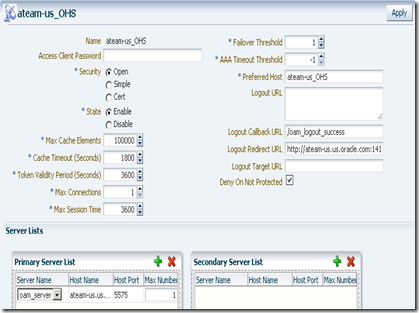
WebGate

On registration, by default, you get an application domain and Authentication and Authorization policies automatically configured for the patterns / and /…/*. You don’t need those policies. Remove them and add the /analytics/…/* as a protected resource to the set of Authentication and Authorization policies.

AuthenticationPolicy

And make sure you copy the generated ObAccessConfig.xml and cwallet.sso from the OAM’s $DOMAIN_HOME/output/<agent-name> to the WebGate’s instance config folder, which is typically located at OHS’ $ORACLE_HOME/instances/<instance-name>/config/OHS/ohs1/webgate/config.

<agent-name> is the name you gave to your WebGate when you registered it in the OAM Console.

Restart both OAM access server and the WebGate.

Checkpoint 2: At this point we should be able to have the WebGate intercepting calls to /analytics URL running in WebLogic and asking for credentials. Upon entering them, the user would be re-challenged by BI login screen.

8 - Create Impersonator user for the BI Server


Connect to the BI Administrator tool and select Manage –> Security.

Select User, right click on the panel’s right side, select New User… and type in the user name. For this exercise, I am calling it Impersonator. Make sure it is a member of the Administrators group.

9 - Add Impersonator user to BI Presentation Services credential store (credentialstore.xml)


Navigate to BI’s home web/bin folder and type:

> cryptotools credstore–add–infile <OracleBIData>/web/config/credentialstore.xml

You are prompted for some information. Make sure the Credential Alias is impersonation (literally). Username and password should obviously match those you just provided in the previous step. Encrypt the password and give it a passphrase.

10 - Configure instanceconfig.xml


instanceconfig.xml is also located at <OracleBIData>/web/config.

In my case, <OracleBIData> is C:\OracleBIData.

In order to allow BI Presentation Services connecting to BI Server using the Impersonator user, add the following snippet as a child of <ServerInstance> element:

<CredentialStore>
<CredentialStorage 
type="file" 
path="C:\OracleBIData\web\config\credentialstore.xml" 
passphrase="welcome1"/>
</CredentialStore>


Make sure to enter the passphrase you chose previously.

In order to allow BI Presentation Services consuming the end user identity authenticated by OAM, add the following as a child of <ServerInstance> element as well:

<Auth>
<SSO enabled="true">
<ParamList>
<Param 
name="IMPERSONATE" 
source="httpHeader" 
nameInSource="OAM_REMOTE_USER"/>
</ParamList>
</SSO>
</Auth>

Here we’re instructing BI Presentation Services to use the OAM_REMOTE_USER http header value as the “impersonatee” user. OMA_REMOTE_USER is always put in the HTTP header by OAM upon successful authentication. BI will simply trust that. Dangerous? Oh yes.

Don NOT go to production without implementing a trusting mechanism between Weblogic and OHS. Weblogic should only accept requests from OHS. And the solutions to the rescue are 2-way SSL or some firewalling protecting Weblogic. Don’t let anyone sending requests directly to Weblogic!


Restart BI Server and BI Presentation Services processes.

Checkpoint 3: At this point SSO should work for /analytics. After getting challenged by OAM on accessing /analytics/saw.dll?Dashboard, you should be let in without any further authentication challenge by BI.

Notice that we still have two user repositories. OAM is looking at the Weblogic embedded LDAP server while BI is looking at its internal repository. That assumes the user is defined in both identity stores.

OBIEE 10g has the option of importing users and groups to its internal repository from external systems. That’s certainly an option, but it involves synchronization, which I am not a great fan of. Import and synchronization are available in the BI Administration tool.

If you seek a single identity store, keep reading.

11 - Define a new OID identity store in OAM

This step assumes OID has been previously installed. In this exercise, OID version is the one packaged in Oracle Identity Management 11.1.1.3.0.
The application policy domain created when we registered our WebGate uses Weblogic embedded LDAP server as the identity store by default.

We need to change it, by pointing it to an external LDAP server. OID being the choice here.

This is done in OAM console. On the System Configuration tab, expand the Data Sources node and select User Identity Stores. Click the New button on the tool bar. Here’s my definition:
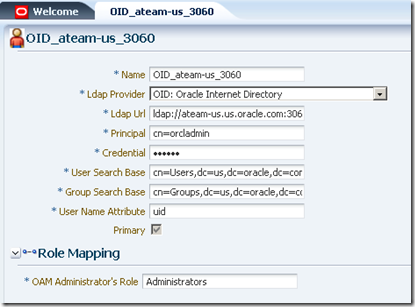
identityStore

Then associate this identity store to the authentication scheme that is associated with the authentication policy protecting the /analytics/…/* pattern. This is done under Authentication Modules node on the System Configuration tab:

authenticationModule

LDAP is the authentication module defined for the authentication scheme protecting our /analytics/…/* pattern.

Restart OAM server.

12 - Create an LDAP server in BI Server (the same OID identity store above)


Using BI Administration tool, define the LDAP server. Go to Manage –> Security –> New… –> LDAP Server

BI_LDAP_Server

Click the Advanced tab and inform uid as the User name attribute type. uid is the attribute that univocally identifies the user in OID.
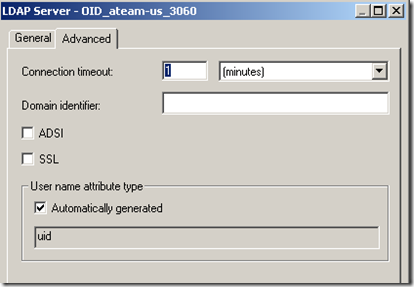
BI_LDAP_Server_Advanced

13 - Create a USER session variable in BI Server.

* Defining a USER session variable tells BI Server to authenticate users in an external repository. But in case of conflicting usernames, users defined in the BI repository takes precedence.

Using the BI Administration tool, go to Manage –> Variables. On the left side panel, under Session, select System. Right click on the right side and pick New USER…

14 - Create an LDAP Initialization Block for authenticating users in OID.


Initialization blocks are the means by which external repository data is communicated to BI server.

Again, using BI Administration tool, go to Manage –> Variables. Click Session. Right click on the right side and pick New Initialization Block… Give it a name, like Authentication Block.

Under Data Source, click Edit Data Source… button, pick LDAP as the type, click Browse button and pick the LDAP server you’ve defined previously.

Under Variable Target, pick the USER variable you’ve created. Inform uid as the LDAP Variable value.

You should end up with something like this:

BI_InitBlock

Restart BI Server.

Checkpoint 4: at this point, you should be able to login with a user defined in OID and access the BI analytics application in SSO mode, but you’ll notice that the privileges within BI analytics look wrong.

15 – Implementing authorizations for BI using groups defined in an external LDAP server.


Unfortunately, OBIEE 10g does not retrieve group memberships directly from LDAP. But it is possible to implement it indirectly, by creating a virtual table in the Oracle database populated with LDAP user/group information (that can be done with DBMS_LDAP package).

Another option would be writing a SQL query directly against OID tables, but that’s too invasive and could break at any time due to changes in the OID schema, which is private.

Once you populate a table using DBMS_LDAP package, you can query it via a second Initialization Block and retrieve the group names for a given user, populating the GROUP session variable. This block should refer the Authentication initialization block we’ve defined earlier as a predecessor so that the USER variable is properly initialized with the authenticated user.

I am not done with this part yet. As time permits, I will come back with the virtual table definition as well as the initialization block.
But I guess there's already plenty to do in case you want to try this out. Let me know about your experiences.

For more details…


Refer to product documentation.

OBIEE 10g Documentation Library (Deployment Guide has most of the information presented here).

OAM 11g Administration Guide

Monday, April 25, 2011

Performance Tuning Tips for OIM

Escalations in OIM are typically related to performance issues; however, performance problems can be prevented by following some common recommended practices on how to configure OIM’s components and connectors.

This article will discuss several kinds of issues/recommendations that can cause/avoid performance problems. These are grouped in the following categories:

  • Memory Related
  • Connector Related
  • Customization Related

MEMORY RELATED ISSUES

Heap Size for the VM running OIM’s process: This is a very common question for which there is not a definitive answer for all cases. Unfortunately, this is highly dependent on how OIM is going to be used. Some companies are highly dependent on automatic provisioning and very rarely use UI driven processes. For these cases, it is important to ensure that the VM has enough memory available to process big loads of data at any given time. Most of the time we have seen 2-4 GB assigned to JVM heap as a maximum which works well for the higher automatic provisioning processes. For those companies that allow their employees to request their own resources, the value of Heap memory should be able to accommodate enough resources according to the following criteria:

  • Concurrency: The higher this gets the more memory will be required. Unfortunately it is very hard to determine an actual number but 4 GB seems reasonable for high concurrency implementations.
  • Complexity of the Data Schema for the resources: If the provisioned resources available in the implementation have a lot of data dependencies on third party systems or the Process Forms are very intricate or have a lot of Child Tables associated. This will require more memory to represent requests for these resources. The recommendation is to always try to simplify as much as possible the design of your process forms and resource objects schemas.
  • Complexity of the Approval processes if any: The need to open connections to third party systems to search for approvers for instance or determine the destination of an approval request affects the memory requirements as well, especially in high concurrency systems. In 11g this is not a factor because these requirements are implemented in SOA Composites handled by a SOA Server.
  • Size of Metadata and Configuration Data (Lookups): Be very mindful of how much information is represented as lookups or configuration data. Some customers decided to store corporate groups as Lookup Fields which is causing hundreds of thousands of entries being pulled out by lookup fields. This is a potential performance problem since OIM’s implementation of Lookup Fields executes Lookup queries to pre-populate the list of values displayed to users for selection. There is no database driven pagination, pagination actually happens in the UI. This affects in a significant way, the amount of memory required and customers should be very careful as to how they represent data associated with the provisioned resources and how this data is retrieved and presented to users in the UI.

CONNECTOR RELATED


Provisioning is a very complex problem to solve in companies. OIM inherits a little bit of that complexity in order to simplify in some degree the mechanisms that tackle this complex problem. Connectors are right in the middle of the storm when it comes to addressing this complexity because they are the cornerstone for account provisioning to target systems, which are as numerous and diverse as the needs of all lines of business in which OIM operates. Customer environments are almost always comprised of a mixture of commercial software systems and in-house built applications which most often than not have very specific requirements. Some things to keep in mind when working with connectors and customizing them are the following:

  • Understand the life cycle of adapters and connectors: This is very important, because many times customers and integrators forget about this and implement customizations in a way that is not suitable to the dynamics of OIM’s component life cycles. Implementing resource pools inside adapters is not a good practice, and it is futile because adapters are instantiated per request and are totally stateless. If adapters need to make use of centralized resources, consider leveraging application server resources like JDBC data sources for instance. This will keep adapters separate from the management of such shared resources and will be able to make use of those resources even across multiple adapter instantiations.
  • When it comes to reconciliation implemented by connectors. Reconciliation uses JMS resources to process messages. To enhance performance customers usually configure distributed JMS destinations when supported by the hosting application server. Some servers have a feature called Server Affinity, which when enabled, prevent the load balancing of messages across multiple physical servers having destinations as part of the distributed JMS destination. In WebLogic this can be turned off, allowing multiple JMS producers to distribute messages to physical destinations present on different servers from the one the producer is sitting on. This truly allows big clusters to be leveraged for large reconciliations. This in conjunction with increasing the number of MDB threads processing reconciliation event messages can enhance the performance of large scale systems. For details check the following link: http://download.oracle.com/docs/cd/E12840_01/wls/docs103/jms_admin/advance_config.html#wp1076348
CUSTOMIZATION RELATED

OIM provides multiple mechanisms to integrate customer’s business logic into their OIM implementation. Some of these mechanisms come in the form of Adapters. Adapters can be used for pre-population of process data forms and request fields, and to perform operations on the user’s data before during or after the user is inserted in the database (Entity Adapters). OIM also provided a rich set of API’s so customers can create their own UI’s to access OIM’s functionality.
Traditionally, OIM 10g customers customized the Struts Actions implementation classes whose source code was actually exposed. Even though this was very powerful, many customers ended up with poor performing UI’s. In OIM 11g, customizing the Out of the Box Web Console beyond adding cosmetic changes like adding logos or changing labels and such is no longer a possibility. If customers require special handling of data that is not supported by the out of the box Web Console in OIM 11g, then using OIM’s APIs from a custom UI is the only approach. Some recommendations that apply to customizations are the following:

  • Pre-Load OIM’s APIs and reuse the references as much as possible: Avoid looking up for OIM’s APIs interfaces every time an adapter needs them. This is a perfect opportunity to implement a wrapper that follows the recommendation above. Make sure you synchronize access to those references to make your code more robust and reliable.
  • Know the size of your data: It is very important to know how much data will be handled by either a customized version of the Out of the Box Web Console or your own UI. Performance may be highly impacted by it and also will affect the memory requirements. See Memory Related Issues for more about this.

Sunday, April 24, 2011

SSL offloading and WebLogic server

A couple of weeks ago I wrote about using Apache to simulate an SSL load balancer and showed this diagram:

One of the important things to note is that by default in this architecture WebLogic and any J2EE applications won't know that the user is using SSL to access the server because any calls to HttpServletRequest.isSecure() will return false!

There is a solution though - two configuration directives in the Weblogic web server plug-ins (mod_wl in Apache and OHS) allow you to tweak the behavior. Those directives are WLProxySSL and WLProxySSLPassThrough.

Friday, April 22, 2011

Authenticated Sessions and WebLogic (including clusters)

When you write a J2EE app or use any of the technologies that are built on top of J2EE some aspects of what happens underneath you are one step removed from magic. That's great when you're in the development process, but when you get closer to production you may need pull back the curtain a bit so you can plan properly.

Let's say you have a very simple Servlet that does two things: tells you who you are and counts the number of times you've loaded the servlet. Something like this:
package project1;

import java.io.*;
import javax.servlet.*;
import javax.servlet.http.*;

public class TestServlet extends HttpServlet {

  public void doGet(HttpServletRequest request,
                    HttpServletResponse response) throws ServletException,
                                                         IOException {
    PrintWriter out = response.getWriter();

    out.write("Username: " + request.getRemoteUser() + "\n");

    HttpSession session = request.getSession(true);
    Integer iCount = 0;
    if (!session.isNew()) {
      iCount = (Integer)session.getAttribute("count");
    }
    iCount++;
    session.setAttribute("count", iCount);

    out.write("Count: " + iCount);
  }

}

And let's say that you protect the app with Basic authentication, like so:
<?xml version = '1.0' encoding = 'ISO-8859-1'?>
<web-app xmlns:xsi="http://www.w3.org/2001/XMLSchema-instance"
         xsi:schemaLocation="http://java.sun.com/xml/ns/javaee http://java.sun.com/xml/ns/javaee/web-app_2_5.xsd"
         version="2.5" xmlns="http://java.sun.com/xml/ns/javaee">
  <servlet>
    <servlet-name>TestServlet</servlet-name>
    <servlet-class>project1.TestServlet</servlet-class>
    <load-on-startup>0</load-on-startup>
  </servlet>
  <servlet-mapping>
    <servlet-name>TestServlet</servlet-name>
    <url-pattern>/*</url-pattern>
  </servlet-mapping>
  <security-constraint>
    <web-resource-collection>
      <web-resource-name>all</web-resource-name>
      <url-pattern>/*</url-pattern>
    </web-resource-collection>
    <auth-constraint>
      <role-name>allusers</role-name>
      <role-name>allusers</role-name>
    </auth-constraint>
  </security-constraint>
  <login-config>
    <auth-method>BASIC</auth-method>
    <realm-name>Session Test</realm-name>
  </login-config>
  <security-role>
    <role-name>allusers</role-name>
  </security-role>
</web-app>

When you hit the app via HTTP the server will see that you haven't authenticated and will respond with a 401 and your browser will pop up a Basic auth box.

The next time you make an HTTP request and this time include your credentials the server will:
  1. validate the creds
  2. see that you don't have a session
  3. create a session for the user
  4. squirrel the session away in memory on that server (i.e. in that JVM)
  5. issue a cookie named JSESSIONID
  6. and finally it will it execute the servlet.

Hit reload a few times and your browser sends the JSESSIONID cookie and the counter goes up each time the page loads.

By editing the WebLogic deployment descriptor (weblogic.xml) you can tweak a bunch of those behaviors - you can rename the cookie or even tell the server not issue you a cookie at all. If you use JDeveloper you can use a simple GUI to do that for you:

When you deploy this application to one server everything just works - you know, like magic. But when it's really important that this application be available 24x7x365 you're going to want to have it running on more than one server. In fact you'll probably want to have a couple of servers here and another couple somewhere else in the world in case something goes wrong in the first data center. And you still want the counter in my little test app to increment properly, right?
Well for that you need to deploy a cluster.

There's a whole lot of info out there about WebLogic Server clustering, so I'm not going to go into the details of how the AdminServer, managed servers and clusters work. This is a blog about security stuff in the Fusion stack so you didn't come here to read about managed servers and clusters anyway.

The only reason I'm writing about all of this is because there are some aspects of this that affect security in a way you might not have thought of until now.