I’d better do it now, otherwise I will forget the details.
Quite some people think that all an IdP-initiated flow requires is the target application URL in the consumer side. This is actually nothing more than a SP-initiated flow. In this way, you’ll hit the Service Provider with no SAML Assertion, will be redirected back to the IdP for the SAML assertion and then sent back to the Service Provider.
An IdP-initiated flow actually first needs to get a hold of a SAML assertion for the authenticated user. The assertion is then submitted along with the request to the target application URL. If the Service Provider decides to accept the assertion, the user is granted access. There’s no need to come back to the IdP for the assertion.
This short post is about how to configure Weblogic SAML 2.0 for an IdP-initiated flow.
The URL to be given to the end user for an IdP initiated flow in Weblogic is:
http://<idp-server>:<port>/saml2/idp/sso/initiator?SPName=<SP-Partner-Name>&RequestURL=<target-application-url>
Showing posts with label sso. Show all posts
Showing posts with label sso. Show all posts
Friday, June 8, 2012


Tuesday, June 5, 2012
Integrating OBIEE 11g into Weblogic’s SAML SSO
SAML is a way to convey identity information across systems. It is an industry-accepted standard and especially interesting when you need to propagate user information between different security domains, because it can overcome the HTTP cookie limitations in cross-domain scenarios (although there are ways to solve that with OAM today) and implement the concept of transient federation (also known as virtual users), where the user base is not shared between partners.
I've recently came across a scenario requiring OBIEE 11g integration into SAML 2.0 SSO. The requirement was that OBIEE 11g should be able to drive its authorization decisions based on the SAML Subject as well as SAML Attribute Statements from the SAML Assertion generated by a home-built Identity Provider (IdP). This post examine what can be done (and how) in this scenario.
The exact products versions used in this demo are as follows:
I've recently came across a scenario requiring OBIEE 11g integration into SAML 2.0 SSO. The requirement was that OBIEE 11g should be able to drive its authorization decisions based on the SAML Subject as well as SAML Attribute Statements from the SAML Assertion generated by a home-built Identity Provider (IdP). This post examine what can be done (and how) in this scenario.
The exact products versions used in this demo are as follows:
- Platform: Windows XP Server
- Oracle Weblogic Server 10.3.5
- Oracle Business Intelligence Enterprise Edition 11.1.1.5
Wednesday, November 30, 2011
5 Minutes or Less: WLS SAML2 SSO and your cookies
This is somewhat related to what Brian describes in WLS Session Cookie Overriding in an OAM/SSO Enabled Environment. Here, I want to quickly point one potential issue if you plan to implement Web SSO using Weblogic server as a SAML2.0 Service Provider (SP).
When configuring a Weblogic server instance for SAML2.0 services, you have to fill in a property called “Published Site URL”.
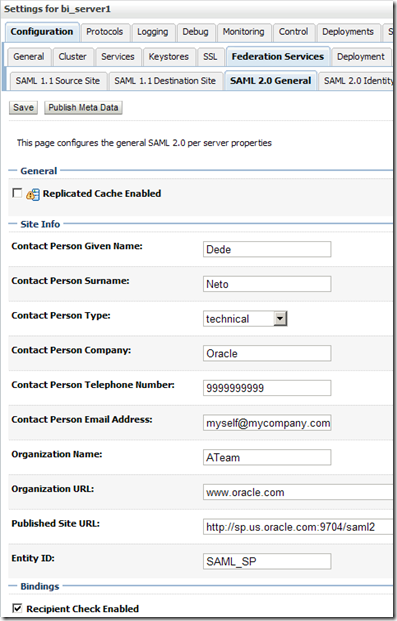
When this instance is an SP, this property tell the partner IdP (Identity Provider) where to post SAML Responses to. In the case of SAML2.0, that URL must be http://<server>:<port>/saml2, where <server> and <port> must refer to how the IdP recognizes the SP. In other words, if you have something like a load balancer in front of Weblogic server (which is the case if you’re running a cluster), <server> and <port> would be the load balancer’s. “saml2” is the web context of Weblogic’s internal SAML2.0 servlet, whose fully qualified name is com.bea.security.saml2.servlet.SAML2Servlet.
Very well, this servlet, when called as a Service Provider, has the ability to consume a SAML assertion created by the partner IdP and instantiate an HTTP session for the browser session in the server. And it will tie it to the browser session by issuing a cookie named JSESSIONID whose cookie-path is set to “/”. So what?
It turns out that many applications specify their own cookie-path to avoid the problem of JSESSIONID clashing, where last accessed applications by the browser override the JSESSIONID cookie value during the same browser session, thus leaving orphaned HTTP sessions in the server.
It also turns out that other applications use a different cookie name to avoid the same problem.
In both cases, the JSESSIONID cookie issued by saml2 servlet won’t be accepted by the application. You may be prompted for authentication again (this time by the application), get an HTTP 401-Unauthorized error or get into an infinite loop of redirects between SP and IdP.
The most obvious solutions to these problems is removing the cookie-path constraint from the application (in which case it defaults to "/") and having the application using the JSESSIONID name. You may need to get the blessings of your application provider for supportability purposes before proceeding to the changes.
That said, get to know your applications' cookies (cookie-name and cookie-path) before integrating them into WLS SAML2 SSO.
When configuring a Weblogic server instance for SAML2.0 services, you have to fill in a property called “Published Site URL”.

When this instance is an SP, this property tell the partner IdP (Identity Provider) where to post SAML Responses to. In the case of SAML2.0, that URL must be http://<server>:<port>/saml2, where <server> and <port> must refer to how the IdP recognizes the SP. In other words, if you have something like a load balancer in front of Weblogic server (which is the case if you’re running a cluster), <server> and <port> would be the load balancer’s. “saml2” is the web context of Weblogic’s internal SAML2.0 servlet, whose fully qualified name is com.bea.security.saml2.servlet.SAML2Servlet.
Very well, this servlet, when called as a Service Provider, has the ability to consume a SAML assertion created by the partner IdP and instantiate an HTTP session for the browser session in the server. And it will tie it to the browser session by issuing a cookie named JSESSIONID whose cookie-path is set to “/”. So what?
It turns out that many applications specify their own cookie-path to avoid the problem of JSESSIONID clashing, where last accessed applications by the browser override the JSESSIONID cookie value during the same browser session, thus leaving orphaned HTTP sessions in the server.
It also turns out that other applications use a different cookie name to avoid the same problem.
In both cases, the JSESSIONID cookie issued by saml2 servlet won’t be accepted by the application. You may be prompted for authentication again (this time by the application), get an HTTP 401-Unauthorized error or get into an infinite loop of redirects between SP and IdP.
The most obvious solutions to these problems is removing the cookie-path constraint from the application (in which case it defaults to "/") and having the application using the JSESSIONID name. You may need to get the blessings of your application provider for supportability purposes before proceeding to the changes.
That said, get to know your applications' cookies (cookie-name and cookie-path) before integrating them into WLS SAML2 SSO.
Tuesday, April 26, 2011
OBIEE 10g SSO Integration with OAM 11g
In this post I share the necessary steps in order to integrate OBIEE 10g into OAM 11g Single Sign On with the little caveat that OBIEE Analytics application is deployed in Weblogic server.
OBIEE 10g has two installation modes: basic and advanced. For SSO integration, you must pick adavanced mode. And Oracle Application Server version 10.1.3.1.0 or later is required.
OBIEE 10g deployment guide states that it can be implemented with any SSO solution that uses cookies, http header variables or JavaEE container server variables. That’s true indeed, and most of the configuration is actually performed on the OBIEE side.
OBIEE 10g implements SSO through the concept of impersonation. It retrieves the end user identity through one of the mechanisms mentioned above and uses an impersonator user to establish a session to the OBIEE server on behalf of the end user.
This post by no means intends to discuss OBIEE architecture or go into the details of OAM 11g. As a matter of fact, the latter is extensively discussed in this blog by my colleagues in the Oracle Access Manager Academy series. Reading strongly recommended. Fantastic material.
And what you’re about to follow has been implemented in a Windows XP box for demonstration purposes.
The exact product versions used were:
Oracle Business Intelligence Enterprise Edition 10.1.3.4.1
Oracle Identity and Access Management 11.1.1.3.0
Oracle Access Manager WebGates 11.1.1.3.0
Oracle Identity Management 11.1.1.3.0
Oracle WebTier Utilities 11.1.1.2.0
Oracle Weblogic Server 10.3.4
Oracle Containers For Java (OC4J) 10.1.3.5.0
Fasten your seat belts! Here we go.
When you install OBIEE 10g, you get a set of standalone component processes, some admin UIs and a front-end web application running on top of OC4J.
For the purposes of this post, we’re interested in the BI Server, BI Presentation Services and the BI Presentation Services Plug-in components. The BI Server is a standalone process that maintains the BI data model and connects to data stores. BI Presentation Services is another standalone process that present information worked by BI Server to clients via ODBC. BI Presentation Services Plug-in allows web clients to interact with BI Presentation Services. In JavaEE application servers, it is a servlet component delivered via the analytics.war web application.
Once OBIEE is installed, find the analytics.war file under $BI_HOME/web folder.
Shut down OC4J in case it's running. We don't need it.
Simply use Weblogic console to deploy the analytics.war application. There really is nothing special here. Click click click and you should get the analytics application up and running in Weblogic.
OHS front-ends Weblogic server. A mod weblogic routing rule will forward requests to the analytics application running in Weblogic.
This step can also be accomplished via Enterprise Manager.
Open mod_wl_ohs.conf located under your OHS instance home config folder and type in the following:
Make sure to replace the values in between <!-- -->
The OHS instance home config folder is typically located at $ORACLE_HOME/instances/<instance-name>/config/OHS/ohs1
Restart OHS.
Checkpoint 1: at this point we should be able to submit requests to OHS and have them directed to Weblogic.
Nothing special here. Just follow OAM 11g install guide. It is a good idea to create one Weblogic domain along with one managed server for the OAM server.
The WebGate checks whether the executing user is authenticated before letting it access the analytics application.
Simply follow OAM Administration Guide Instructions.
Here’s my WebGate definition:
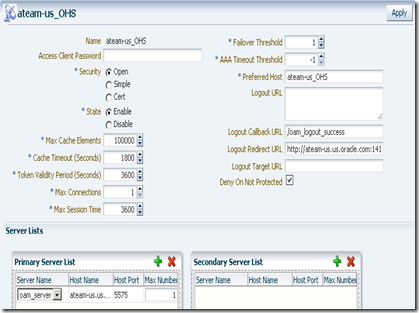
On registration, by default, you get an application domain and Authentication and Authorization policies automatically configured for the patterns / and /…/*. You don’t need those policies. Remove them and add the /analytics/…/* as a protected resource to the set of Authentication and Authorization policies.

And make sure you copy the generated ObAccessConfig.xml and cwallet.sso from the OAM’s $DOMAIN_HOME/output/<agent-name> to the WebGate’s instance config folder, which is typically located at OHS’ $ORACLE_HOME/instances/<instance-name>/config/OHS/ohs1/webgate/config.
<agent-name> is the name you gave to your WebGate when you registered it in the OAM Console.
Restart both OAM access server and the WebGate.
Checkpoint 2: At this point we should be able to have the WebGate intercepting calls to /analytics URL running in WebLogic and asking for credentials. Upon entering them, the user would be re-challenged by BI login screen.
Connect to the BI Administrator tool and select Manage –> Security.
Select User, right click on the panel’s right side, select New User… and type in the user name. For this exercise, I am calling it Impersonator. Make sure it is a member of the Administrators group.
Navigate to BI’s home web/bin folder and type:
You are prompted for some information. Make sure the Credential Alias is impersonation (literally). Username and password should obviously match those you just provided in the previous step. Encrypt the password and give it a passphrase.
instanceconfig.xml is also located at <OracleBIData>/web/config.
In my case, <OracleBIData> is C:\OracleBIData.
In order to allow BI Presentation Services connecting to BI Server using the Impersonator user, add the following snippet as a child of <ServerInstance> element:
Make sure to enter the passphrase you chose previously.
In order to allow BI Presentation Services consuming the end user identity authenticated by OAM, add the following as a child of <ServerInstance> element as well:
Here we’re instructing BI Presentation Services to use the OAM_REMOTE_USER http header value as the “impersonatee” user. OMA_REMOTE_USER is always put in the HTTP header by OAM upon successful authentication. BI will simply trust that. Dangerous? Oh yes.
Don NOT go to production without implementing a trusting mechanism between Weblogic and OHS. Weblogic should only accept requests from OHS. And the solutions to the rescue are 2-way SSL or some firewalling protecting Weblogic. Don’t let anyone sending requests directly to Weblogic!
Restart BI Server and BI Presentation Services processes.
Checkpoint 3: At this point SSO should work for /analytics. After getting challenged by OAM on accessing /analytics/saw.dll?Dashboard, you should be let in without any further authentication challenge by BI.
Notice that we still have two user repositories. OAM is looking at the Weblogic embedded LDAP server while BI is looking at its internal repository. That assumes the user is defined in both identity stores.
OBIEE 10g has the option of importing users and groups to its internal repository from external systems. That’s certainly an option, but it involves synchronization, which I am not a great fan of. Import and synchronization are available in the BI Administration tool.
If you seek a single identity store, keep reading.
The application policy domain created when we registered our WebGate uses Weblogic embedded LDAP server as the identity store by default.
We need to change it, by pointing it to an external LDAP server. OID being the choice here.
This is done in OAM console. On the System Configuration tab, expand the Data Sources node and select User Identity Stores. Click the New button on the tool bar. Here’s my definition:
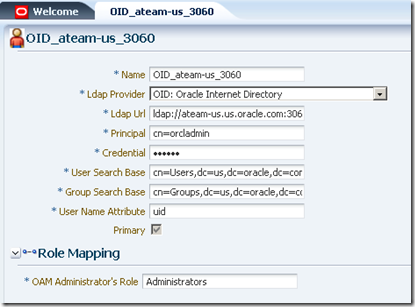
Then associate this identity store to the authentication scheme that is associated with the authentication policy protecting the /analytics/…/* pattern. This is done under Authentication Modules node on the System Configuration tab:

LDAP is the authentication module defined for the authentication scheme protecting our /analytics/…/* pattern.
Restart OAM server.
Using BI Administration tool, define the LDAP server. Go to Manage –> Security –> New… –> LDAP Server

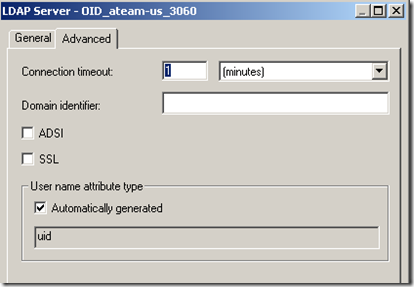
Click the Advanced tab and inform uid as the User name attribute type. uid is the attribute that univocally identifies the user in OID.
Using the BI Administration tool, go to Manage –> Variables. On the left side panel, under Session, select System. Right click on the right side and pick New USER…
Initialization blocks are the means by which external repository data is communicated to BI server.
Again, using BI Administration tool, go to Manage –> Variables. Click Session. Right click on the right side and pick New Initialization Block… Give it a name, like Authentication Block.
Under Data Source, click Edit Data Source… button, pick LDAP as the type, click Browse button and pick the LDAP server you’ve defined previously.
Under Variable Target, pick the USER variable you’ve created. Inform uid as the LDAP Variable value.
You should end up with something like this:

Restart BI Server.
Checkpoint 4: at this point, you should be able to login with a user defined in OID and access the BI analytics application in SSO mode, but you’ll notice that the privileges within BI analytics look wrong.
Unfortunately, OBIEE 10g does not retrieve group memberships directly from LDAP. But it is possible to implement it indirectly, by creating a virtual table in the Oracle database populated with LDAP user/group information (that can be done with DBMS_LDAP package).
Another option would be writing a SQL query directly against OID tables, but that’s too invasive and could break at any time due to changes in the OID schema, which is private.
Once you populate a table using DBMS_LDAP package, you can query it via a second Initialization Block and retrieve the group names for a given user, populating the GROUP session variable. This block should refer the Authentication initialization block we’ve defined earlier as a predecessor so that the USER variable is properly initialized with the authenticated user.
I am not done with this part yet. As time permits, I will come back with the virtual table definition as well as the initialization block.
But I guess there's already plenty to do in case you want to try this out. Let me know about your experiences.
Refer to product documentation.
OBIEE 10g Documentation Library (Deployment Guide has most of the information presented here).
OAM 11g Administration Guide
OBIEE 10g has two installation modes: basic and advanced. For SSO integration, you must pick adavanced mode. And Oracle Application Server version 10.1.3.1.0 or later is required.
OBIEE 10g deployment guide states that it can be implemented with any SSO solution that uses cookies, http header variables or JavaEE container server variables. That’s true indeed, and most of the configuration is actually performed on the OBIEE side.
OBIEE 10g implements SSO through the concept of impersonation. It retrieves the end user identity through one of the mechanisms mentioned above and uses an impersonator user to establish a session to the OBIEE server on behalf of the end user.
This post by no means intends to discuss OBIEE architecture or go into the details of OAM 11g. As a matter of fact, the latter is extensively discussed in this blog by my colleagues in the Oracle Access Manager Academy series. Reading strongly recommended. Fantastic material.
And what you’re about to follow has been implemented in a Windows XP box for demonstration purposes.
The exact product versions used were:
Oracle Business Intelligence Enterprise Edition 10.1.3.4.1
Oracle Identity and Access Management 11.1.1.3.0
Oracle Access Manager WebGates 11.1.1.3.0
Oracle Identity Management 11.1.1.3.0
Oracle WebTier Utilities 11.1.1.2.0
Oracle Weblogic Server 10.3.4
Oracle Containers For Java (OC4J) 10.1.3.5.0
Fasten your seat belts! Here we go.
1 - Install OBIEE 10g
When you install OBIEE 10g, you get a set of standalone component processes, some admin UIs and a front-end web application running on top of OC4J.
For the purposes of this post, we’re interested in the BI Server, BI Presentation Services and the BI Presentation Services Plug-in components. The BI Server is a standalone process that maintains the BI data model and connects to data stores. BI Presentation Services is another standalone process that present information worked by BI Server to clients via ODBC. BI Presentation Services Plug-in allows web clients to interact with BI Presentation Services. In JavaEE application servers, it is a servlet component delivered via the analytics.war web application.
Once OBIEE is installed, find the analytics.war file under $BI_HOME/web folder.
Shut down OC4J in case it's running. We don't need it.
2 - Deploy the analytics.war application in WebLogic
Simply use Weblogic console to deploy the analytics.war application. There really is nothing special here. Click click click and you should get the analytics application up and running in Weblogic.
3 - Install Oracle HTTP Server (OHS)
OHS front-ends Weblogic server. A mod weblogic routing rule will forward requests to the analytics application running in Weblogic.
4 - Create routing rule in OHS mod weblogic for /analytics URL
This step can also be accomplished via Enterprise Manager.
Open mod_wl_ohs.conf located under your OHS instance home config folder and type in the following:
1: <IfModule weblogic_module>
2: WebLogicHost <!--weblogic-server-running-analytics-application-->
3: WebLogicPort <!--weblogic-port-->
4: Debug ON 5: WLLogFile /tmp/weblogic.log6: </IfModule>
7: 8: <Location /analytics>
9: SetHandler weblogic-handler10: </Location>
Make sure to replace the values in between <!-- -->
The OHS instance home config folder is typically located at $ORACLE_HOME/instances/<instance-name>/config/OHS/ohs1
Restart OHS.
Checkpoint 1: at this point we should be able to submit requests to OHS and have them directed to Weblogic.
5 - Install OAM 11g
Nothing special here. Just follow OAM 11g install guide. It is a good idea to create one Weblogic domain along with one managed server for the OAM server.
6 - Install OAM 11g WebGate in OHS
The WebGate checks whether the executing user is authenticated before letting it access the analytics application.
7 – Register the WebGate in OAM Console
Simply follow OAM Administration Guide Instructions.
Here’s my WebGate definition:

On registration, by default, you get an application domain and Authentication and Authorization policies automatically configured for the patterns / and /…/*. You don’t need those policies. Remove them and add the /analytics/…/* as a protected resource to the set of Authentication and Authorization policies.

And make sure you copy the generated ObAccessConfig.xml and cwallet.sso from the OAM’s $DOMAIN_HOME/output/<agent-name> to the WebGate’s instance config folder, which is typically located at OHS’ $ORACLE_HOME/instances/<instance-name>/config/OHS/ohs1/webgate/config.
<agent-name> is the name you gave to your WebGate when you registered it in the OAM Console.
Restart both OAM access server and the WebGate.
Checkpoint 2: At this point we should be able to have the WebGate intercepting calls to /analytics URL running in WebLogic and asking for credentials. Upon entering them, the user would be re-challenged by BI login screen.
8 - Create Impersonator user for the BI Server
Connect to the BI Administrator tool and select Manage –> Security.
Select User, right click on the panel’s right side, select New User… and type in the user name. For this exercise, I am calling it Impersonator. Make sure it is a member of the Administrators group.
9 - Add Impersonator user to BI Presentation Services credential store (credentialstore.xml)
Navigate to BI’s home web/bin folder and type:
> cryptotools credstore–add–infile <OracleBIData>/web/config/credentialstore.xml
10 - Configure instanceconfig.xml
instanceconfig.xml is also located at <OracleBIData>/web/config.
In my case, <OracleBIData> is C:\OracleBIData.
In order to allow BI Presentation Services connecting to BI Server using the Impersonator user, add the following snippet as a child of <ServerInstance> element:
<CredentialStore>
<CredentialStorage
type="file" path="C:\OracleBIData\web\config\credentialstore.xml" passphrase="welcome1"/></CredentialStore>
Make sure to enter the passphrase you chose previously.
In order to allow BI Presentation Services consuming the end user identity authenticated by OAM, add the following as a child of <ServerInstance> element as well:
<Auth>
<SSO enabled="true"><ParamList>
<Param
name="IMPERSONATE" source="httpHeader" nameInSource="OAM_REMOTE_USER"/></ParamList>
</SSO>
</Auth>
Here we’re instructing BI Presentation Services to use the OAM_REMOTE_USER http header value as the “impersonatee” user. OMA_REMOTE_USER is always put in the HTTP header by OAM upon successful authentication. BI will simply trust that. Dangerous? Oh yes.
Don NOT go to production without implementing a trusting mechanism between Weblogic and OHS. Weblogic should only accept requests from OHS. And the solutions to the rescue are 2-way SSL or some firewalling protecting Weblogic. Don’t let anyone sending requests directly to Weblogic!
Restart BI Server and BI Presentation Services processes.
Checkpoint 3: At this point SSO should work for /analytics. After getting challenged by OAM on accessing /analytics/saw.dll?Dashboard, you should be let in without any further authentication challenge by BI.
Notice that we still have two user repositories. OAM is looking at the Weblogic embedded LDAP server while BI is looking at its internal repository. That assumes the user is defined in both identity stores.
OBIEE 10g has the option of importing users and groups to its internal repository from external systems. That’s certainly an option, but it involves synchronization, which I am not a great fan of. Import and synchronization are available in the BI Administration tool.
If you seek a single identity store, keep reading.
11 - Define a new OID identity store in OAM
This step assumes OID has been previously installed. In this exercise, OID version is the one packaged in Oracle Identity Management 11.1.1.3.0.The application policy domain created when we registered our WebGate uses Weblogic embedded LDAP server as the identity store by default.
We need to change it, by pointing it to an external LDAP server. OID being the choice here.
This is done in OAM console. On the System Configuration tab, expand the Data Sources node and select User Identity Stores. Click the New button on the tool bar. Here’s my definition:

Then associate this identity store to the authentication scheme that is associated with the authentication policy protecting the /analytics/…/* pattern. This is done under Authentication Modules node on the System Configuration tab:

LDAP is the authentication module defined for the authentication scheme protecting our /analytics/…/* pattern.
Restart OAM server.
12 - Create an LDAP server in BI Server (the same OID identity store above)
Using BI Administration tool, define the LDAP server. Go to Manage –> Security –> New… –> LDAP Server

Click the Advanced tab and inform uid as the User name attribute type. uid is the attribute that univocally identifies the user in OID.

13 - Create a USER session variable in BI Server.
* Defining a USER session variable tells BI Server to authenticate users in an external repository. But in case of conflicting usernames, users defined in the BI repository takes precedence.Using the BI Administration tool, go to Manage –> Variables. On the left side panel, under Session, select System. Right click on the right side and pick New USER…
14 - Create an LDAP Initialization Block for authenticating users in OID.
Initialization blocks are the means by which external repository data is communicated to BI server.
Again, using BI Administration tool, go to Manage –> Variables. Click Session. Right click on the right side and pick New Initialization Block… Give it a name, like Authentication Block.
Under Data Source, click Edit Data Source… button, pick LDAP as the type, click Browse button and pick the LDAP server you’ve defined previously.
Under Variable Target, pick the USER variable you’ve created. Inform uid as the LDAP Variable value.
You should end up with something like this:

Restart BI Server.
Checkpoint 4: at this point, you should be able to login with a user defined in OID and access the BI analytics application in SSO mode, but you’ll notice that the privileges within BI analytics look wrong.
15 – Implementing authorizations for BI using groups defined in an external LDAP server.
Unfortunately, OBIEE 10g does not retrieve group memberships directly from LDAP. But it is possible to implement it indirectly, by creating a virtual table in the Oracle database populated with LDAP user/group information (that can be done with DBMS_LDAP package).
Another option would be writing a SQL query directly against OID tables, but that’s too invasive and could break at any time due to changes in the OID schema, which is private.
Once you populate a table using DBMS_LDAP package, you can query it via a second Initialization Block and retrieve the group names for a given user, populating the GROUP session variable. This block should refer the Authentication initialization block we’ve defined earlier as a predecessor so that the USER variable is properly initialized with the authenticated user.
I am not done with this part yet. As time permits, I will come back with the virtual table definition as well as the initialization block.
But I guess there's already plenty to do in case you want to try this out. Let me know about your experiences.
For more details…
Refer to product documentation.
OBIEE 10g Documentation Library (Deployment Guide has most of the information presented here).
OAM 11g Administration Guide
Tuesday, July 13, 2010
WLS Session Cookie Overriding in an OAM/SSO Enabled Environment
First I’d like to remind everybody about the Identity Management 11g launch that is coming up. You can register for it here.
With that out of the way, today I’d like to conclude my series of posts on user session management in OAM/SSO enabled environments by talking in detail about the issue of WLS session cookie overriding.
The Problem
To review, if OAM is protecting multiple containers or applications that by default issue session cookies with the same name then it is important to realize that as a user moves from one container/application to another that the session cookie of the 2nd container/application will blow away the session cookie from the first container/application.
An example of this is OAM protecting multiple WebLogic applications that are not sharing a session. The JSESSIONID cookie issued when a user accesses a second application will blow away the JSESSIONID from the first application.
Now, what you usually see in such a setup is that the user can go back and access the first application without having to login again. However, underneath the covers they will be issued a new session. So, upon returning to the first application, any data associated with their original session will be lost and the application flow may be disrupted or different from the expected behavior.
Solutions
As far as I know there are 3 possible solutions to this issue:
None of these solutions is perfect, so we’ll now go through and discuss the advantages, disadvantages, and limitations of all 3.
Session Sharing
By default, applications do not share the same WLS session. However, for applications deployed in the same EAR, it is pretty easy to set it up so that they do share the user session. The main limitation here is that the applications have to be deployed in the same EAR.
To enable session sharing between applications in an EAR, set the sharing-enabled attribute in the session descriptor to true in the weblogic-application.xml.
Changing the Session Cookie Name
Going the route of giving unique names to the session cookie for each application is a solid solution and realistic solution to the session cookie overriding problem. However, there are a few draw backs that I’ll get to.
First, let’s talk about how to change the WLS session cookie names. On the application side, you set the cookie-name deployment descriptor variable in the weblogic.xml. If you are fronting WebLogic with a real web server, you’ll need to configure the mod_wl connector “routing rules” with the appropriate cookie name to be used for each application. Specifically with regard to OHS/Apache and mod_wl_ohs, the appropriate directive is WLCookieName. The following is an example mod_wl_ohs configuration using this directive:
Sample mod_wl (httpd.conf/mod_wl.conf) configuration
#### /AppA
SetHandler weblogic-handler
WebLogicHost test_server1
WebLogicPort 7001
WLCookieName cookie1
DynamicServerList OFF
Debug ALL
WLLogFile logs/httpd_proxy1.log
#### /AppB
SetHandler weblogic-handler
WebLogicHost test_server2
WebLogicPort 7001
WLCookieName cookie2
DynamicServerList OFF
Debug ALL
WLLogFile logs/httpd_proxy1.log
#### /AppC
SetHandler weblogic-handler
WebLogicCluster machine_1:7001,machine_2:7001
WLCookieName cookie3
Debug ALL
WLLogFile logs/httpd_proxy1.log
As you can see this does complicate your mod_wl configuration some in that you have to isolate the context-root of every application that is to have a unique cookie. You’ll also have to then distribute updates to every http server in your deployment. One other issue you might encounter with this solution is that you might have infrastructure software like monitoring software that is hard coded or pre-configured to look specifically for JSESSIONID. If you change the name of the session cookie your monitoring may break. Finally, some black box commercial applications that run on WebLogic cannot be changed to use alternative cookie names.
Changing Session Cookie Paths
Setting the “cookie path” of the session cookie for each application to the context root of the application allows you to maintain separate WLS session cookies for each application without having the cookies for different applications overwriting each other.
To implement this you simply need to set the cookie-path deployment descriptor variable in the weblogic.xml. One advantage to this approach is there are no required configuration changes on the web server / mod_wl side of things.
On the downside, the problem of black box applications running on WLS is arguably worse with the unique path solution than with the unique name solution. Just like with the cookie name, some black box commercial application that run on WebLogic cannot be changed to use different cookie paths and most of these have hard coded cookie paths set to “/”. In such situations these black box applications will not only interfere with each other, but you also will get conflicts between the black box applications and your custom applications for which you are properly setting the paths to the context root. From my little bit of testing of browser behavior it seems that the more specific path always wins so it seems it is mainly an issue of the session cookies for the black box apps being overwritten by your applications session cookies. In any case, it is definitely something to be aware of.
Conclusion
WLS Session Cookie Overriding is a common problem in an OAM/SSO enabled environment. There are 3 possible solutions to the problem: session sharing, application unique session cookie names, and application unique cookie paths.
However, all 3 solutions have their limitations.
Tuesday, June 29, 2010
Oracle Access Manager (OAM) and the SSO Synchronization Filter
A while back I wrote about some challenges concerning session management in an OAM/SSO enabled environment. I briefly mentioned that the WebLogic SSO Synchronization Filter can help address some of these challenges.
Today I’d like to explore the SSO Sync Filter in a little more detail. The filter is implemented as a system filter for WebLogic 11g. It works in conjunction with the OAM Identity Asserter for WebLogic. The filter is only active when the OAM Identity Asserter is configured in a security realm.
It works by comparing the value of the OAM_REMOTE_USER header set by the OAM webgate to the value of the user principal name. If they are consistent then the filter lets the request through, but if they are inconsistent then the filter invalidates the WLS/JSESSION session and redirects the user back to the same URL which should either result in a user challenge or the establishment of a new WLS session with the same identity contained in the OAM session.
Note, that the SSO Sync Filter has no knowledge of OAM policies. Its view of what is or isn’t protected is based only on the headers it sees in the request. If no OAM_REMOTE_USER header is found, then the filter assumes that the request is for an unprotected resource and just passes it through. On the other hand, resources protected by the OAM anonymous authentication scheme will be considered protected by the filter since an OAM_REMOTE_USER header should always be present for such resources and set to the value of a real authenticated user or the configured anonymous user identity.
Given the functionality described above, it should be apparent that the filter is a great aid in helping to address session synchronization issues that can occur in an OAM/SSO enabled environment including issues around single logouts and session timeouts.
The documentation for this valuable Fusion Middleware component can be found here: http://download.oracle.com/docs/cd/E15523_01/core.1111/e10043/osso.htm#CHDHDBED
In my next post, I’ll discuss how to address the issue of JSESSIONID Cookie Overriding in SSO enabled environments.
Today I’d like to explore the SSO Sync Filter in a little more detail. The filter is implemented as a system filter for WebLogic 11g. It works in conjunction with the OAM Identity Asserter for WebLogic. The filter is only active when the OAM Identity Asserter is configured in a security realm.
It works by comparing the value of the OAM_REMOTE_USER header set by the OAM webgate to the value of the user principal name. If they are consistent then the filter lets the request through, but if they are inconsistent then the filter invalidates the WLS/JSESSION session and redirects the user back to the same URL which should either result in a user challenge or the establishment of a new WLS session with the same identity contained in the OAM session.
Note, that the SSO Sync Filter has no knowledge of OAM policies. Its view of what is or isn’t protected is based only on the headers it sees in the request. If no OAM_REMOTE_USER header is found, then the filter assumes that the request is for an unprotected resource and just passes it through. On the other hand, resources protected by the OAM anonymous authentication scheme will be considered protected by the filter since an OAM_REMOTE_USER header should always be present for such resources and set to the value of a real authenticated user or the configured anonymous user identity.
Given the functionality described above, it should be apparent that the filter is a great aid in helping to address session synchronization issues that can occur in an OAM/SSO enabled environment including issues around single logouts and session timeouts.
The documentation for this valuable Fusion Middleware component can be found here: http://download.oracle.com/docs/cd/E15523_01/core.1111/e10043/osso.htm#CHDHDBED
In my next post, I’ll discuss how to address the issue of JSESSIONID Cookie Overriding in SSO enabled environments.
Thursday, April 8, 2010
SAML is good, but it's no replacement for WAM
My recent posts about SAML got me thinking about a couple of common misconceptions I see from customers surrounding the technology.
The first and most important misconception is articulated by this quote:
"there is no SAML Fairy"
- Brian Eidelman
In other words there's nothing magical about SAML. Browsers don't "speak" SAML. SAML isn't like an HTTP cookie (and it's not like a chocolate chip one either, but I digress). SAML is just a means to convey identity from one place to another, so adding SAML into your architecture doesn't do anything to make it more secure. Application sessions will still be managed with cookies, hidden form fields, information in the query string or whatever it is that the app already did.
The other misconception / misunderstanding is that SAML can take care of all of your SSO problems. Or as a customer recently put it "if I just setup one authentication point for my enterprise and then use SAML to sign onto all of my applications I don't need a Web SSO solution like [OAM, OpenSSO, SiteMinder, etc]". This product space is usually called Web Access Management, abbreviated as WAM, which is pronounced like, but is unrelated to the band with a similar sounding name.
I've seen this same idea discussed by customers, application vendors and others so it seems pretty common. The fact the idea is common is bad, but it's the fact that it's both wrong and widespread that concerns me, and is why I'm writing this post.
The motivations people have put forward for using SAML in this way have included:
- using "the standard"
- only having thing to integrate to get SSO for everything
- lots of applications support SAML out of the box
- simplifying the environment
- loosely coupling infrastructure components
- avoiding license costs
The main features of a WAM product (according to Wikipedia) are:
- Authentication Management
- Policy-based Authorization
- Audit & Reporting Services (optional)
- Single sign-on Convenience
Authentication Management includes obvious things like checking a username and password (i.e. HTTP Basic authentication or from an HTML form) or Certificates. It also includes features like requiring different authentication methods for different resources. The rest of the above are fairly self explanatory. I'd add a few more features that are common across most of the products in the space:
- Session management - including enforcing maximum session time, idle timeouts, administratively terminating a session, etc
- Security in depth - e.g. securing at least both the web tier and the app tier
If you use SAML for SSO you can centralize authentication, and if you do things carefully you can almost certainly get a limited form of Single Sign-On working. But trying to get most of the other items on my lists above is actually a whole lot harder than you might think.
Consider the use case where you have two applications protected with either a WAM solution or some sort of SAML integration. With a conventional WAM product you'd be able to log into either one and move back and forth seamlessly; your session would be active on either one or both apps for as long as specified in the central configuration and if you log out of one you would be logged out of all. Contrast this with the SAML solution...
You could do central login by configuring the existing login page of each application to kick off a Service Provider initiated SSO, and as long as your session was live at the central IdP you could go back there to get an assertion for the application. Of course you'd need to make sure that the central session didn't time out too early or you lose all SSO capabilities. You could also configure SAML to support Single Logout (SLO), though doing SLO across more than a handful of Service Providers gets problematic quickly.
So what are you missing? Lots of stuff...
- Authentication technologies. WAM products generally support a wide variety of authentication methods out of the box. From the common username and password, certificates, smart cards, SecurID and Kerberos to less common things like biometrics and multifactor methods. Enabling additional authentication method with a WAM product generally requires simply following a set of documented configuration steps. Contrast this with what most people think of as how they'll "do" a SAML IdP for their internal SSO project... a web app deployed on an app server. In that case you'll be able to support username and password, certificates, probably Kerberos and not much more very easily (for appropriate values of "very"). Further you start running into problems when you try to configure one web application to require more than one method - J2EE apps, for example, can only support one authentication method.
- Idle timeouts across the environment. Idle timeouts can't be enforced because SAML doesn't include a profile for session synchronization. Period. End of statement. Simply not possible with SAML. So once a user SSOs over to an SP there's no way to let the IdP know that the user is still actively using the app.
- Session time limits. Maximum session time limits generally can't be enforced because SAML only specifies a time period during which an assertion will be valid (NotBefore and NotOnOrAfter). The SAML specification does include another attribute (SessionNotOnOrAfter) which is supposed to specify the maximum session time the SP should allow. In my experience this support is generally poorly implemented in all but the most advanced SAML-supporting products. Anecdotally and FWIW I've gone to a number of interop test events and I've never actually seen this feature included in the conformance test suite. Caveat emptor!
- Central authorization policies. WAM products include "course grained access control" features. You generally wouldn't use a WAM product to secure individual features of an application, but using a WAM product to decide who is allowed to reach each application is common.
- Central Authorization Reporting. Centralizing policies means that you can easily figure out who is going to have access to each application. You can then use this information to generate useful things like attestation reports which are often required by security auditors.
- Central auditing. When a WAM product is deployed across applications you gain the ability report on who can do what (above) but also the ability to centrally track usage (who actually did what?). Most products will record user actions in flat files, a database, or both. Generating reports from that data then becomes a simple matter of pointing your reporting system at that data and clicking "Generate Report".
There are some other important features of WAM products, but those are the ones that come to mind immediately.
Then in addition to all of the features you're missing you introduce a bunch of additional problems. Such as? How about the fact that each Service Provider requires an x.509 certificate? And the fact that setting up a SAML Service Provider is still painful (even with the Metadata exchange protocol). And the fact that when you stand up a new SP you have to configure settings on the IdP.
None of which you have to worry about with a WAM product.
So when it comes to web browsers use SAML for the things it was intended to do - propagating identity across boundaries. And use WAM products for your intra-company SSO.
Do you disagree? Are you using SAML for your web SSO solution successfully? Have you figured out something I haven't?
Let me know below.
Thursday, March 25, 2010
Oracle Access Manager (OAM), SSO and Session Management
The subject for today is understanding user session management in an OAM/SSO enabled web application environment.
Some people think that once OAM is deployed, that the OAM session which is represented by the OBSSO Cookie replaces application or container (app server, .net, PHP etc) specific sessions. This is not the case. Application and container specific sessions still exist. It is just that rather than logging into a specific application to initiate the application or container session, the session will be initiated automatically if the user has an existing OBSSO cookie. Thus, as the user moves from one container or application to another, they initiate new user sessions without having to re-authenticate.
For all its glory, the introduction of OAM creates a few nuanced issues for architects of web applications to navigate:
Session Timeouts
It is important to be aware of the relationship between the session timeout values in OAM and session timeouts for container/application sessions.
OAM sessions have both idle and maximum session timeout controls. Most container/application sessions control only the maximum length of the session.
Ideally, your OAM and container/application sessions will timeout at the same time but it is important to understand what happens if they don’t. Even if your session timeouts are set to the same value, the OAM session can timeout before an application session if a user moves from one container to another in the same OAM session. This is because the 2nd container/application session will have started well after the OAM session.
So, if a user’s OAM session expires before their container/application session, they will be blocked at the web server (or proxy server) by the OAM webgate and asked to re-authenticate. Upon re-authenticating, they will be let through to the application. What happens next depends on the details of the integration between OAM and the container or application.
If a new login to OAM always results in a fresh application/container session then everything will work as you expect.
If however, the existing application session from before the OAM session timeout is still in place then the user of the browser will continue with that session. This is fine as long as the user re-authenticating is the same as the original user. In the case of extranet applications, applications used from shared systems or even just applications that are accessible from the public it is important to put measures in place to ensure that the user associated with the OAM session is the same as the user associated with the application session. See session synchronization below for more on this.
Logouts
If your pre-OAM enabled application has logout capabilities, you will want to synchronize this capability with an OAM logout. OAM logs a user out when they access a logout URI. Logout URIs are configurable in OAM and can be set to pretty much anything. By default, OAM will log a user out when they access any URI ending in logout.* where * is anything other than gif or jpg.
Session Synchronization
For applications that can be accessed from external/uncontrolled networks, especially public extranet applications, it is a good idea to put measures in place to make sure that the user associated with an active OAM session is the same as the user associated with an active container/application session being protected by OAM.
What you are trying to avoid is a situation where users either intentionally or accidentally log in to OAM as themselves but access the application as someone else.
The basic idea is to have a filter in place that compares the user in the OAM session to the user in the application/container session. Fusion Middleware 11g contains such a filter called the SSO Synchronization Filter. You can read more about it here: http://download.oracle.com/docs/cd/E15523_01/core.1111/e10043/osso.htm#CHDHDBED
Session Cookie Overriding
Finally, if OAM is protecting multiple containers or applications that by default issue session cookies with the same name then it is important to realize that as a user moves from one container/application to another that the session cookie of the 2nd container/application will blow away the session cookie from the first container/application.
An example of this is OAM protecting multiple WebLogic applications that are not sharing a session. The JSESSIONID cookie issued when a user accesses a second application will blow away the JSESSIONID from the first application.
Now, what you usually see in such a setup is that the user can go back and access the first application without having to login again. However, underneath the covers they will be issued a new session. So, upon returning to the first application, any data associated with their original session will be lost and the application flow may be disrupted or different from the expected behavior.
Some people think that once OAM is deployed, that the OAM session which is represented by the OBSSO Cookie replaces application or container (app server, .net, PHP etc) specific sessions. This is not the case. Application and container specific sessions still exist. It is just that rather than logging into a specific application to initiate the application or container session, the session will be initiated automatically if the user has an existing OBSSO cookie. Thus, as the user moves from one container or application to another, they initiate new user sessions without having to re-authenticate.
For all its glory, the introduction of OAM creates a few nuanced issues for architects of web applications to navigate:
Session Timeouts
It is important to be aware of the relationship between the session timeout values in OAM and session timeouts for container/application sessions.
OAM sessions have both idle and maximum session timeout controls. Most container/application sessions control only the maximum length of the session.
Ideally, your OAM and container/application sessions will timeout at the same time but it is important to understand what happens if they don’t. Even if your session timeouts are set to the same value, the OAM session can timeout before an application session if a user moves from one container to another in the same OAM session. This is because the 2nd container/application session will have started well after the OAM session.
So, if a user’s OAM session expires before their container/application session, they will be blocked at the web server (or proxy server) by the OAM webgate and asked to re-authenticate. Upon re-authenticating, they will be let through to the application. What happens next depends on the details of the integration between OAM and the container or application.
If a new login to OAM always results in a fresh application/container session then everything will work as you expect.
If however, the existing application session from before the OAM session timeout is still in place then the user of the browser will continue with that session. This is fine as long as the user re-authenticating is the same as the original user. In the case of extranet applications, applications used from shared systems or even just applications that are accessible from the public it is important to put measures in place to ensure that the user associated with the OAM session is the same as the user associated with the application session. See session synchronization below for more on this.
Logouts
If your pre-OAM enabled application has logout capabilities, you will want to synchronize this capability with an OAM logout. OAM logs a user out when they access a logout URI. Logout URIs are configurable in OAM and can be set to pretty much anything. By default, OAM will log a user out when they access any URI ending in logout.* where * is anything other than gif or jpg.
Session Synchronization
For applications that can be accessed from external/uncontrolled networks, especially public extranet applications, it is a good idea to put measures in place to make sure that the user associated with an active OAM session is the same as the user associated with an active container/application session being protected by OAM.
What you are trying to avoid is a situation where users either intentionally or accidentally log in to OAM as themselves but access the application as someone else.
The basic idea is to have a filter in place that compares the user in the OAM session to the user in the application/container session. Fusion Middleware 11g contains such a filter called the SSO Synchronization Filter. You can read more about it here: http://download.oracle.com/docs/cd/E15523_01/core.1111/e10043/osso.htm#CHDHDBED
Session Cookie Overriding
Finally, if OAM is protecting multiple containers or applications that by default issue session cookies with the same name then it is important to realize that as a user moves from one container/application to another that the session cookie of the 2nd container/application will blow away the session cookie from the first container/application.
An example of this is OAM protecting multiple WebLogic applications that are not sharing a session. The JSESSIONID cookie issued when a user accesses a second application will blow away the JSESSIONID from the first application.
Now, what you usually see in such a setup is that the user can go back and access the first application without having to login again. However, underneath the covers they will be issued a new session. So, upon returning to the first application, any data associated with their original session will be lost and the application flow may be disrupted or different from the expected behavior.
Wednesday, January 20, 2010
Integrating Oracle Access Manager (OAM) with WebLogic Server (WLS) - Different Versions and Architectures
A very common decision confronted by customer is how to integrate WebLogic Server with their Oracle Access Manager (OAM). The main question here is "Identity Assertion vs. Authentication". An identity can be established in WebLogic Server two ways - by providing credentials (authentication) or by providing a token (identity assertion). If you're authenticating with OAM via WLS directly, then you don't need to install a WebGate in a WebServer protecting WebLogic Server (or have a Web Server at all). If you're doing Identity Assertion, then you do need a Web Gate in a Web Server, since that component will generate the ObSSO cookie that will be consumed (asserted) inside of WebLogic Server.
The specifics of the each of these scenarios varies slightly between Oracle Access Manager 10.1.4.2 and 10.1.4.3. In OAM 10.1.4.2, the authentication scenario is referred to as Authentication for Mixed Web and Non-Web Resources. This some what confusing name does underscore an important point. WebLogic Server has a single set of providers for all resource types, so if you have other clients (ejb/rmi) that need to authenticate, their credentials will also be validated against OAM. It's also worth noting that in 10.1.4.2, the user will get an OBSSOCookie which can be used to perform SSO with other OAM WebGates. In the 10.1.4.3 OAM+WLS integration, called Configuring Single Sign-On in Oracle Fusion Middleware - Deploying the Oracle Access Management Solution, the user will get only a JSESSIONID cookie - the WebLogic Server cookie.
The identity assertion scenarios are also slightly different. In 10.1.4.2, the Identity Assertion scenario called Authentication for Web Only Resources, the OAM SSPI authentication provider is used to retrieve the groups from LDAP. This is a call from WLS to the access server and then from the access server to LDAP. In 10.1.4.3, Configuring the Oracle Access Manager Identity Asserter for Single Sign On, you can use any WLS Authentication Provider to work with the assertion (OBSSOCookie) from OAM. The most common configuration is to pair the OAMIdentityAsserter with the OID Authentication Provider. The difference here is that the call to validate the user and retrieve their groups goes from WLS to LDAP directly - not through OAM. There are pros and cons to both. The advantage of the 10.1.4.2 architecture is that the connectivity to LDAP is funneled through OAM, so WLS instances can share LDAP more efficiently. The downside is that this requires an extra network hop, and extra configuration.
There is another approach that, unfortunately, is rather common - use a Web Gate in front of WebLogic Server and use a very weak identity asserter or no SSPI connector at all. In this model, applications or the identity asserter is most likely directly reading the REMOTE_USER header. Its definitely not a best practice to trust a clear-text username to establish identity. The exposure is that someone with knowledge of the solution can easily impersonate the identity of any user if they know their username. There are a number of ways to mitigate this risk like using a WebLogic Server connection filter or running WLS on the same machine as the WebGate and only configuring WebLogic server to listen on the loopback address. This approach may not make sense if the whole purpose of the web-server is to provide defense in depth by moving WLS behind a firewall.
Finally, in the analysis of which approach and which version of OAM SSPI connector to use, its worth noting that 10.1.4.3 is all Java, and runs on "All Weblogic Application Server 10.3.1.x supported platforms". My basic approach is that the 10.1.4.3 integration is simpler and more aligned with the way that most customers use WLS and OAM together. I would look at 10.1.4.3, IdentityAssertion with the WebGate as the 1st best option.
The specifics of the each of these scenarios varies slightly between Oracle Access Manager 10.1.4.2 and 10.1.4.3. In OAM 10.1.4.2, the authentication scenario is referred to as Authentication for Mixed Web and Non-Web Resources. This some what confusing name does underscore an important point. WebLogic Server has a single set of providers for all resource types, so if you have other clients (ejb/rmi) that need to authenticate, their credentials will also be validated against OAM. It's also worth noting that in 10.1.4.2, the user will get an OBSSOCookie which can be used to perform SSO with other OAM WebGates. In the 10.1.4.3 OAM+WLS integration, called Configuring Single Sign-On in Oracle Fusion Middleware - Deploying the Oracle Access Management Solution, the user will get only a JSESSIONID cookie - the WebLogic Server cookie.
The identity assertion scenarios are also slightly different. In 10.1.4.2, the Identity Assertion scenario called Authentication for Web Only Resources, the OAM SSPI authentication provider is used to retrieve the groups from LDAP. This is a call from WLS to the access server and then from the access server to LDAP. In 10.1.4.3, Configuring the Oracle Access Manager Identity Asserter for Single Sign On, you can use any WLS Authentication Provider to work with the assertion (OBSSOCookie) from OAM. The most common configuration is to pair the OAMIdentityAsserter with the OID Authentication Provider. The difference here is that the call to validate the user and retrieve their groups goes from WLS to LDAP directly - not through OAM. There are pros and cons to both. The advantage of the 10.1.4.2 architecture is that the connectivity to LDAP is funneled through OAM, so WLS instances can share LDAP more efficiently. The downside is that this requires an extra network hop, and extra configuration.
There is another approach that, unfortunately, is rather common - use a Web Gate in front of WebLogic Server and use a very weak identity asserter or no SSPI connector at all. In this model, applications or the identity asserter is most likely directly reading the REMOTE_USER header. Its definitely not a best practice to trust a clear-text username to establish identity. The exposure is that someone with knowledge of the solution can easily impersonate the identity of any user if they know their username. There are a number of ways to mitigate this risk like using a WebLogic Server connection filter or running WLS on the same machine as the WebGate and only configuring WebLogic server to listen on the loopback address. This approach may not make sense if the whole purpose of the web-server is to provide defense in depth by moving WLS behind a firewall.
Finally, in the analysis of which approach and which version of OAM SSPI connector to use, its worth noting that 10.1.4.3 is all Java, and runs on "All Weblogic Application Server 10.3.1.x supported platforms". My basic approach is that the 10.1.4.3 integration is simpler and more aligned with the way that most customers use WLS and OAM together. I would look at 10.1.4.3, IdentityAssertion with the WebGate as the 1st best option.
Subscribe to:
Posts (Atom)

 Posts
Posts


