This is a continuation of my post from last week describing an integration between OES and UCM. This post is the fun post where I get to talk about the functionality in the solution and some more of the technical details.
Overview
Basically, what I've built is a custom component inside of UCM that makes calls to the
OES Java API. To be specific, the component actually talks to a wrapper which in turn uses Java refection to communicate to the actual Java API. This is a consequence of using the custom-classloader example. As I discussed previously, the benefit of doing this is that the OES component can have an isolated classloader which comes in very handy since UCM loads all of the classes that all of the custom components need into the system classloader. I think that this is not really a big deal, and most of the useful APIs have already been handled in the examples.
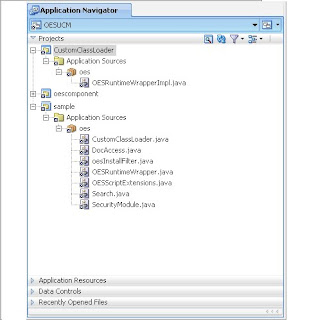
The
OESRuntimeWrapperImpl is the only class in the
oesucmclassloader.jar. This jar along with all of the other jars in the
BEA_HOME/ales32-ssm/java-ssm/lib directory are loaded by the custom classloader. How are this and the OES Java API then available to the oes-ucm component (
sample project) which is loaded by the system classloader? Its all handed by the
OESRuntimeWrapper
                customLoader = new CustomClassLoader(Thread.currentThread().getContextClassLoader(), u);


                    Thread.currentThread().setContextClassLoader(customLoader);

                    // load the entry class using custom classloader
                    Class myClass = Class.forName("oes.OESRuntimeWrapperImpl", true, customLoader);
                    Class[] paramType;
                    // get references to all the needed methods

                    paramType = new Class[] {   Object.class,
                                    String.class,
                                    String.class,
                                    Properties.class,
                                    Map.class };

                    isAccessAllowedMethod = myClass.getMethod("isAccessAllowed", paramType);

                   paramType = new Class [] { String.class, Object.class};

                    assertIdentityMethod = myClass.getMethod("assertIdentity",paramType);

                    paramType = new Class[] { CallbackHandler.class };
                    authenticateMethod = myClass.getMethod("authenticate", paramType);

                    paramType = new Class[] {   String.class,
                                    String.class,
                                    String.class,
                                    String.class };


                    // call the constructor
                    Constructor cons = myClass.getConstructor(paramType);
                    Object[] args = { alesAppConfigName, alesAppConfigId, resourceAuthority, actionAuthority };
                    OESRuntimeWrapperImplObj = cons.newInstance(args);
When the
OESRuntimeWrapper gets created, it instantiates
java.lang.reflect.Method objects for each of the methods in the OESRuntimeWrapper, and then uses those same
Method objects, but instead invokes them on the
OESRuntimeWrapperImpl object. Below is the example of the
OESRuntimeWrapper.isAccessAllowed
    public Boolean isAccessAllowed(Object authenticIdentity, String runtimeResource, String runtimeAction
        , Properties appContext, Map responseContext)
    {
            ClassLoader threadCLDR = Thread.currentThread().getContextClassLoader();

            Boolean result = null;

            try
            {

                    Thread.currentThread().setContextClassLoader(customLoader);
                    Object paramObj[] = { authenticIdentity, runtimeResource, runtimeAction, appContext, responseContext };

                    result = (Boolean) isAccessAllowedMethod.invoke(OESRuntimeWrapperImplObj, paramObj);

            }
            catch (InvocationTargetException refEx)
            {
                    Throwable srcEx = refEx.getCause();
                    if (Error.class.isInstance(srcEx)) throw (Error) srcEx;
                    if (RuntimeException.class.isInstance(srcEx)) throw (RuntimeException) srcEx;
                    throw new RuntimeException("InvocationTargetException"  + srcEx.getMessage(), refEx);

            }
            catch (Exception e)
            {
                    // LOGGER.error("Error getDescription ", e);
                    throw new RuntimeException(e.getMessage(), e);

            }
            finally
            {
                    Thread.currentThread().setContextClassLoader(threadCLDR);
            }

            if (null != result) return result.booleanValue();
            return false;

    }
The reason I'm going into all of this detail is so that if you need to modify any of the methods in the sample to expose different OES APIs (like for example, to do an authorization query), that you'll know how.
Remember, if you make any changes to the OESRuntimeWrapperImpl, you need to rebuild the oesucmclassloader.jar and deploy it to the BEA_HOME/ales32-ssm/java-ssm/lib directoryThe oes component for UCM
Let's start by looking at the UCM Component Wizard's view of the oes component

Initialization
On the Java tab, we can see the Filters and Class Aliases that this component uses. The
extraAfterConfigInit,extraBeforeCacheLoadInit,extraAfterServicesLoadInit, and initSubjects are all filters called at various phases of initialization of UCM. The
oesInstallFilter is called during the extraAfterServicesLoadInit and instatiates the OESRuntimeWrapper
      String configID = SecurityModule.tryGetPolicyDomainName();
      runtime = OESRuntimeWrapper.getInstance("Java API Example Application", configID, "exampleResource", "exampleAction");

                    Object obj = runtime.assertIdentity("USERID_TOKEN","weblogic");
                    System.out.println(obj);
This is as good as time as any to discuss the
UsernameIdentityAsserter and how its used within the oes component. Basically, this IdentityAsserter will generate an authentic identity as long as you pass it a valid username. The ultimate validity of the name falls to the configured authentication providers in the configured SM instance. In order to avoid replicating all of the usernames in UCM into the OES RDBMS authentication provider I used a trick
that enables any username to be valid. The trick is in the SQL query that the authentication provider used to validate the user. Change the Entry
SQL Query to Verify User to
Select ? from dual
. As you'll see in other examples inside of the component, we're retrieving the username from the
UserData class, so the right solution to identity assertion problem is to replace the example
UsernameIdentityAsserter with an IdentityAsserter that take the UserData object, thus avoiding the
Worlds Most Dangerous IdentityAsserter.
checkExtendedSecurityModelDocAccess
For people that don't have the
HowToComponentsBundle handy, this is the definition for the
checkExtendedSecurityModelDocAccess Filter
During a security check for a document, executed to augment the normal security levels to grant access to other documents.
Cached Objects: Integer desiredPrivilege, intradoc.data.ResultSet securityProfileResultSet, intradoc.data.DataBinder securityProfileData, Boolean securityResult, String securityResultMsg
So, this is the Filter that gets called when a user attempts to access a single document/folder. I'm not UCM API expert, but you can check out the cleverly named
DocAccess class to see how I'm able to pull the relevant pieces (user, action, resource) out of the Filter and call the OES API. In the example, I was only interested in documents, not folders, so I only make the isAccessAllowed call when I get passed an account or a security group (this seems to only occur on documents). I also based the URL of the URL of the document. You'll have to tweak the resource scheme to meet your needs. I think one important aspect of the solution is the passing of all of the meta-data on the document down to OES as attributes. There are 50+ attributes available by default and you can add custom attributes. This is the foundation for some very powerful label based or attribute based access control models.
CommonSearchConfigCompanion
By extending the
intradoc.search.DBSearchConfigCompanion class, the
oes.Search class can be used to add search filters based on response returned by OES policies. All of this "magic" happens in the
prepareQueryText method.
  @Override
    public int prepareQueryText(DataBinder dataBinder,
                                ExecutionContext executionContext) throws DataException {
        System.out.println("Before PrepareQueryText "+dataBinder.getLocalData());

        String queryText = (String)dataBinder.getActiveAllowMissing("QueryText");

        System.out.println("WC: QueryText="+queryText);

        //queryText = "xoesroles <contains> `stateFL`";
        String user = dataBinder.getLocal("dUser");

        if (user.equals("sysadmin")) {
            int rc =  super.prepareQueryText(dataBinder, executionContext);
            System.out.println("After PrepareQueryText "+dataBinder.getLocalData());
            return rc;
        }

        String action = "search";

        String resource = oesInstallFilter.getResourcePrefix();

        Object authenticIdentity = oesInstallFilter.getRuntime().assertIdentity("USERID_TOKEN",user);

        HashMap responses = new HashMap();

        boolean isAccessAllowed = oesInstallFilter.getRuntime().isAccessAllowed(authenticIdentity,resource,action,dataBinder.getLocalData(),responses);

        System.out.println(isAccessAllowed+" "+responses);

        if (!isAccessAllowed) {
            System.out.println("Not authorized");
            int rc =  super.prepareQueryText(dataBinder, executionContext);
            System.out.println("After PrepareQueryText "+dataBinder.getLocalData());
            return rc;
        }

        if (responses==null || responses.size()==0) {
            int rc =  super.prepareQueryText(dataBinder, executionContext);
            System.out.println("After PrepareQueryText "+dataBinder.getLocalData());
            return rc;
        } else {
            System.out.println("There are "+responses.size()+" responses");
        }

        if (queryText==null) {
            queryText="";
        }

        if (queryText.trim().length() > 0) {

            queryText+=" <AND> ";

        }

        queryText+=" "+oesInstallFilter.getRoleAttribute()+" <contains> `";

        Iterator<String> keys = responses.keySet().iterator();

        while( keys.hasNext()) {

            queryText+=keys.next()+",";


        }

        queryText = queryText.substring(0,queryText.length()-1);
        queryText+="`";

        System.out.println("QueryText="+queryText);


        Properties props = dataBinder.getLocalData();
        props.setProperty("QueryText",queryText);


        int rc =  super.prepareQueryText(dataBinder, executionContext);
        System.out.println("After PrepareQueryText "+dataBinder.getLocalData());
        return rc;
    }
The idea is that we're looking for responses, and that response are values defined for a special meta-data attribute
xoespolicies that I added to the repository. Any responses I recieve, I concatenate into the list of allowable values for that attribute and append it to the
QueryText data binder attribute. This new QueryText is used by the search engine (in this case OracleText) to make the correct queries. This approach avoids having to go row by row when searching and applying policies on each individual document. This example can be extended to work with other attributes of the documents.

The Resource Definition tab of the Component Wizard shows the resources for the custom IdocScript that I also created. I added a very simple function
$isAccessAllowed$. It takes a single argument (the action), and retrieves the name from the
UserData and the resource from the
APP_ID attribute in the
QUERY_STRING. The intricacies of creating custom IdocScript extensions could fill a whole new post, but I'll just focus on the relevant pieces here. From the
oes.OESScriptExtensions, here's the code:
                 case 4:    //isAccessAllowed

                        String appName = null;

                        String queryString = binder.getEnvironment().getProperty("QUERY_STRING");

                        List<String> parameters = Arrays.asList(queryString.split("&"));

                        for (String param: parameters) {

                            if (param.startsWith("APP_ID")) {

                                int posOfEq = param.indexOf("=");
                                appName = param.substring(posOfEq+1);

                            }

                        }


                        Object authenticIdentity = oesInstallFilter.getRuntime().assertIdentity("USERID_TOKEN",userData.getProperty("dName"));
                        System.out.println("OES USER="+authenticIdentity);
                        System.out.println("APPNAME="+appName);

                        String resource = oesInstallFilter.getResourcePrefix()+"/"+appName;
                        String action = sArg1;

                        bResult = oesInstallFilter.getRuntime().isAccessAllowed(authenticIdentity,resource,action, new Properties(), new HashMap());


                   args[nargs] = ScriptExtensionUtils.computeReturnObject(1,
              bResult, iResult, dResult, oResult);


      return true;
I think that there are lots of variations for the custom IdocScript that could call other OES API calls, or maybe once the call is made store information like the roles or privileges in other variables accessable from IdocScript. The sky is really the limit.
Summary
The samples that I've posted are just the foundation for many richer and deeper integrations between OES and UCM. I've done a lot of the heavy-lifting (classloader, configuration, basic integration) with the hope that other people will use it in their own projects. As always, I'm happy to answer questions, or take suggestions/request. Simply post them here.


 Posts


