In this post, we have a quick look at POST data preservation, a new feature introduced in the 11g R2 PS1 (or 11.1.2.1) version of Oracle Access Manager. We'll explain the problem that this feature solves and walk through a simple example explaining how to configure and use the feature. This post is part of a larger series on Oracle Access Manager 11g called Oracle Access Manager Academy. An index to the entire series with links to each of the separate posts is available.
Showing posts with label 11gR2. Show all posts
Showing posts with label 11gR2. Show all posts
Thursday, September 19, 2013


Wednesday, July 17, 2013
OIM 11g R2 Delegated Administration Model - Sample implementation (Part I)
Introduction
It is a very common requirement from customers to have a delegated administration model that is not tied to the organizations where the administrators are placed.
Historically, OIM only supports a one-to-one relationship between Users and Organizations. However, starting with OIM 11g R2 and the introduction of the Catalog, it is possible to publish resources to one or more Organizations.
This allows to limit the visibility of the resources to only the users who need them. However, OIM 11g R2 also provides the mechanisms to delegate the administration of Users, Organizations and Resources to specific users regardless of the Organization to which those users belong.
This article describes an approach that can be used to implement a Provisioning Solution powered by OIM 11g R2 that is not necessarily tied to an organization-centric model. The intent of this design is to show our readers how to leverage the advanced features of OIM 11g R2 to implement Delegated Administration Models that are resource-centric and not organization-centric.
Monday, July 15, 2013
OAM 11g Custom Authentication Plugins: Interacting with the Identity Store
The OAM 11g release includes a powerful authentication plugin framework, which can be used to extend the out-of-the-box authentication schemes, or to implement something completely custom. In this post, we explore how an authentication plugin can interact with the underlying LDAP Identity Store, via a simple example. This post is part of a larger series on Oracle Access Manager 11g called Oracle Access Manager Academy. An index to the entire series with links to each of the separate posts is available.
Wednesday, May 1, 2013
Synchronization of Roles in Catalog OIM 11g R2
Introduction
The Catalog is one of the most fundamental features of OIM
11g R2 request based provisioning. All requests for Resources/Accounts,
Entitlements and Roles are accomplished through the Catalog. Roles in OIM 11g
R2 can be defined within a given category. There are two main out-of-the-box
categories: OIM Roles and Default. The category affects the visibility of the
Role in the Catalog.
Sometimes, customers may require to change the category of
an existing Role in order to make it possible to request the Role through the
Catalog. If the Role was initially created within the OIM Roles category, it will not be visible in the Catalog because
there is no entry in the Catalog's table for the Role.
Procedure
A Role is available in the Catalog when its category is set
to 'Default'. This can be ensured by modifying the Role's attributes in the
Self-Service User Interface and selecting the 'Default' category from the List
of Values. The picture that follows shows where this is done and provides an
example:

In the example above, the role MASSACHUSETTS ORG MEMBER was
originally created with OIM Roles as the selected category. As a result, this
role can't be requested through the Catalog. The role's category will need to
be updated to 'Default'. The images below demonstrate the change:


Roles are published immediately after they are created;
however, if a Role is updated after creation like in the previous example, the
Catalog Synchronization Job has to be executed to reflect the changes in the
Catalog.
To invoke the Catalog Synchronization Job, an Administrator
needs to log in to the System Administration Console of OIM and open the
Scheduler Window; then navigate to the Catalog Synchronization Job as shown in
the following picture:

The Job must be executed with the following values in the
Job's attributes:
- Mode = full
- Process Roles set to Yes
- Updated Date must be blank
After the execution of the Catalog Synchronization Job,
searching for the Role in the Catalog should now display the role in the
results as shown below:

Summary
The Catalog is one of the main components of OIM 11g R2. The
Request-Based provisioning functionality revolves around it. Any entity in OIM
that can be requested by users needs to be visible in the Catalog. Roles that
have OIM Roles as their category, are not visible in the Catalog; only the ones
in the 'Default' category will be displayed in Catalog Search Results.
If a Role was initially created with OIM Roles as its
category and then is updated to the Default category will not be displayed in
the results of a Catalog search unless the Role is added to the CATALOG table
in OIM's Database. This is accomplished by running the Catalog Synchronization
Job through OIM's Scheduler. The job must be executed in Full mode, the
'Process Roles' option must be set to 'Yes' and the 'Updated Date' value must
be blank.
Monday, March 11, 2013
OAM 11g Custom Authentication Plugins: Collecting additional credentials
One of the things that OAM 11g does a very good job of is enabling LDAP-based user authentication, based on collecting username and password from a login form. I've seen a lot of questions from the field relating to how to handle more complex, multi-step or multi-factor authentication scenarios and while this post is certainly not intended to be exhaustive regarding this topic, I will go through a fairly common scenario on which most multi-factor authentication processes will depend: returning the user to the login page to collect additional credentials.
This post is part of a larger series on Oracle Access Manager 11g called Oracle Access Manager Academy. An index to the entire series with links to each of the separate posts is available.
This post is part of a larger series on Oracle Access Manager 11g called Oracle Access Manager Academy. An index to the entire series with links to each of the separate posts is available.
Wednesday, December 12, 2012
Password Policy in OAM 11g R2
One of the features in the new 11G R2 (or 11.1.2) release of Oracle Access Manager that's been most eagerly anticipated is the support for password policy within the OAM product; that is, the ability for OAM itself to support a subset of password management processes without the need to use Oracle Identity Manager and LDAP Sync. In this post, I'd like to explore this functionality in a little more detail and also explore exactly which use cases are supported.
This post is part of a larger series on Oracle Access Manager 11g called Oracle Access Manager Academy. An index to the entire series with links to each of the separate posts is available.
This post is part of a larger series on Oracle Access Manager 11g called Oracle Access Manager Academy. An index to the entire series with links to each of the separate posts is available.
Wednesday, September 19, 2012
OIM 11g R2 Catalog Customization Example
This post shows how OIM catalog can be customized by using OIM UI capabilities such as managed beans and EL expressions. The post first describes the use case and the solution to address the use case; then it describes the solution details as well as provides links to the artifacts.
In order to have a better understanding of the customization described in this post, one should read the posts about the catalog and about the OIM UI customization.
Tuesday, September 18, 2012
OIM 11g R2 UI customization
OIM 11g R2 new user interface is probably one of the most expected new features of this release. The main reason for that is the great customization capability provided by the underlying technologies: Oracle ADF and Oracle WebCenter Composer.
OIM user interface customizations are easier now, and they 'survive' patch applications (there is no need to reapply them after patching). Adding new artifacts, new skins, and 'plugging' code directly into the user interface components became an easier task.
This post introduces some of the customization related concepts provided by the new OIM user interface.
OIM user interface customizations are easier now, and they 'survive' patch applications (there is no need to reapply them after patching). Adding new artifacts, new skins, and 'plugging' code directly into the user interface components became an easier task.
This post introduces some of the customization related concepts provided by the new OIM user interface.
Monday, September 17, 2012
Creating your first OAM 11g R2 domain
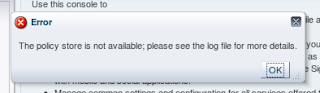
So you downloaded the Identity Management R2 release bits, spun up your little test environment and created a WebLogic domain. But the first time you sign in you get the error message "The policy store is not available; please see the log file for more details." in a pop up.
like this:
 The logs aren't particularly helpful:
What did you do wrong?!
 The logs aren't particularly helpful:
####<Sep 13, 2012 6:19:42 PM EDT> <Error> <oracle.oam.engine.policy> <iamr2.oracleateam.com> <AdminServer> <[ACTIVE] ExecuteThread: '7' for queue: 'weblogic.kernel.Default (self-tuning)'> <weblogic> <> <e3b75e49ebb52881:-4d179e40:139c1939ab6:-8000-00000000000005a3> <1347574782661> <BEA-000000> <The policy store is not available; please see the log file for more details.
oracle.security.am.common.policy.admin.store.PolicyStoreException: OAMSSA-06252: The policy store is not available; please see the log file for more details.
        at oracle.security.am.common.policy.util.OESUtils.checkAndThrowException(OESUtils.java:630)
        at oracle.security.am.common.policy.util.ResourceTypeHelper.setupHostIdentifierResourceType(ResourceTypeHelper.java:438)
        at oracle.security.am.common.policy.admin.provider.oes.DefaultApplicationDomain.createHostIdentifierPolicy(DefaultApplicationDomain.java:118)
        at oracle.security.am.common.policy.admin.provider.oes.DefaultApplicationDomain.<init>(DefaultApplicationDomain.java:93)
        at oracle.security.am.common.policy.admin.provider.oes.DefaultApplicationDomain.getGlobalDefault(DefaultApplicationDomain.java:461)
        at oracle.security.am.common.policy.admin.provider.oes.ApplicationManager.setupGlobalDefaultAppDomain(ApplicationManager.java:112)
        at oracle.security.am.common.policy.admin.provider.oes.ApplicationManager.<init>(ApplicationManager.java:61)
        at oracle.security.am.common.policy.admin.provider.oes.ApplicationManager.getApplicationManager(ApplicationManager.java:125)
        at oracle.security.am.common.policy.util.OESSetupHelper.loadOAMApplicationManager(OESSetupHelper.java:340)
        at oracle.security.am.common.policy.util.OESSetupHelper.loadOAMApplicationPolicies(OESSetupHelper.java:166)
        at oracle.security.am.common.policy.util.OESSetupHelper.loadApplicationPolicies(OESSetupHelper.java:154)
        at oracle.security.am.common.policy.admin.provider.oes.proxy.OESAdminProxy.init(OESAdminProxy.java:84)
        at oracle.security.am.common.policy.admin.provider.oes.OESPolicyAdminProvider.init(OESPolicyAdminProvider.java:130)
        at oracle.security.am.common.policy.admin.PolicyAdminFactory.getProvider(PolicyAdminFactory.java:241)
        at oracle.security.am.common.policy.admin.PolicyAdminFactory.init(PolicyAdminFactory.java:166)
        at oracle.security.am.common.policy.admin.PolicyAdminFactory.getPolicyAdmin(PolicyAdminFactory.java:334)
...
And in the -diagnostic log:
[2012-09-13T18:19:42.364-04:00] [AdminServer] [NOTIFICATION] [] [oracle.adfdt.model.mds.MDSApplicationService] [tid: [ACTIVE].ExecuteThread: '7' for queue: 'weblogic.kernel.Default (self-tuning)'] [userId: weblogic] [ecid: e3b75e49ebb52881:-4d179e40:139c1939ab6:-8000-00000000000005a3,0] [APP: oam_admin#11.1.2.0.0] [[
oracle.mds.exception.ReadOnlyStoreException: MDS-01273: The operation on the resource /oracle/oam/ui/adfm/DataBindings.cpx failed because source metadata store mapped to the namespace / DEFAULT is read only.
        at oracle.mds.core.MDSSession.checkAndSetWriteStoreInUse(MDSSession.java:2495)
        at oracle.mds.core.MDSSession.checkAndSetWriteStoreInUse(MDSSession.java:2548)
        at oracle.mds.core.MDSSession.getMutableMO(MDSSession.java:3493)
        at oracle.mds.core.MDSSession.getMutableMO(MDSSession.java:1660)
        at oracle.mds.core.MDSSession.getMutableMO(MDSSession.java:1546)
        at oracle.adfdt.model.mds.MDSApplicationService.findApplication(MDSApplicationService.java:57)
        at oracle.adfdt.model.mds.MDSModelDesignTimeContext.initServices(MDSModelDesignTimeContext.java:232)
        at oracle.adfdt.model.mds.MDSModelDesignTimeContext.<init>(MDSModelDesignTimeContext.java:82)
        at oracle.adfdt.mds.MDSDesignTimeContext.<init>(MDSDesignTimeContext.java:66)
        at oracle.adfinternal.view.page.editor.Page.getDesignTimeBindingContainer(Page.java:596)
        at oracle.adfinternal.view.page.editor.contextual.event.ContextualModelManager.getBindingContainerForView(ContextualModelManager.java:209)
        at oracle.adfinternal.view.page.editor.contextual.event.ContextualModelManager.getCurrentContextualResolver(ContextualModelManager.java:131)
        at oracle.adfinternal.view.page.editor.bean.ContextualWiringBean.getResolver(ContextualWiringBean.java:625)
        at oracle.adfinternal.view.page.editor.bean.ContextualWiringBean.clearSelection(ContextualWiringBean.java:594)
        at oracle.adfinternal.view.page.editor.bean.ContextualWiringBean.handlePageNavigation(ContextualWiringBean.java:130)
        at oracle.adfinternal.view.page.editor.contextual.event.EventHandler.processNavigation(EventHandler.java:92)
...
What did you do wrong?!
Wednesday, September 12, 2012
Oracle IAM 11g R2 docs are now available
The docs for the OAM 11g R2 release are now up and available either online at http://docs.oracle.com/cd/E27559_01/index.htm or as a download on via eDelivery.
To get your very own copy from eDelivery:
 Click that and scroll down to the bottom and you'll see the doc set:
 One of the great things about the new doc set is the inclusion of ePub files. This means that if you have an iPad you can load up the doc library onto that and read the docs on the couch. On on a plane.
Or on the throne!
(just don't lend me your iPad afterwards please!) You can pull the ePubs out of the zip directly or you can get them by opening the library's index, picking one of the docs inside and then looking in the upper right hand corner:
 ENJOY!
To get your very own copy from eDelivery:
- go to http://edelivery.oracle.com/
- Sign in
- Pick "Oracle Fusion Middleware" as the Product Pack
- Pick Linux x86-64 as the Platform (or pick Windows if that's your thing!)
- hit Go
 Click that and scroll down to the bottom and you'll see the doc set:
 One of the great things about the new doc set is the inclusion of ePub files. This means that if you have an iPad you can load up the doc library onto that and read the docs on the couch. On on a plane.
Or on the throne!
(just don't lend me your iPad afterwards please!) You can pull the ePubs out of the zip directly or you can get them by opening the library's index, picking one of the docs inside and then looking in the upper right hand corner:
 ENJOY!
Tuesday, September 11, 2012
OIM 11g R2 Catalog
The Catalog is one of most commented new features in OIM 11g. It introduces a new way to search items and to create access requests and it also introduces the ‘shopping cart’ experience.
The request process was drastically simplified with the Catalog. Whereas in OIM 11g R1 users have to go through a multiple step wizard to create a request, in OIM 11g R2 the work is done in two pages: the catalog search and the shopping cart summary.
The request process was drastically simplified with the Catalog. Whereas in OIM 11g R1 users have to go through a multiple step wizard to create a request, in OIM 11g R2 the work is done in two pages: the catalog search and the shopping cart summary.
Wednesday, August 22, 2012
OIM 11g R2 & X.509 authentication
OIM 11g R2 is out! This release brings a lot of new features and also improvements to existing features.
OIM authentication providers are among the ones that were improved. The improvements make easier to integrate OIM with SSO solutions (for both SSO products and custom SSO solutions).
The integration with OpenSSO is documented here. The integration with OAM is still a powerful solution for SSO and password management and it is documented here.
The improvements also bring the support to X.509 based user authentication. In previous 11g release, one would need to leverage a SSO solution like OAM to do such authentication. In R2, X.509 authentication can be directly configured in WebLogic. This post describes how to configure this authentication.
OIM authentication providers are among the ones that were improved. The improvements make easier to integrate OIM with SSO solutions (for both SSO products and custom SSO solutions).
The integration with OpenSSO is documented here. The integration with OAM is still a powerful solution for SSO and password management and it is documented here.
The improvements also bring the support to X.509 based user authentication. In previous 11g release, one would need to leverage a SSO solution like OAM to do such authentication. In R2, X.509 authentication can be directly configured in WebLogic. This post describes how to configure this authentication.
Friday, July 13, 2012
Oracle Identity Management 11g R2 Launch Webcast
The 11g R2 release of the Oracle Identity Management stack is upon us. The 11g R2 release greatly expands the capabilities of the stack, especially in the area of cloud and mobile environments. On Thursday, July 19 at 10am PST / 1pm EST there will be an interactive Oracle Identity Management 11g R2 launch webcast hosted by Oracle product development executives Hasan Rizvi and Amit Jasuja.
Register now for the interactive launch Webcast, and don’t miss this chance to have your questions answered by Oracle product experts.
Register now for the interactive launch Webcast, and don’t miss this chance to have your questions answered by Oracle product experts.
Subscribe to:
Posts (Atom)

 Posts
Posts


