All,
December 31,2010 is my last day at Oracle. This blog has been a really amazing experience for me, and truly one of the most interesting and rewarding parts of my job at Oracle during the past three years. It represents a significant amount of work to build consistent quality technical content, and actively work with customers on solving their most challenging problems. Thank you for everyone who has made this blog such a success.
But wait....the blog will continue on. Brian and Chris are redoubling their efforts to continue what we started on into the coming year.
I've started a new blog at http://xmlgateway.blogspot.com. I hope that you'll check it out.
Thanks, Good Luck and Happy New Year,
Josh
Thursday, December 30, 2010


Wednesday, December 22, 2010
Creating OES SM instances on 64 bit systems
I've already opened a bug on this against OES 10gR3 CP5, but in case anyone else runs into it before it gets fixed I wanted to blog it too. (NOTE: CP5 is when official support was introduced for running OES on a 64 bit system with a 64 bit JVM)
When you run the ConfigTool on a 64 bit Linux host you may see an error like this:
As you can see the first error is that the instancewizard failed. THAT problem is probably occurring on your system because when you applied the CP you chose a 64 bit JVM but the instancewizard.sh script has a hard coded JAVA_HOME pointing to a 32 bit JVM. When the instance wizard runs (under the covers) the JVM is trying to load a 64 bit JNI library that the CP installed.
The fix?
Edit instancewizard.sh and change JAVA_HOME to point to the right JVM. Like so:
Incidentally I found the root cause by running instancewizard.sh with the -log= and -log_priority= flags. You can run ./instancewazard.sh -h to get the command line help.
When you run the ConfigTool on a 64 bit Linux host you may see an error like this:
Check completed succesfully.
Starting to make changes ...
Creating SSM instance...
2010-12-22 14:36:46,952 [Main Thread] ERROR com.bea.security.SsmConfigTool.AlesConfig - Instance wizard returned error: 255
Done creating SSM instance.
Loading ALES Policy using policyloader. Please wait ...
2010-12-22 14:36:46,956 [/software/oracle/middleware/ales32-ssm/wls-ssm/instance/irmssm/bin/policyloader.sh] ERROR com.bea.security.SsmConfigTool.Daemon - Error During execution of requestd command
java.io.IOException: java.io.IOException: /software/oracle/middleware/ales32-ssm/wls-ssm/instance/irmssm/bin/policyloader.sh: not found
As you can see the first error is that the instancewizard failed. THAT problem is probably occurring on your system because when you applied the CP you chose a 64 bit JVM but the instancewizard.sh script has a hard coded JAVA_HOME pointing to a 32 bit JVM. When the instance wizard runs (under the covers) the JVM is trying to load a 64 bit JNI library that the CP installed.
The fix?
Edit instancewizard.sh and change JAVA_HOME to point to the right JVM. Like so:
JAVA_HOME="/usr/java/latest"
Incidentally I found the root cause by running instancewizard.sh with the -log= and -log_priority= flags. You can run ./instancewazard.sh -h to get the command line help.
Thursday, December 16, 2010
A Quick Note about Oracle Access Manager 11g and WebLogic
A lot of people have been asking me lately about how Oracle Access Manager (OAM) 11g integrates with WebLogic. The answer is very straight forward. OAM 11g integrates with WebLogic using the very same components used to integrate OAM 10.1.4.3. Under most circumstances, that means using the OAM Identity Asserter (the same one used with OAM 10.1.4.3) which asserts the OAM_REMOTE_USER header as the user principal in the JAAS subject. This is used in conjunction with an authentication provider (usually an LDAP provider) which looks up the user in the identity store and builds the rest of the subject based on the group memberships of the user.
You can read more details about integrating OAM and WLS here: http://fusionsecurity.blogspot.com/2010/01/integrating-oracle-access-manager-oam.html
Again, it is important to fully understand how to use the OAM Identity Asserter in a secure solution. I talked about the security of the Identity Asserter a while ago in this post: http://fusionsecurity.blogspot.com/2010/04/security-clarification-oam-identity.html
Thursday, December 9, 2010
Fusion Middleware and Certificate Expirations
I wanted to take a moment to blog about one of the most common, yet most easily preventable causes of middleware system outages. The cause is the expiration of digital certificates used in middleware infrastructure.
Certificates are used throughout many Oracle Fusion Middleware products for purposes of authentication and encryption. This includes:
- Server certificates for SSL in OHS and WLS
- Certificates used for intra and inter product transport communication in WLS, OAM, OAAM, OID, OVD, OIM, OSB etc…
- Certificates used for signing and authentication in OWSM, WLS, OSB, OIF, and Oracle STS.
Despite the fact that digital certificates are such an integral part of middleware infrastructure, you might be surprised how many customers are not well organized about their PKI and in particular about when the different certificates in their infrastructure expire.
It is such a little, simple thing, but all it takes is one expired certificate in one middleware component to bring an application down.
I encourage you today to “not be that customer”, stay organized and keep track of when your certificates expire so that you can issue updated certificates before that happens.
A Note about OAM and the certificates used in Simple Mode
OAM has three different security “modes” for the communication done between the webgate (web server plug-in) and the OAM server component which processes authentication and authorization. These 3 modes are:
- Open: Unencrypted communication
- Simple: Communication over SSL using certificates generated by OAM using an Oracle CA certificate that comes with OAM. Simple mode is popular with customers who want to secure webgate to OAM server communication but don’t feel the need to use their own PKI infrastructure.
- Cert: Communication over SSL using certificates issued by a third party CA.
The mode most relevant to this discussion on expiring certificates is simple mode where the certificates are generated automatically and may be out of sight and mind.
In OAM 10g the certificates are only issued with a validity period of one year by default. If you want to extend the validity period for the certificates generated in simple mode (and I recommend that you do), then follow the instructions in appendix F, section 2.9 of the OAM Identity Admin Guide: http://download.oracle.com/docs/cd/E12530_01/oam.1014/b32419/trblsht.htm#BABDDBJF
In OAM 11g, the validity period of the certificates used in simple mode is 10 years, making early expiration of the certificates less of a problem.
Tuesday, November 30, 2010
Security in Service-Enabled ADF Business Components
This article is a developer-focused tutorial where operations carried by ADF BC (Application Development Framework Business Components) are exposed as web services, so they can be easily integrated into SOA applications. I will describe the end to end development process, starting with service-enabling ADF BC Application Modules, showing how to secure them and how to package the application using JDeveloper.
Service-Enabling ADF Business Components
So let’s take a look at how service-enabling business logic encapsulated in ADF BC looks like. Roughly put, ADF BC comprise 3 main components: Entity Objects (EOs), View Objects (VOs) and Application Modules (AMs). EOs are the object representations of a business domain, VOs are the queries built on top of those objects, giving shape to data, and AMs are the way in which data and business logic is exposed to the outside world. I strongly recommend reading JDeveloper’s embedded documentation on ADF for the full picture. ADF BC is a very powerful framework and aims for quick and consistent development of java-based enterprise-wide applications. It is worth mentioning that is the natural path for the thousands of Oracle Forms customers to enter an SOA world.
AMs are the entry point for encapsulated business logic. They are the components for which web services interfaces are created. Service-enabled AMs are stateless enterprise session beans that are added a SOAP binding. One can expose any AM public custom method or any VO method as a service operation. And each of these operations can be added distinct security policies.
As an example, I am considering an SOA Loan Application. In order to make a decision whether or not the Loan should be granted to the requester, the application needs to query an AM for the requester payment history. This is precisely the AM that I will make available as a SOAP web service.
Here is the sequence:

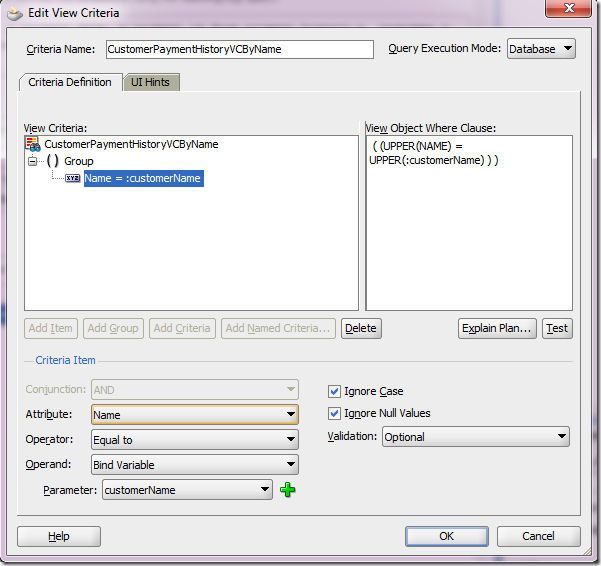
Couple of things to notice:
a) customerName bind variable, used in the specified view criteria.

b) CustomerPaymentHistoryVCByName view criteria, allowing any name to be added to the query at runtime.
Attention to the Target Namespace field value. That’s vital information when it comes to securing the web service. More on this later.
Also see that there’s an option of generating asynchronous web services methods. I will cover it in a future article.
Click Next button.

b) On the left side, click Service View Instances, pick the VO instance, select it and send it to right side using the blue arrow.

c) Select View Criteria Find Operations tab and click on the green plus sign.

d) Pick the View Criteria that was previously created in step 1 and give the operation a more meaningful name. The binding variable defined for the view criteria is automatically exposed as an input parameter.
Click Ok.
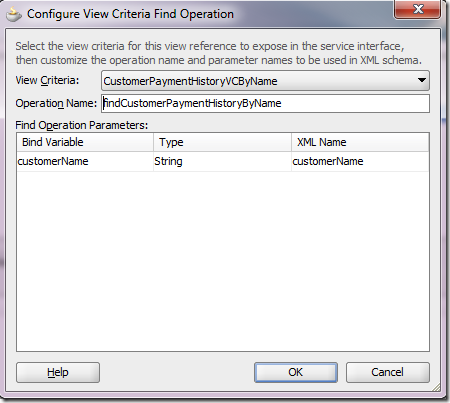
e) The View Criteria gets exposed as a method that takes the binding variable as an input parameter. Click Next.

f) In the summary screen, do notice the Service Interface name (highlighted). It will be used when securing the service.

g) Upon clicking the Finish button, here’s what we get:

Four classes are defined for the Application Module. For the purposes of security we’re interested in the Remote Server Class, which is the web service implementation.
a) To attach the policies, place the cursor over the web service implementation class name (CustomerHistoryAMServiceImpl.java). In the property inspector, under Web Services Extension, under OWSM Policies, click the … button next to Security

b) Pick the following policies from the list:
oracle/wss_username_token_service_policy and oracle/binding_permission_authorization_policy.
Notice they are added as a SecurityPolicy class annotation.

These policies can also be added/removed/changed in Enterprise Manager.
At this point, all operations of our web service will require a valid user, but there’s still no authorization rule governing which users can access the findCustomerPaymentHistoryByName method. Let’s take care of it now.
Here’s the jazn-data.xml snippet.
Attention to lines 15-31. They define the authorization rule for our method.
Line 19 contains the role name granted the permission to invoke the method.
Line 26 defines the permission class that understands the name and actions specified in lines 27 and 28. oracle.wsm.security.WSFunctionPermission is mandatory for authorization rules based on OWSM authorization policies.
Line 27 defines the web service and the operation name being protected. Here is where we need the web service namespace and name, as said in subsection 2f above. You can also find this information in the service wsdl.
The format is <webservice-target-namespace>/<webservice-name>#<method-name>
And yes, you can use * in place of <method-name> and protect all methods in one shot.
Line 28 defines the action. The only available and allowed for webservices at the time of this writing is invoke.
Deploying the Application
To deploy an application like this, it is necessary to create a Business Components Service Interface Deployment Profile and then deploy it to an EAR file.
a) In JDev’s Application Navigator, right-click your project and select New…
Under General Categories, choose Deployment Profile and pick Business Components Service Interface in the right side.

Upon clicking OK button, give it a meaningful name and click OK

The deployment profile gets created.
b) Now, to actually package the application into an EAR file, click the little screen sign next to the application name in JDev’s application navigator, as shown below.
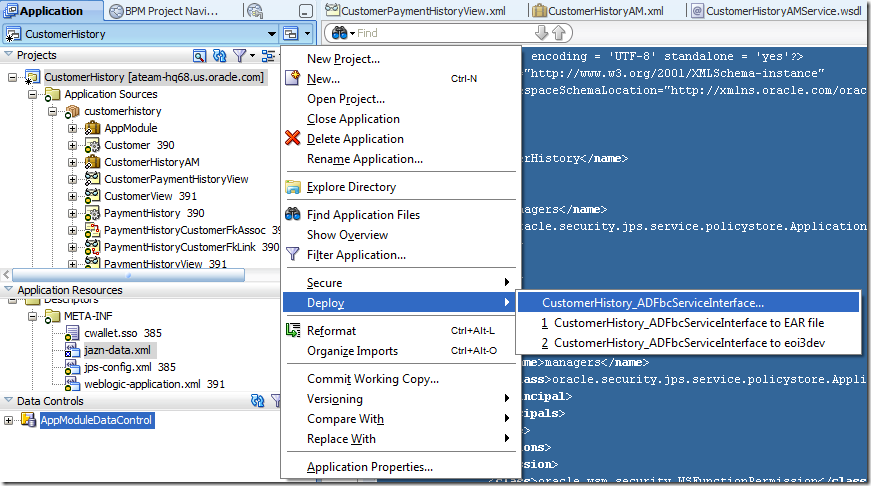
Then pick the deployment profile you have just created and deploy it to an EAR file.
That’s it. Your secured service-enabled ADF BC is ready to de deployed.
Hope this is useful for you. Good luck!
Service-Enabling ADF Business Components
So let’s take a look at how service-enabling business logic encapsulated in ADF BC looks like. Roughly put, ADF BC comprise 3 main components: Entity Objects (EOs), View Objects (VOs) and Application Modules (AMs). EOs are the object representations of a business domain, VOs are the queries built on top of those objects, giving shape to data, and AMs are the way in which data and business logic is exposed to the outside world. I strongly recommend reading JDeveloper’s embedded documentation on ADF for the full picture. ADF BC is a very powerful framework and aims for quick and consistent development of java-based enterprise-wide applications. It is worth mentioning that is the natural path for the thousands of Oracle Forms customers to enter an SOA world.
AMs are the entry point for encapsulated business logic. They are the components for which web services interfaces are created. Service-enabled AMs are stateless enterprise session beans that are added a SOAP binding. One can expose any AM public custom method or any VO method as a service operation. And each of these operations can be added distinct security policies.
As an example, I am considering an SOA Loan Application. In order to make a decision whether or not the Loan should be granted to the requester, the application needs to query an AM for the requester payment history. This is precisely the AM that I will make available as a SOAP web service.
Here is the sequence:
1 – VO definition
This is a read-only VO, meaning it is not based on an EO, so you cannot update data through it. It queries a database for the customer payment history.
Couple of things to notice:
a) customerName bind variable, used in the specified view criteria.

b) CustomerPaymentHistoryVCByName view criteria, allowing any name to be added to the query at runtime.

2 – Service Enabling the AM and exposing View Criteria as a web service method
a) Double-click the AM (CustomerHistoryAM) in the Application Navigator on the left side, click Service Interface (on the right side) and then click the green plus sign on the top right.Attention to the Target Namespace field value. That’s vital information when it comes to securing the web service. More on this later.
Also see that there’s an option of generating asynchronous web services methods. I will cover it in a future article.
Click Next button.

b) On the left side, click Service View Instances, pick the VO instance, select it and send it to right side using the blue arrow.

c) Select View Criteria Find Operations tab and click on the green plus sign.

d) Pick the View Criteria that was previously created in step 1 and give the operation a more meaningful name. The binding variable defined for the view criteria is automatically exposed as an input parameter.
Click Ok.

e) The View Criteria gets exposed as a method that takes the binding variable as an input parameter. Click Next.

f) In the summary screen, do notice the Service Interface name (highlighted). It will be used when securing the service.

g) Upon clicking the Finish button, here’s what we get:

Four classes are defined for the Application Module. For the purposes of security we’re interested in the Remote Server Class, which is the web service implementation.
Securing the web service
Securing the web service here means attaching an OWSM authentication and an authorization policy to it. Both are attached at the service level, meaning all operations are now protected. However, different operations can be granted to different subjects.1 - Adding OWSM Policies to the Web Service
In this example, the authentication policy is a username-based one, which means this web service expects a username token in the incoming SOAP message header. The authorization policy delegates the authorization decision to the OPSS layer, which expects an authorization policy defined in the OPSS policy store.a) To attach the policies, place the cursor over the web service implementation class name (CustomerHistoryAMServiceImpl.java). In the property inspector, under Web Services Extension, under OWSM Policies, click the … button next to Security

b) Pick the following policies from the list:
oracle/wss_username_token_service_policy and oracle/binding_permission_authorization_policy.
Notice they are added as a SecurityPolicy class annotation.

These policies can also be added/removed/changed in Enterprise Manager.
At this point, all operations of our web service will require a valid user, but there’s still no authorization rule governing which users can access the findCustomerPaymentHistoryByName method. Let’s take care of it now.
2 - Adding the OPSS Authorization Rule to the Web Service Operation
As you might think, these authorization rules are expressed in the OPSS policy store. At design time, this translates to creating the rule in jazn-data.xml. Let’s assume that we only want to allow members of the manager role to invoke the findCustomerPaymentHistoryByName method.Here’s the jazn-data.xml snippet.
Attention to lines 15-31. They define the authorization rule for our method.
1: <?xml version = '1.0' encoding = 'UTF-8' standalone = 'yes'?>
2: <jazn-data xmlns:xsi="http://www.w3.org/2001/XMLSchema-instance"
3: xsi:noNamespaceSchemaLocation="http://xmlns.oracle.com/oracleas/schema/jazn-data-11_0.xsd">
4: <policy-store>
5: <applications>
6: <application>
7: <name>CustomerHistory</name>
8: <app-roles>
9: <app-role>
10: <name>managers</name>
11: <class>oracle.security.jps.service.policystore.ApplicationRole</class>
12: </app-role>
13: </app-roles>
14: <jazn-policy>
15: <grant>
16: <grantee>
17: <principals>
18: <principal>
19: <name>managers</name>
20: <class>oracle.security.jps.service.policystore.ApplicationRole</class>
21: </principal>
22: </principals>
23: </grantee>
24: <permissions>
25: <permission>
26: <class>oracle.wsm.security.WSFunctionPermission</class>
27: <name>/customerhistory/common/CustomerHistoryAMService#findCustomerPaymentHistoryByName</name>
28: <actions>invoke</actions>
29: </permission>
30: </permissions>
31: </grant>
32: </jazn-policy>
33: </application>
34: </applications>
35: </policy-store>
36: </jazn-data>
Line 26 defines the permission class that understands the name and actions specified in lines 27 and 28. oracle.wsm.security.WSFunctionPermission is mandatory for authorization rules based on OWSM authorization policies.
Line 27 defines the web service and the operation name being protected. Here is where we need the web service namespace and name, as said in subsection 2f above. You can also find this information in the service wsdl.
The format is <webservice-target-namespace>/<webservice-name>#<method-name>
And yes, you can use * in place of <method-name> and protect all methods in one shot.
Line 28 defines the action. The only available and allowed for webservices at the time of this writing is invoke.
Deploying the Application
To deploy an application like this, it is necessary to create a Business Components Service Interface Deployment Profile and then deploy it to an EAR file.
a) In JDev’s Application Navigator, right-click your project and select New…
Under General Categories, choose Deployment Profile and pick Business Components Service Interface in the right side.

Upon clicking OK button, give it a meaningful name and click OK

The deployment profile gets created.
b) Now, to actually package the application into an EAR file, click the little screen sign next to the application name in JDev’s application navigator, as shown below.

Then pick the deployment profile you have just created and deploy it to an EAR file.
That’s it. Your secured service-enabled ADF BC is ready to de deployed.
Hope this is useful for you. Good luck!
Subscribe to:
Posts (Atom)

 Posts
Posts


