Monday, September 20, 2010

Users and Groups migration: a handy JDeveloper feature

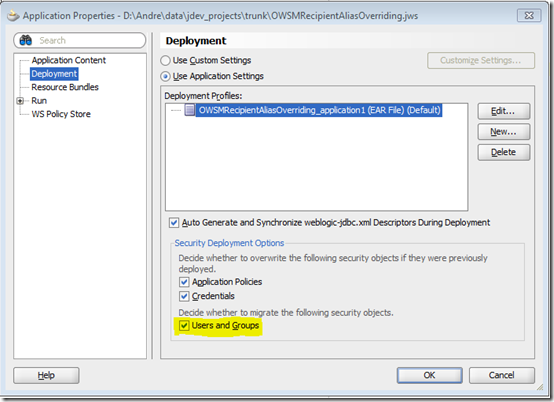
When you run an ADF web application directly from JDeveloper, it starts its embedded WLS and deploys the application. In such context, JDeveloper has a very convenient feature when dealing with users and groups defined in the application's jazn-data.xml file. They get deployed along with the application into WLS embedded LDAP server, provided the Users and Groups check box is selected in the Application Properties Deployment window, as shown right below:


applicationMenu

UsersAndGroupsMigration 

Then by simply asking JDeveloper to run your application you get everything you need.

As said, that's a JDeveloper convenience that only works when deploying the application through JDeveloper. Do notice this apply whether you click & run a page or taskflow or explicitly ask JDeveloper to deploy your application into WLS, as shown:

DeployingViaJDev

But if you’re not using JDeveloper, you’re on your own. You should not expect it to happen when generating an ear file and deploying via any other means, although jazn-data.xml is packed within the ear file. `I've gotten this question from a few of customers. And some believe that's a bug. It's not.

You need to manually populate WLS embedded LDAP. There are two ways to accomplish it:

1) Using wlst.sh:

> connect ('weblogic','<weblogic-password>','t3://<server>:<port>')
> cd('<folder-where-your-ldif-file-is-kept>')> 
> cmo.importData('DefaultAtn', '<your-ldif-file>', None) 


2) Using WLS Console:

Notice the path at the top to understand how to get to this screen.

Enter the ldif file absolute path name in “Import File” on Server field. Notice the file has to be accessible on the server file system.

DefaultAuthenticatoSetupWLS

Here's a small sample of the ldif file you can use and extend:

dn: dc=@domain@
dc: @domain@
objectclass: top
objectclass: domain
      
dn: ou=@realm@,dc=@domain@
ou: @realm@
objectclass: top
objectclass: organizationalUnit
      
dn: ou=groups,ou=@realm@,dc=@domain@
ou: groups
objectclass: organizationalUnit
objectclass: top
      
dn: cn=group1, ou=groups, ou=@realm@, dc=@domain@
memberURL: ldap:///ou=people,ou=@realm@,dc=@domain@??sub?(&(objectClass=person)(wlsMemberOf=cn=group1,ou=groups,ou=@realm@,dc=@domain@))
objectclass: top
objectclass: groupOfUniqueNames
objectclass: groupOfURLs
cn: group1
uniquemember: cn=user1,ou=people,ou=@realm@,dc=@domain@ 
 
dn: ou=people,ou=@realm@,dc=@domain@
ou: people
objectclass: organizationalUnit
objectclass: top
      
dn: uid=user1,ou=people,ou=@realm@,dc=@domain@
objectclass: top
objectclass: person
objectclass: organizationalPerson
objectclass: inetOrgPerson
objectclass: wlsUser
cn: user1
sn: user1
uid: user1
userpassword: welcome1
wlsMemberOf: cn=group1,ou=groups,ou=@realm@,dc=@domain@

Thursday, September 16, 2010

Externalizing Authorization in PL/SQL? Inconceivable!

Ok, so it’s not a land war in Asia. But for a recent engagement, I received requirements for replacing a home-grown authorization system and doing a proof-of-concept on APEX. Eek, unsupported platform. Alright, let’s roll up our sleeves.

If there’s one thing you can find at Oracle, it’s PL/SQL expertise. I was referred to one of our rock stars, Tyler Muth, for guidance in approaching this requirement. Tyler directed me to the flex-ws-api which allows you to make PL/SQL call to a SOAP interface. OES provides a SOAP interface for authorization, so could this be love at first sight?

Flex-ws-api is pretty straightforward. You put the SOAP envelope right into the body of a CLOB data type. OES Web Service Security Module, hereto forth referred to as the Policy Decision Point or PDP, authenticates using a username-only Identity Asserter. See the OES documentation on setting up Sharepoint for instructions on this.

set serveroutput on


declare

l_BLOB BLOB;

l_CLOB CLOB;

l_envelope CLOB;

l_response_msg varchar2(32767);

l_response_xml XMLType;

procedure show_xml (p_xml in xmltype) is l_str long; begin l_str := p_xml.extract('/*').getstringval(); loop exit when l_str is null; dbms_output.put_line (substr (l_str, 1, instr (l_str, chr(10)) - 1)); l_str := substr (l_str, instr (l_str, chr(10)) + 1); end loop; end show_xml;

BEGIN

l_envelope := q'! <?xml version='1.0' encoding='UTF-8'?>!';

l_envelope := l_envelope || ' <soap:Envelope xmlns:soap="http://schemas.xmlsoap.org/soap/envelope/" xmlns:xsi="http://www.w3.org/2001/XMLSchema-instance" xmlns:xsd="http://www.w3.org/2001/XMLSchema">

<soap:Body>

<isAccessAllowed xmlns="http://security.bea.com/ssmws/ssm-soap-types-1.0.xsd">

<IdentityAssertion>

<sampletoken>matt.carter </sampletoken>

</IdentityAssertion>

<RuntimeResource>

<ResourceString>app/claim </ResourceString>

<AuthorityName>ARME_RESOURCE_AUTHORITY </AuthorityName>

</RuntimeResource>

<RuntimeAction>

<ActionString>view </ActionString>

<AuthorityName>ARME_ACTION_AUTHORITY </AuthorityName>

</RuntimeAction>

<RequestedCredentialType>sampletoken </RequestedCredentialType>

<AppContext>

<Record>

<q1:RecordName xmlns="" xmlns:q1="http://security.bea.com/ssmws/ssm-soap-types-1.0.xsd">attrname </q1:RecordName>

<StringValue>attrvalue </StringValue>

</Record>

</AppContext>

<AtzDirection>ALES_ONCE </AtzDirection>

</isAccessAllowed>

</soap:Body>

</soap:Envelope>';

l_response_xml := flex_ws_api.make_request(

p_url => 'http://oes-pdp:9000/Authorization',

p_action => 'isAccessAllowed',

p_envelope => l_envelope);

show_xml(l_response_xml);

END;

/

The OES response would look something like:


<soapenv:Envelope xmlns:soapenv="http://schemas.xmlsoap.org/soap/envelope/" xmlns:xsd="http://www.w3.org/2001/XMLSchema" xmlns:xsi="http://www.w3.org/2001/XMLSchema-instance">

<soapenv:Body>

<isAccessAllowedResponse xmlns="http://security.bea.com/ssmws/ssm-soap-types-1.0.xsd">

<AccessAllowed>true </AccessAllowed>

<AtzDecisionData>

<AtzTtlAdvice>300 </AtzTtlAdvice>

</AtzDecisionData>

<ContextRequests xsi:nil="true"/>

</isAccessAllowedResponse>

</soapenv:Body>

</soapenv:Envelope>

From a database permissions side, the 10g database on the client site connected right to the PDP. In our 11g testing we found you had to set up some Access Control Lists on the database to have the database make a network connection. See this article for instructions on setting up this ACL.

The client was happy to PL/SQL and felt they could go the next step to externalizing this authorization in APEX. I haven’t accomplished this myself, so I would welcome readers to take this the next step. APEX has the capability for very fine-grained authorization and the ability to externalize this to a "PL/SQL Function returning a Boolean" type of Authorization Scheme, so it would seem APEX could call to OES for a Permit or Deny.

Special thanks to Tyler Muth for his direction on the PL/SQL side and Sri and the OES team for their guidance. Thanks to the A-Team for helping me get the word out.

mkc

Using asymmetric cryptography in OWSM

Introduction

It has been somewhat a common practice replicating the same java key store across interacting WLS domains so that web services clients and web services can chat with message protection (WSS - Web Services Security). In that case, OWSM (Oracle Web Services Manager) is able to default to the private key stored in the key store to encrypt the symmetric key used for message encryption/decryption.

While that’s acceptable in developments environments, it might not be in production mode. Organizations may want to eliminate the risk of having the private key shared and compromised in distributed WLS deployments.

This article describes how that can be implemented in OWSM by examining the required OWSM configuration and two sample client applications: one Oracle ADF using a Web Service Data Control and one non-ADF using JAX-WS proxy.

Long story short: web services providers distribute their public key to consumers, who in turn explicitly refer to them when attaching OWSM client-side policies by overriding the keystore.recipient.alias property. Keep reading if you are interested in seeing how that is done.

Configuring the WLS domain hosting the web service

Let’s first understand how OWSM gets the services it needs to work with WSS.

OWSM relies on OPSS (Oracle Platform Security Services) configuration for its required services. By default, OWSM looks for the “default” jpsContext to get a hold of them. We’re interested in credstore and keystore services. OPSS configuration is held in jps-config.xml that sits in $DOMAIN_HOME/config/fmwconfig.

In the snippet below, we’re looking at the default jpsContext in jps-config.xml.


   1: <jpsContexts default="default">
   2:     <!-- This is the default JPS context. All the mendatory services and Login Modules must be configured in this default context -->
   3:     <jpsContext name="default">
   4:         <serviceInstanceRef ref="credstore"/>
   5:         <serviceInstanceRef ref="keystore"/>
   6:         <serviceInstanceRef ref="policystore.xml"/>
   7:         <serviceInstanceRef ref="audit"/>
   8:         <serviceInstanceRef ref="idstore.ldap"/>
   9:     </jpsContext>

Line 5 above tells OWSM to look for the keystore serviceInstance, which is out-of-box defined as:


   1: <!-- KeyStore Service Instance -->
   2:         <serviceInstance name="keystore" provider="keystore.provider" location="./default-keystore.jks">
   3:             <description>Default JPS Keystore Service</description>
   4:             <property name="keystore.type" value="JKS"/>
   5:             <property name="keystore.csf.map" value="oracle.wsm.security"/>
   6:             <property name="keystore.pass.csf.key" value="keystore-csf-key"/>
   7:             <property name="keystore.sig.csf.key" value="sign-csf-key"/>
   8:             <property name="keystore.enc.csf.key" value="enc-csf-key"/>
   9:         </serviceInstance>

It basically says that ./default-keystore.jks is the keystore file holding the certificate keys for WSS.

Likewise, line 6 in the first snippet informs OWSM on the credential store service. The credential store holds the credentials required for accessing the keystore as well as the aliases defined within it. Here’s how the cred store service is configured in jps-config.xml. Notice the location attribute. It points to the current directory. In reality, the credential store (as a file) is materialized as cwallet.sso file in that directory.


   1: <!-- JPS Credential Store Service Instance -->
   2:         <serviceInstance name="credstore" provider="credstoressp" location="./">
   3:             <description>File Based Credential Store Service Instance</description>
   4:         </serviceInstance>

Ok, basic OPSS configuration understood, let’s create an asymmetric key pair for the WLS server hosting the web service.

To execute the subsequent commands, have the keytool tool in your system path.

> keytool -genkeypair -keyalg RSA -alias orakey -keypass welcome1 -keystore default-keystore.jks -storepass welcome1 -validity 3600 

Now default-keystore.jks contains a self-signed certificate whose encrypting algorithm is RSA. RSA will be used for encrypting the symmetric key that encrypts the SOAP message.

Notice the storepass parameter value, which is welcome1. That defines the keystore password. Also notice the alias parameter and keystore parameter values. Those need to be properly seeded in the credential store. Please refer to this article on how to create them.

Next step is exporting the public key to a file.

> keytool -export -keystore default-keystore.jks -alias orakey -file server.crt

Such public key (server.crt) is the one that is distributed to everyone who wants to call in the WSS web services in this WLS domain.

Configuring the WLS domain hosting the web service client


The same jps-config.xml configuration applies to the WLS client domain. But in the client we just need to import the server.crt file containing the server public key into the key store.

> keytool -import -trustcacerts -alias server-public-cert -file server.crt -keystore default-keystore.jks

Notice the alias name: server-public-cert. It defines to where the public key is copied within the key store. You’ll need this name when overriding the keystore.recipient.alias property in the OWSM policy attachment in the web service client application.

Overriding the keystore.recipient.alias property


In this example, our client application is an ADF one that invokes the web service via an ADF Web Service Data Control. I won’t go into the details of defining the data control here. That’s something that can be found in the ADF Developers Guide available at OTN or in JDeveloper itself.

Once the data control is defined, follow these steps:

1 - In Applications Navigator, click the DataControls.dcx file:

showDataControl

2 - In the DataControls.dcx structure, right click the ADF Data Control Web Service and then click Define Web Service Security… option:

defineWSS

3 – In the Edit Data Control Policies window, choose oracle/wss11_username_token_with_message_protection_client_policy. It will allow the client to propagate a fixed identity to the web service at the same time providing WSS to the entire SOAP message. Take a bit of time to read the policy description. It is worth it.

Do notice that choosing such policy implies that the web service is configured with the corresponding OWSM server-side policy.

policyAttachment

4 – Click the Override Properties button.

The csf-key property defined the key in the credential store that holds the user to be propagated to the web service in the UsernameToken header.

In order to create it, execute the following wlst online command in the client WLS domain:

> createCred(map=”oracle.wsm.security”,key=”manager-key”,user=”my-wife”,password=”yesdear”)

If you click the New Key.. button, you have the opportunity to define it right here (thus avoiding the wlst command above) and it will be pushed to the WLS domain credential store when you deploy your application (this “pushing credentials”  feature can be disabled if you want).

keystore.recipient.alias is what we’re really interested in this article. It references the alias name for the server public key in the WLS client domain’s key store.

overridingProperties

What if my client application is a non-ADF one?


If you had a JAX-WS proxy in a non-ADF client application, this is how you would do it.

Notice line 25. There we’re overriding the keystore.recipient.alias.

   1:
   2: import java.net.MalformedURLException;
   3: import java.net.URL;
   4: import javax.xml.namespace.QName;
   5: import javax.xml.parsers.DocumentBuilderFactory;
   6: import javax.xml.ws.BindingProvider;
   7: import oracle.j2ee.ws.common.jaxws.ServiceDelegateImpl;
   8: import oracle.webservices.ClientConstants;
   9: import oracle.wsm.security.util.SecurityConstants;
  10: import org.w3c.dom.Element;
  11:
  12:         String endpoint = "http://127.0.0.1:7101/context-root/GreetingsAppModuleService";
  13:  
  14:         URL wsdlURL = new URL(endpoint+"?WSDL");
  15:  
  16:        ServiceDelegateImpl serviceDelegate = new ServiceDelegateImpl(wsdlURL, new QName("http://xmlns.oracle.com/trunk/owsm/", "GreetingsAppModuleService"), oracle.webservices.OracleService.class);
  17:        MyAppModuleService port = serviceDelegate.getPort(new QName("http://xmlns.oracle.com/trunk/owsm/", "GreetingsAppModuleServiceSoapHttpPort"), GreetingsAppModuleService.class );
  18:        
  19:         InputStream isClientPolicy = this.getClass().getResourceAsStream("client-policy.xml");
  20:        
  21:         try {
  22:           ((BindingProvider)port).getRequestContext().put(ClientConstants.CLIENT_CONFIG, fileToElement(isClientPolicy));
  23:           ((BindingProvider)port).getRequestContext().put(BindingProvider.ENDPOINT_ADDRESS_PROPERTY, endpoint);
  24:           ((BindingProvider)port).getRequestContext().put(SecurityConstants.ClientConstants.WSS_CSF_KEY, "manager-key");
  25:           ((BindingProvider)port).getRequestContext().put(SecurityConstants.ClientConstants.WSS_RECIPIENT_KEY_ALIAS, "server-public-cert");
  26:         }
  27:         catch (Exception ex) {
  28:           ex.printStackTrace();
  29:         }
  30:        
  31:  
  32:         return port.sayHello(name);
  33:  
  34:     public static Element fileToElement(InputStream f) throws IOException, Exception {
  35:        DocumentBuilderFactory builderFactory = DocumentBuilderFactory.newInstance();
  36:        builderFactory.setValidating(false);
  37:        builderFactory.setNamespaceAware(true);
  38:        builderFactory.setIgnoringElementContentWhitespace(true);
  39:        builderFactory.setIgnoringComments(true);
  40:        return builderFactory.newDocumentBuilder().parse(f).getDocumentElement();
  41:     }


The client-policy.xml would be:


   1: <?xml version="1.0" encoding="UTF-8"?>
   2: <oracle-webservice-clients>
   3:    <webservice-client>
   4:        <port-info>
   5:            <policy-references>
   6:                <policy-reference uri="oracle/wss11_username_token_with_message_protection_client_policy" category="security"/>
   7:             </policy-references>
   8:        </port-info>
   9:    </webservice-client>
  10: </oracle-webservice-clients>

Conclusion

In this article I showed how to use real asymmetric cryptography in OWSM by examining the keystore configuration details and looked at how web services client applications should be configured to support it. I believe this is a very important topic, since it eliminates the risk of having a single private key shared across WLS domains that participates in web services interactions.

Saturday, September 4, 2010

Hands-on WSRP Security in Oracle Fusion Middleware

Introduction

This article shows how to securely propagate a user identity to a portlet, have this identity asserted and authorized to view the portlet.

WSRP (Web Services Remote Portlets) are web services. In Oracle Fusion Middleware, the way of enabling identity propagation and authentication is via OWSM (Oracle Web Services Manager) policies. The concept is no different that securing any regular web service.

Portlets authorization is handled by the OPSS (Oracle Platform Security Services) layer once authentication is done.


Note: What follows has been implemented in Oracle Fusion Middleware 11g PS1 stack (JDeveloper, WLS, Web Center, OWSM and OPSS)

OWSM policies

OWSM  is the component that implements web services security and allows for runtime enforcement and declarative policy attachment within Oracle Fusion Middleware.

OWSM provides policies for different types of use case scenarios. For example, there are policies supporting SAML token profile, kerberos, WSS1.0, SSL, etc. I will soon write an article covering OWSM in detail.

For WSRP, let’s pick a SAML token profile with WSS1.0. It basically means that the portlet will require a SAML token in the incoming SOAP header and the whole message will be digitally signed and encrypted according to WSS1.0 standards.

On the portlet producer side, we’ll attach wss10_saml_token_with_message_protection_service_policy. And on the consumer side, we’ll attach wss10_saml_token_with_message_protection_client_policy.

The policy attached to the consumer adds the SAML token to the SOAP header and performs message signing/encryption. The policy attached to the provider verifies the signature, decrypts the message, retrieve the SAML token and delegates the assertion to the OPSS layer, which verifies its validity against the configured identity store.

Securing the Producer

Authentication

The policy wss10_saml_token_with_message_protection_service_policy needs to be attached to the portlet producer. Here I will show how to do it by updating oracle-webservices.xml. Do notice this can also be accomplished via Oracle Enterprise Manager.

oracle-webservices.xml is a packaging-time artifact, meaning it is not available in JDeveloper during design-time. Therefore, to edit the file, first deploy your application to an ear file, extract the file, update it and repackage it into the ear file.

The update itself is very simple. Look for port-component name=”WSRP_v2_Markup_Service” and add the highlighted snippet shown below:

<port-component name="WSRP_v2_Markup_Service" style="document"
                                  bindingQName="{urn:oasis:names:tc:wsrp:v2:bind WSRP_v2_Markup_Binding_SOAP"
                                  enabled="true"
                                  schemaValidateInput="false">
   
<policy-references>
     <policy-reference enabled="true" 
                                       uri="oracle/wss10_saml_token_with_message_protection_service_policy"
                                       category="security"/>
   </policy-references>

   <operations>
     ...
   </operations>
   <!-- start:deployment time generated info -->
   <deployment>
    <tie-class-name>oasis.names.tc.wsrp.v2.bind.runtime.WSRP_v2_Markup_Binding_SOAP_Tie</tie-class-name>
    <service-qname namespaceURI="urn:oasis:names:tc:wsrp:v2:wsdl"
localpart="WSRP_v2_Service"/>
    <soap-version>soap1.1</soap-version>
   </deployment>
   <!-- end:deployment time generated info   -->
   <servlet-link>WSRP_v2_Markup_Service</servlet-link>
 </port-component>


Note: The portlet producer application needs to be deployed in order to be called by consumers. You cannot “Click & Run” a secured portlet application from JDeveloper.


Key store and Credential store configuration

This is a necessary step only because the OWSM policies we’re using require message-level protection.

Both key store and credential store are WLS domain wide artifacts and WLS expects them to be found under $DOMAIN_HOME/config/fmwconfig folder.

In a nutshell, the key store contains the signing and encryption keys used to sign/encrypt/decrypt messages. Each key and the key store itself are password protected. They are also referred by an alias. These aliases and the corresponding passwords are stored in the credential store. When access to key store is required, the credential store is first queried for the necessary aliases and passwords.


Key store contents

The key store is created by using JDK’s keytool command. Assuming JDK is on your $PATH, type keytool in a command prompt and you will see the command options.

To list the contents of the key store, type:

keytool –list –v –keystore <keystore_filename> -storepass <keystore password>


How to create a certificate key

In order to protect the symmetric key used to actually encrypt the SOAP message, we need a PKI certificate in the key store. For the sake of this example, let's have this certificate under an alias called “orakey”, with password equals to “welcome1”.

keytool -genkeypair -keyalg RSA -alias orakey -keypass welcome1 -keystore default-keystore.jks -storepass welcome1 -validity 3600


Note: JDK 6 is required to generate a key store compatible with OWSM in FMW 11g.


Credential store contents

A credential store is split into maps. Each map contains a set of keys. Each key points to the actual credential. The aliases created in the key store must have a corresponding credential in the credential store. For example, if we have named our alias as “orakey” in the key store, there must be a credential named “orakey” in the credential store. Such credential is pointed by a predefined key names.

For OWSM, these key names are sign-csf-key and enc-csf-key, which are used to sign and encrypt/decrypt messages. Another important key is keystore-csf-key, which holds the key store alias and password and is used to open the key store.

OWSM uses a predefined credential map named oracle.wsm.security.


How to populate the credential store

The credential store can be populated through WLST or Oracle Enterprise Manager.

In WLST, execute these online commands:

wls:/DefaultDomain/serverConfig> createCred(map="oracle.wsm.security", key="keystore-csf-key", user="owsm", password="welcome1", desc="Keystore key")
wls:/DefaultDomain/serverConfig> createCred(map="oracle.wsm.security", key="enc-csf-key", user="orakey", password="welcome1", desc="Encryption key")
wls:/DefaultDomain/serverConfig> createCred(map="oracle.wsm.security", key="sign-csf-key", user="orakey", password="welcome1", desc="Signing key")

Such commands update your domain level credential store. Normally, it corresponds to cwallet.sso under $DOMAIN_HOME/config/fmwconfig.


Verifying key store and credential store configuration in jps-config.xml

Open jps-config.xml located at $DOMAIN_HOME/config/fmwconfig and check whether the following entry exists. This should be out of box configured.

<serviceInstance location="./" provider="credstoressp" name="credstore"> 
  <description>File Based Credential Store Service Instance</description>
 </serviceInstance>
 <serviceInstance name="keystore" provider="keystore.provider" location="./default-keystore.jks">
   <description>Default JPS Keystore Service</description>
   <property name="keystore.type" value="JKS"/>
   <property name="keystore.csf.map" value="oracle.wsm.security"/>
   <property name="keystore.pass.csf.key" value="keystore-csf-key"/>
   <property name="keystore.sig.csf.key" value="sign-csf-key"/>
   <property name="keystore.enc.csf.key" value="enc-csf-key"/>
 </serviceInstance>


Also, make sure the “default” context references the key store and credential store service instances above:

<jpsContext name="default">
   <serviceInstanceRef ref="credstore"/>
   <serviceInstanceRef ref="policystore.xml"/>
   <serviceInstanceRef ref="audit"/>
   <serviceInstanceRef ref="idstore.ldap"/>
   <serviceInstanceRef ref="keystore"/>
 </jpsContext>


Note: If this configuration is already in place, you don’t need to restart your WLS domain. Otherwise, make the changes and restart your WLS domain.


Authorization


Portlets authorization is delegated to OPSS layer, i.e., the decision whether or not a portlet is available to a user is done against the OPSS policy store. Portlets are just one way of exposing local ADF task flows to remote applications. There’s a component called portlet brigde that is responsible for providing the glue between portlets and task flows. It basically makes possible exposing a task flow as a portlet.

In the example below, the policy store is file-based. Normally it is represented by system-jazn-data.xml located under $DOMAIN_HOME/config/fmwconfig folder. That can be easily changed to be and LDAP-based one.

Once the right task flow permissions are already in place in the policy store, there’s only one more permission that needs to be added, and it should be granted to the authenticated-role:

<permission> 
  <class>oracle.adf.controller.security.TaskFlowPermission</class>
   <name>/WEB-INF/adfp-portlet-bridge-container.xml#adfp-portlet-bridge-container</name>
   <actions>view</actions>
 </permission>


Here’s an example of a complete set of grants required for portlet authorization. In the example, the propagated user must be granted approle1 application role in order to view the portlet (assuming /WEB-INF/my-task-flow.xml#my-task-flow is taskflow exposed as a portlet).

<jazn-policy> 
  <grant>
     <grantee>
       <principals>
         <principal>
           <class>oracle.security.jps.internal.core.principals.JpsAuthenticatedRoleImpl</class>
           <name>authenticated-role</name>
         </principal>
       </principals>
     </grantee>
     <permissions>
       <permission>
         <class>oracle.adf.controller.security.TaskFlowPermission</class>
         <name>/WEB-INF/adfp-portlet-bridge-container.xml#adfp-portlet-bridge-container</name>
         <actions>view</actions>
       </permission>
     </permissions>
   </grant>
   <grant>
     <grantee>
       <principals>
         <principal>
           <class>oracle.security.jps.service.policystore.ApplicationRole</class>
           <name>approle1</name>
         </principal>
       </principals>
     </grantee>
     <permissions>
       <permission>
         <class>oracle.adf.controller.security.TaskFlowPermission</class>
         <name>/WEB-INF/my-task-flow.xml#my-task-flow</name>
         <actions>view</actions>
       </permission>
     </permissions>
   </grant>
 </jazn-policy>


Securing the Consumer


Securing a portlet consumer basically means enabling identity propagation. This is done during portlet producer registration in JDeveloper. When doing it, make sure you select/enter the right information in step 5 at WSRP Portlet Producer Registration wizard, as shown below:


Note: the configuration made here is written to connections.xml


Key store and Credential store configuration


Within the portlet consumer WLS domain, both key store and credential store can be the same used by the portlet producer. Have them at $DOMAIN_HOME/config/fmwconfig, as explained previously.

It is true we have a potential security issue here, since the certificates used by WSS are the same across WLS domains, and I’ll cover how to harden it in a next article.